

Creating a Multi-Warehouse Sales Order
Last updated:
When you need to issue quantities for stock items stored in multiple warehouses, there’s no need to create a separate invoice for each item.
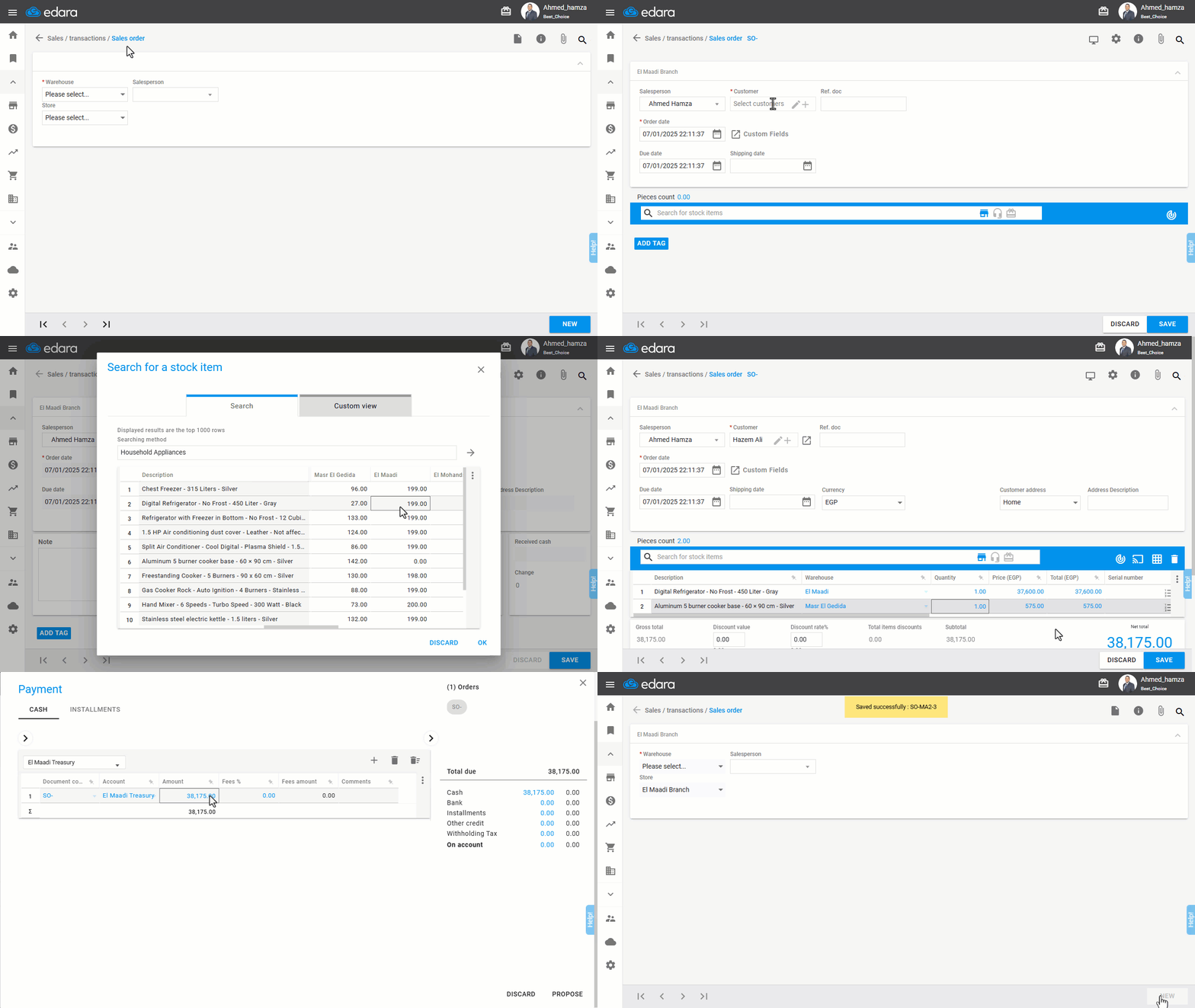
"Edara" allows you to create a multi-warehouse sales order.
Steps to Create a Multi-Warehouse Sales Order
Ensure you have permission for the Sales Store before creating the sales order.
- Go to the Sales module.
- Select “Sales Order”.
- Choose the “Store” and the “Salesperson”.
- Click on “New”.
- Enter the “Customer Name”.
- Search for the Stock Item.
- Click on the item's Stock Balance for the required warehouse from which the quantity will be issued.
- Click “OK”.
- Enter the Quantity and Price.
- Select the Payment Method by clicking on 💳.
- Click “Save”.
If you encounter any challenges or have questions during these processes, you can contact our technical support team, who are ready to assist you at any time.
Did this answer your question?