

Cancelling a sales order
Last updated:
You can cancel a sales order to keep the sales order code sequence and make it easier to review its details.
Cancelling a sales order
Make sure the sales order is not linked to any documents and has not been approved. If it was approved before, cancel the approval first, and make sure the sales order cancellation setting is enabled.
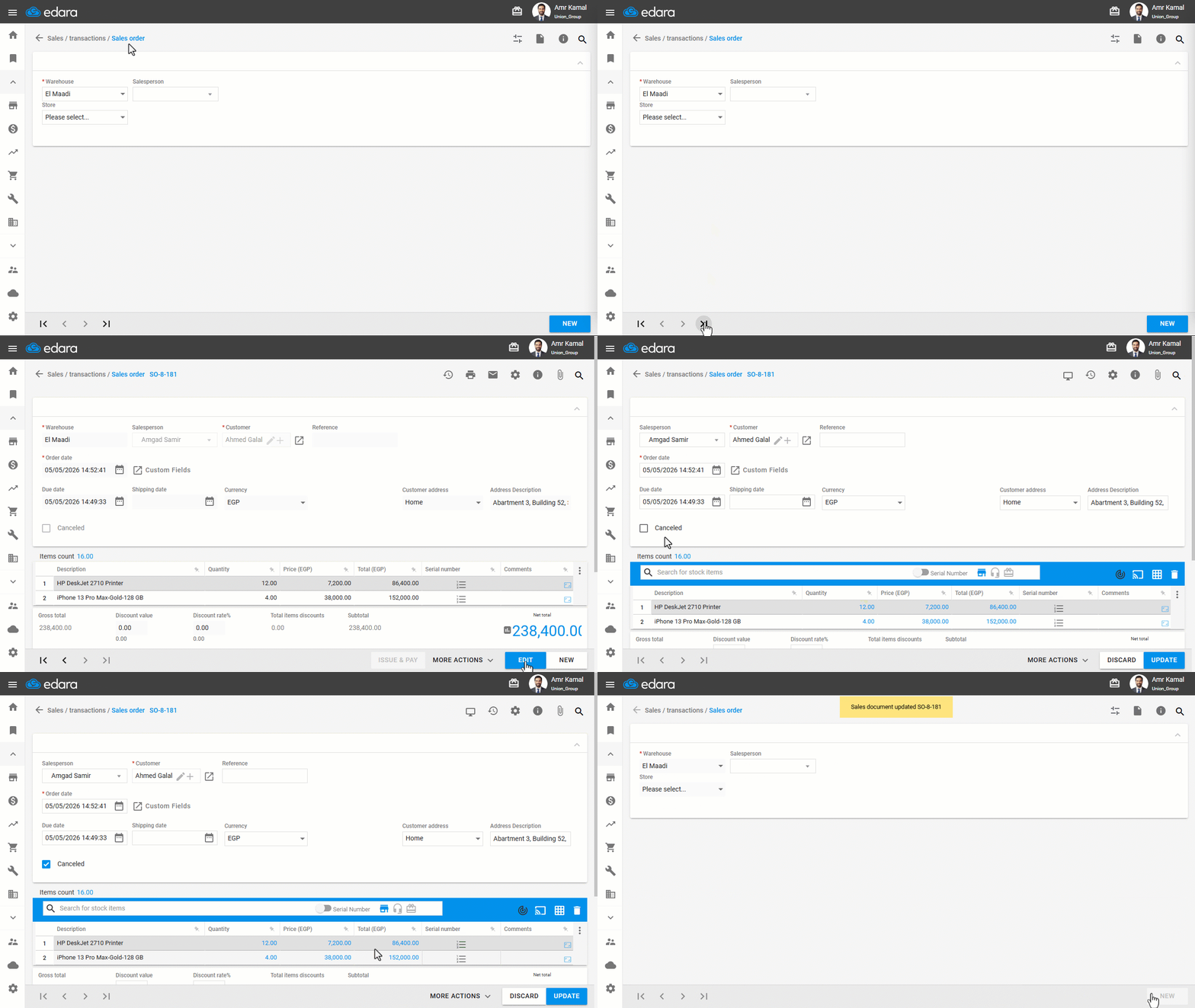
- Go to the “Sales” Module.
- Open the “Sales Order” page.
- Search for the sales order using “🔍” or the arrows at the bottom of the page.
- Click on “Edit”.
- Enable “Canceled”.
- Click on “Update”.
Frequently asked questions
Why can't I cancel the sales order?
Make sure the sales order is not linked to any documents and has not been approved. If it was approved before, cancel the approval first, and make sure the sales order cancellation setting is enabled.
If you encounter any challenges or have questions during these processes, you can contact our technical support team, who are ready to assist you at any time.
Did this answer your question?