

Creating a Purchase Order from a Sales Order
Last updated:
If you create a sales order and don't have enough stock of the desired item, you can consider this order as a reservation for the item when it becomes available, and create a purchase order from the sales order to provide the desired item.
Creating a Purchase Order from a Sales Order
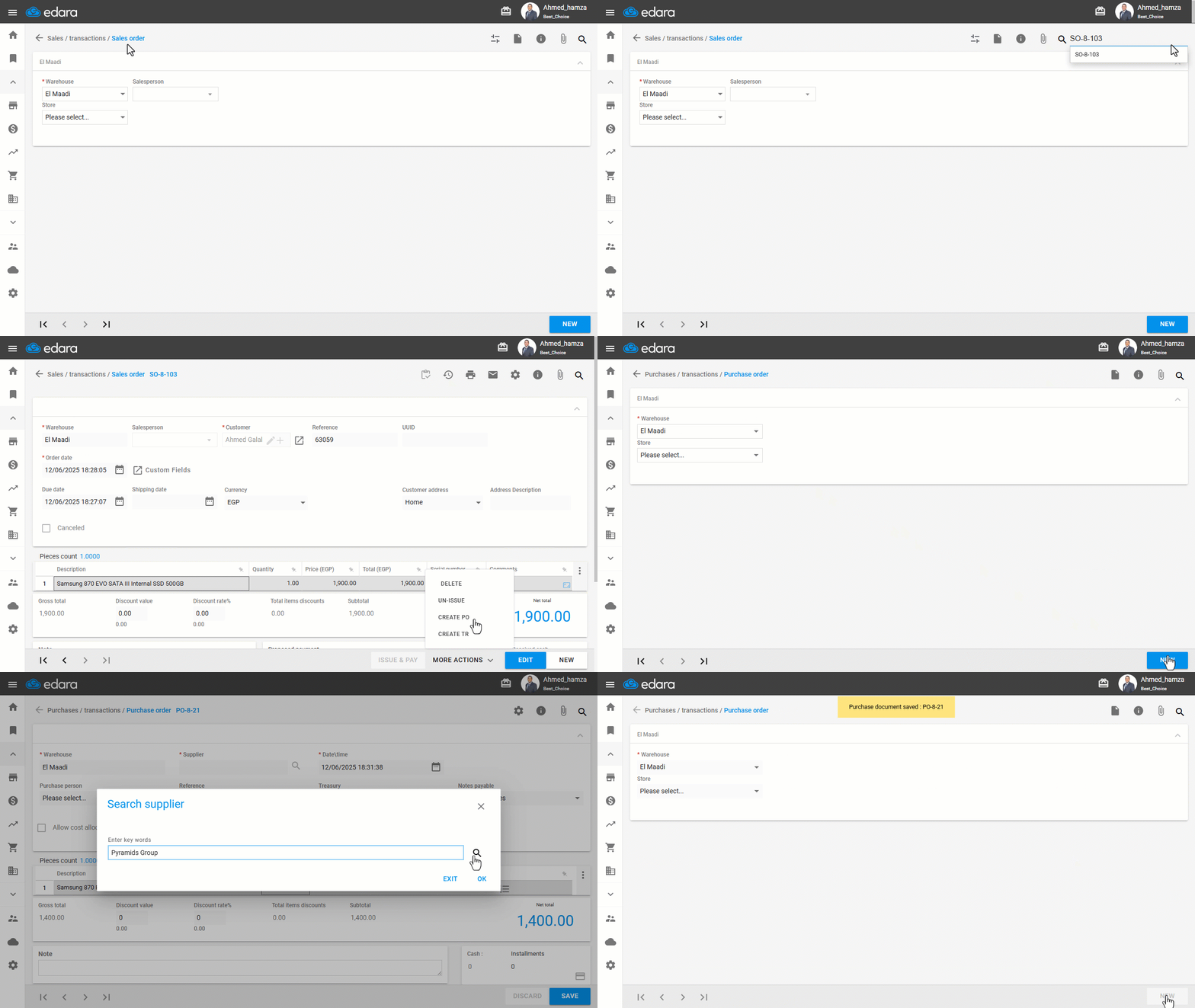
- Go to the Sales module.
- Open the “Sales Order” page.
- Search for the sales order you want to generate a purchase order from.
- Click on "More Actions".
- Click on "Create PO".
You will be redirected to the Purchase Order page, and all the items and quantities from the sales order will be automatically filled in.
- Select the warehouse.
- Click on "New".
- Select the Supplier.
- Click on "Save".
If you encounter any challenges or have questions during these processes, you can contact our technical support team, who are ready to assist you at any time.
Did this answer your question?