

Creating a Transfer Request from a Sales Order
Last updated:
When your business operates multiple branches with a main warehouse, some branches may not hold large quantities of stock. In such cases, you may need to transfer supplies from the main warehouse to a branch to fulfill customer orders.
With “Edara”, you can easily generate a Transfer Request directly from a Sales Order, without having to manually search for the items or re-enter quantities.
Creating a Transfer Request from a Sales Order
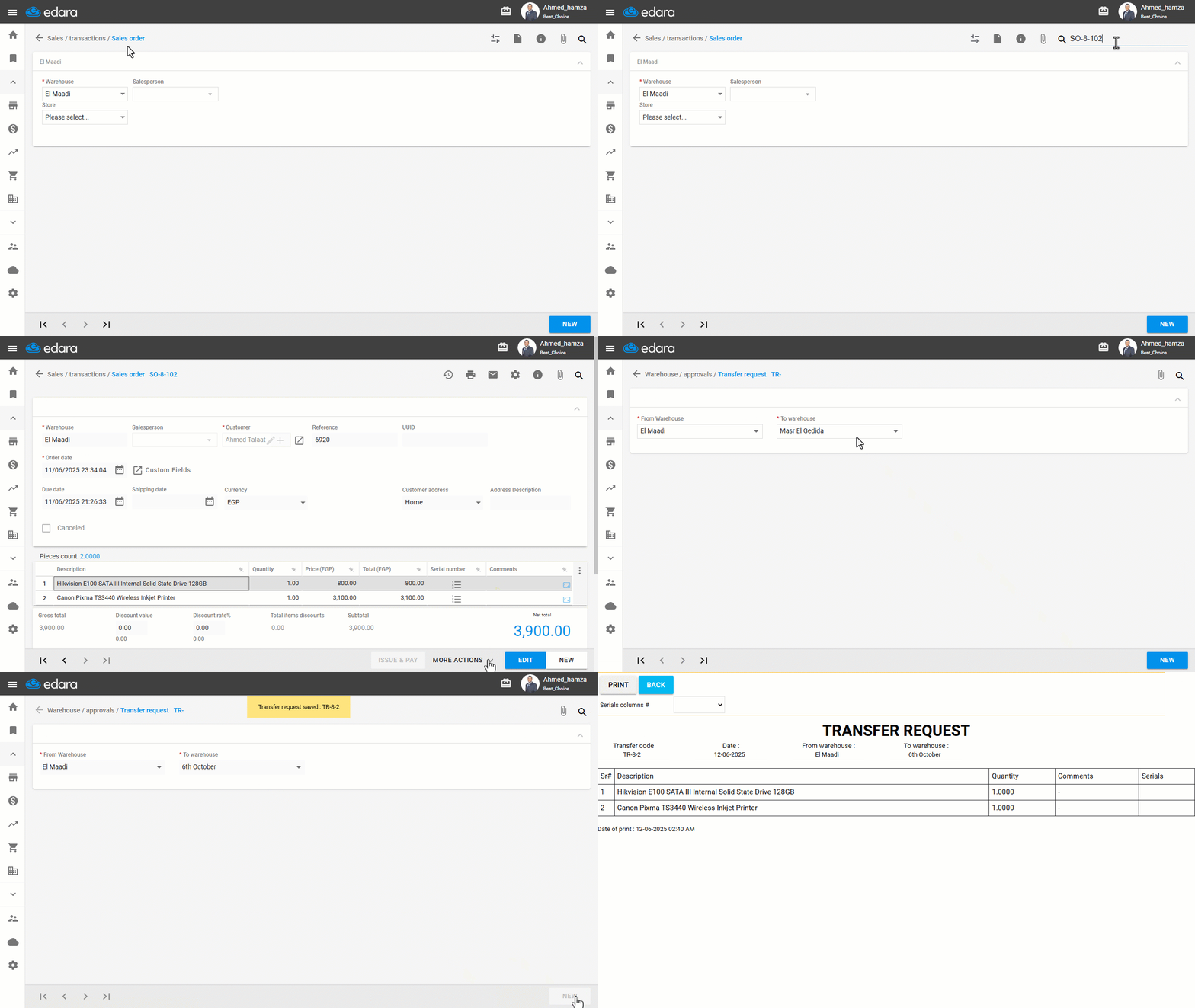
- Go to the Sales module.
- Open the “Sales Order” page.
- Search for the sales order you want to generate a transfer request from.
- Click on "More Actions".
- Click on "Create TR".
You will be redirected to the Transfer Request page, and all the items and quantities from the sales order will be automatically filled in.
- Select the destination warehouse (usually the branch’s warehouse).
- Click on "New".
- Click on "Save".
Note: You can also create a Purchase Order directly from a Sales Order. This is useful when the item is out of stock at the time of sale — the Sales Order acts as a reservation, and you can trigger a purchase for the needed products accordingly.
If you encounter any challenges or have questions during these processes, you can contact our technical support team, who are ready to assist you at any time.