

Automatic Calculation of Unit Price Based on Total Amount in a Sales Order
Last updated:
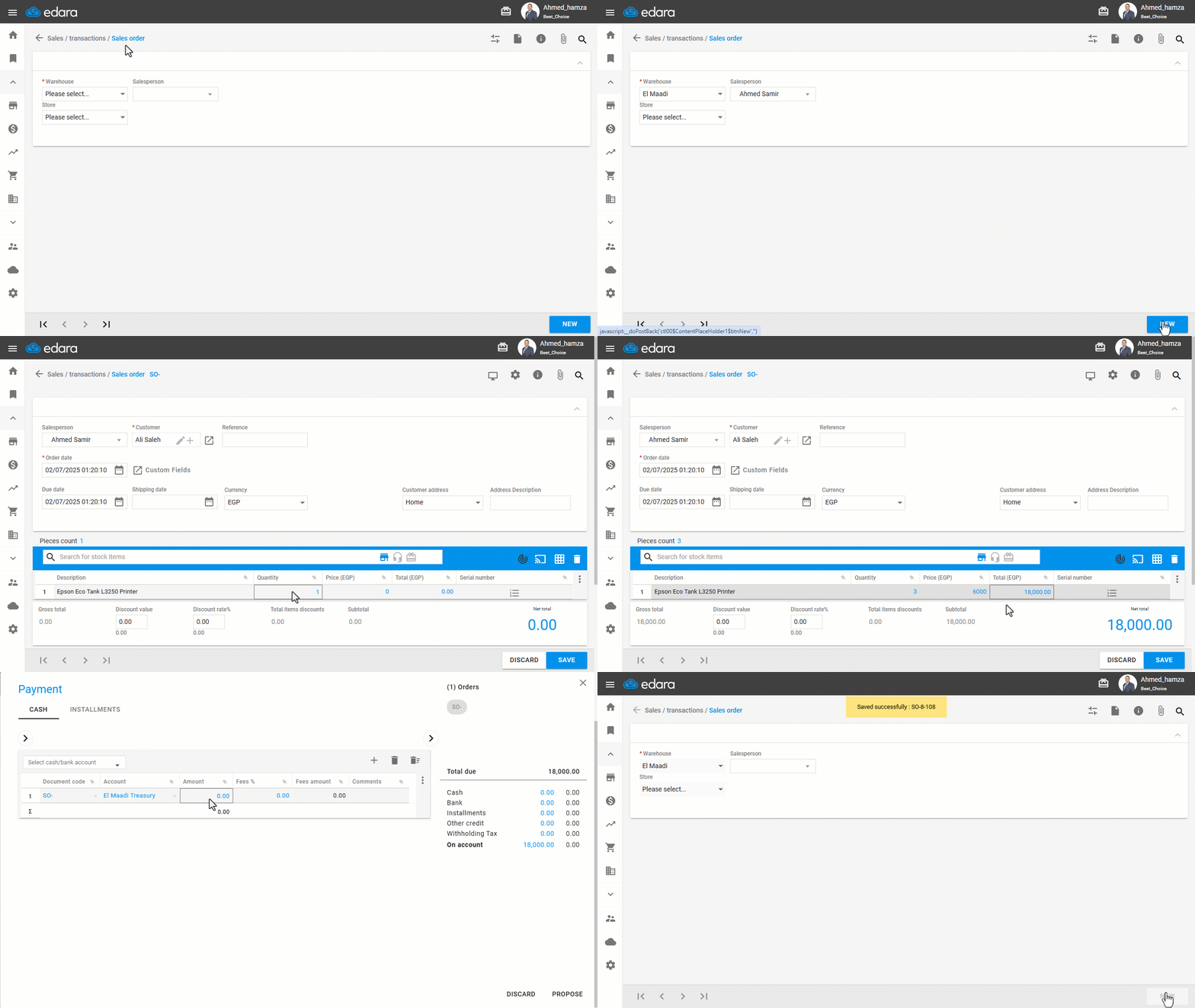
When creating a sales order in Edara, the unit price is automatically calculated based on the total amount entered. This saves time and ensures accurate calculations.
For example, if you enter the total price of a product or service, the system will calculate the individual unit price based on the quantity provided.
Automatic Calculation of Unit Price Based on Total Amount in a Sales Order
- Go to the Sales module.
- Open the “Sales Order” page.
- Choose the “Warehouse” and the “Salesperson”.
- Click on “New”.
- Enter the customer’s name.
- Search and select the stock items.
- Enter the quantity.
- Enter the total amount — the system will automatically calculate the unit price.
- Select the payment method by clicking 💳.
- Click on “Save”.
If you encounter any challenges or have questions during these processes, you can contact our technical support team, who are ready to assist you at any time.
Did this answer your question?