

Creating an invoice in a new currency
Last updated:
When dealing with customers from different countries, you may need to issue invoices in different currencies based on the customer’s country.
Creating an invoice in a new currency

Make sure the currency is already added through the “Currencies” page and selected in the customer’s details.
- Go to the “Sales” Module.
- Open the “Sales Order” page.
- Select the warehouse.
- Click on “New”.
- Search for the required stock items.
- Enter the customer’s name.
- Select the currency you want.
- Click on “Save”.
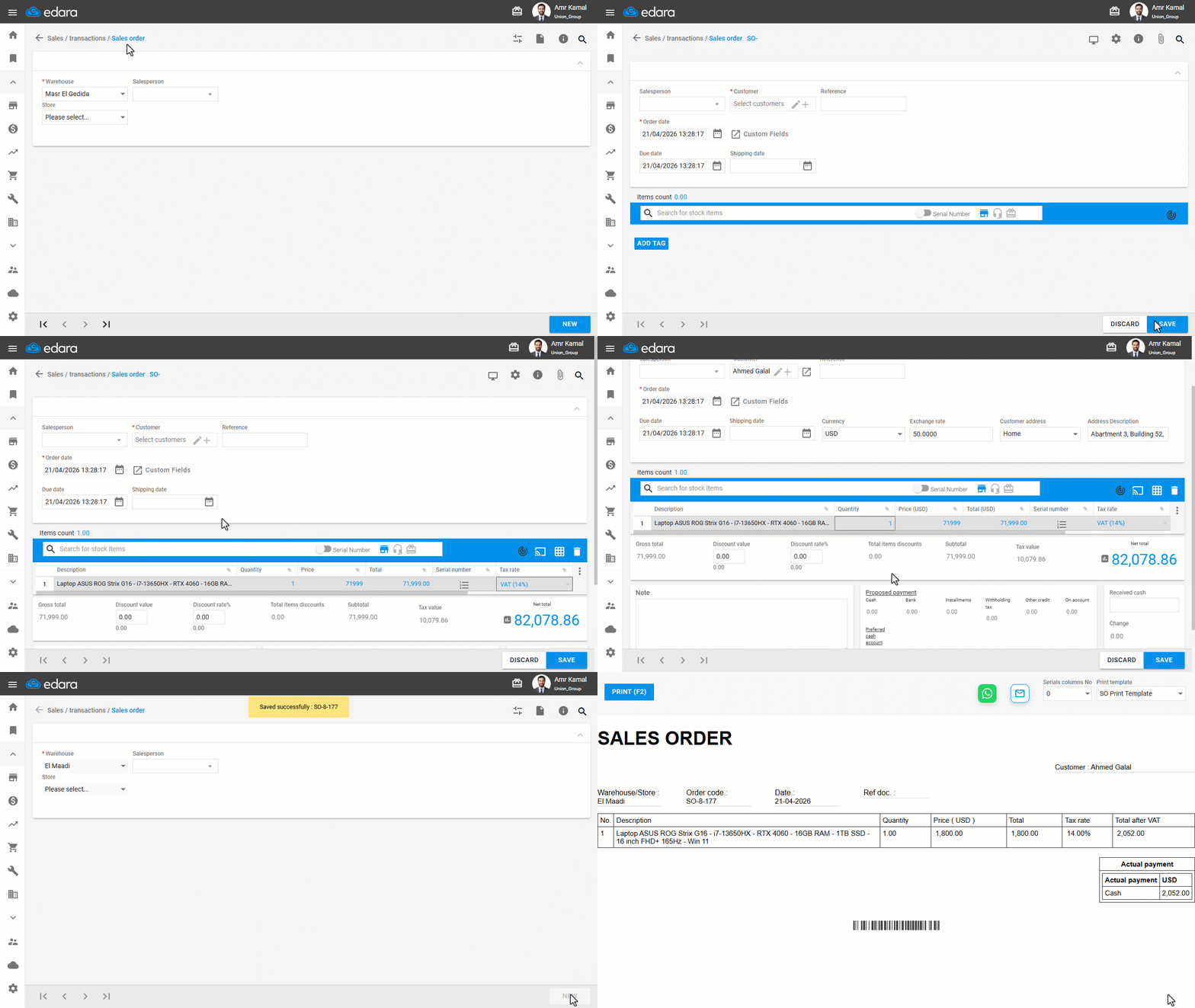
Note: You can change the currency within the sales order as long as no related transactions have been processed.
Frequently asked questions
Can I change the currency after saving the order?
You can change the currency within the sales order as long as no related transactions have been processed.
If you encounter any challenges or have questions during these processes, you can contact our technical support team, who are ready to assist you at any time.
Did this answer your question?