

Adding Withholding Tax to the Sales Order
Last updated:
Adding the withholding tax to sales orders ensures that the correct tax amount is calculated and collected from customers, eliminating the need for manual calculations or separate tax invoices.
This helps businesses comply with tax regulations and avoid penalties or tax payment shortfalls.
Adding Withholding Tax to the Sales Order
Ensure that the item has the withholding tax rate applied and that there is a dedicated account for this tax. Then, follow these steps:
- Go to the Sales module.
- Open the Sales Order Page.
- Click on “New”.
- Enter the required details in the sales order.
- Select the item with withholding tax applied.
- Click on ⚙️ (Settings).
- Choose the Withholding Tax Rate.
- Select the required Payment Method.
- Click “Save”.
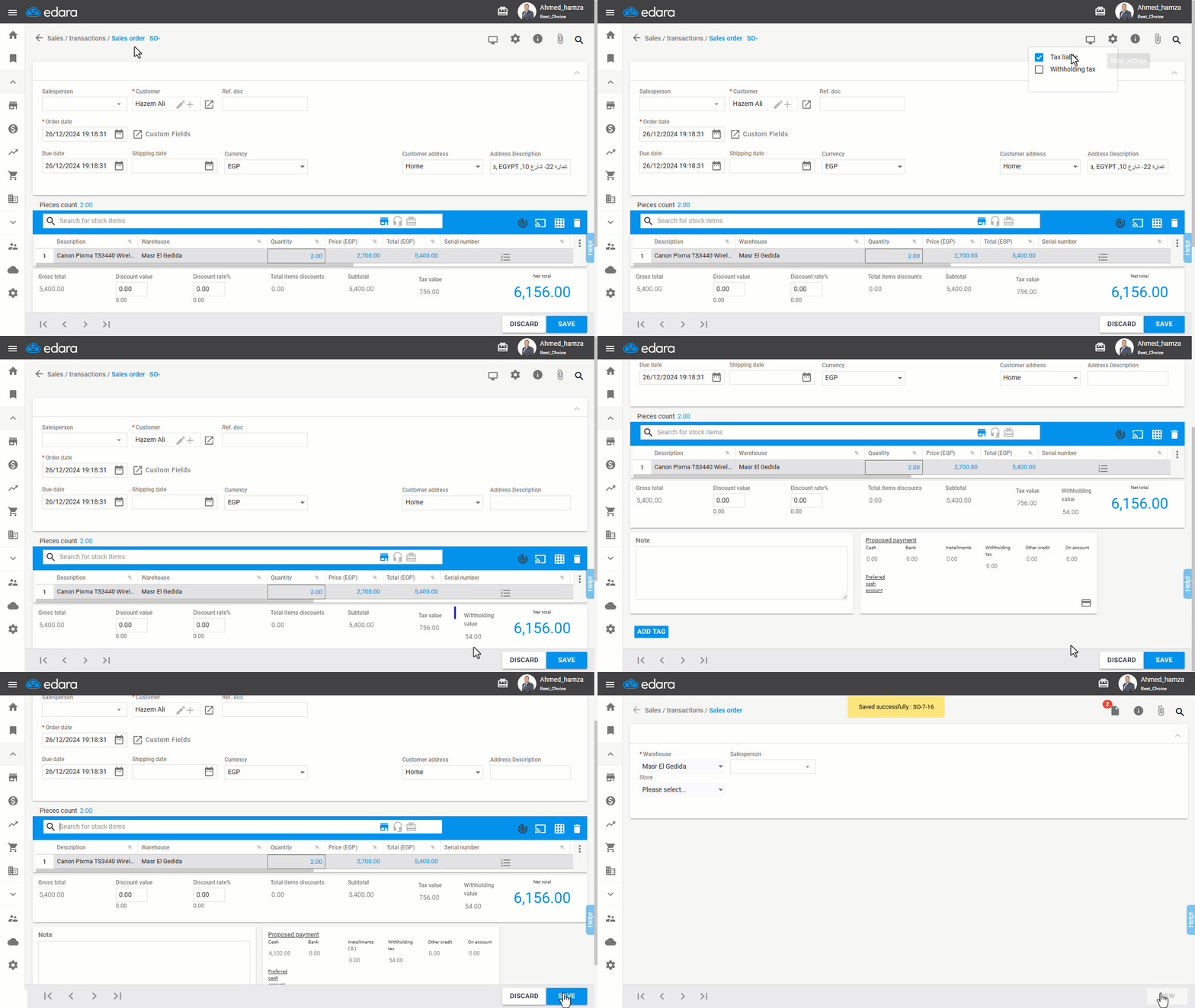
Note: You can also enable the withholding tax by default in sales orders.
If you encounter any challenges or have questions during these processes, you can contact our technical support team, who are ready to assist you at any time.
Did this answer your question?