

Saving the Withholding Tax JE from a Sales Order
Last updated:
Some users face an issue where an issue offerings document (IO) is saved without also saving the associated journal entry for Withholding Tax. As a result, the order and its journal link disappear from the approvals page, disrupting workflow and complicating financial tracking and documentation.
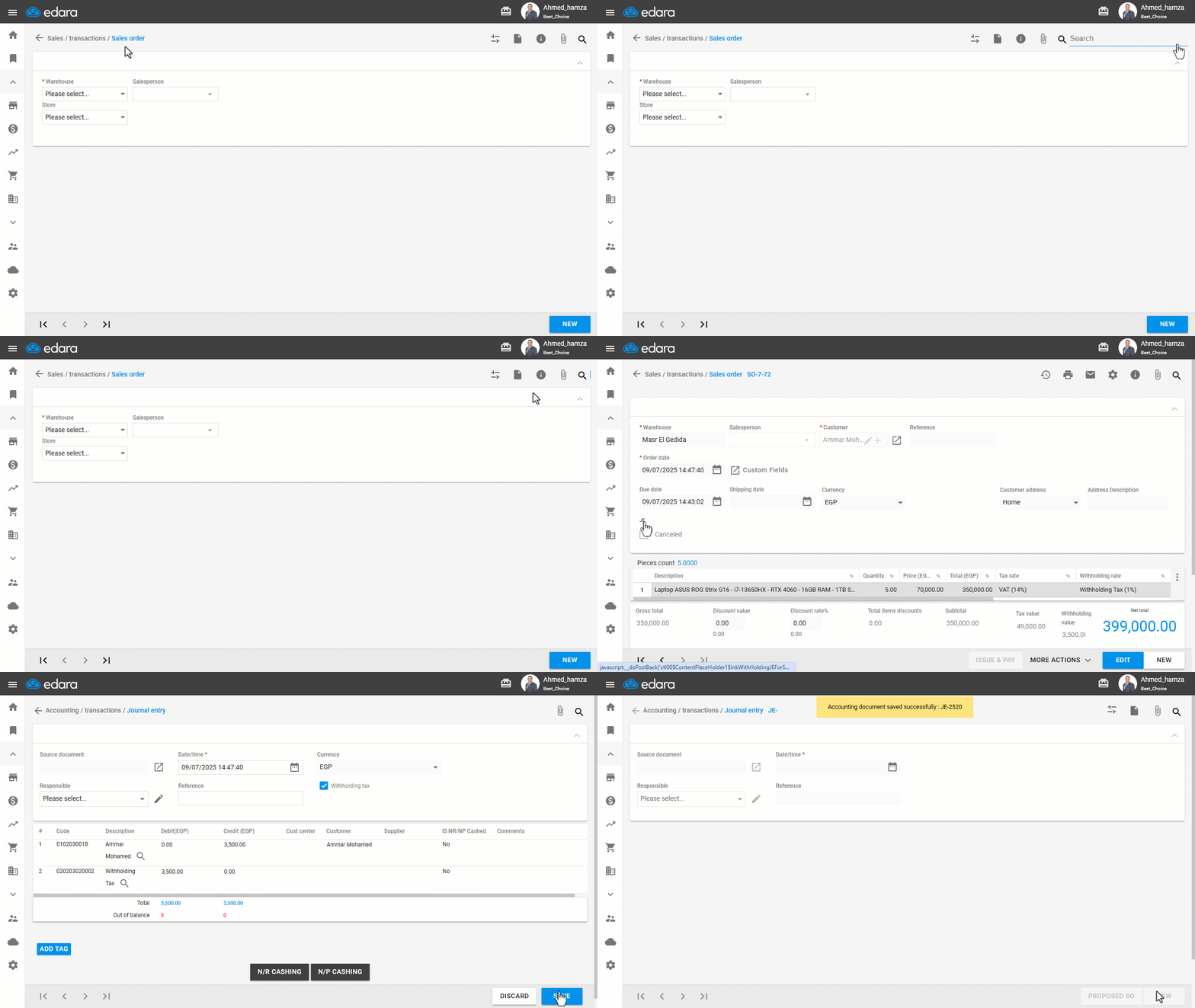
Saving the Withholding Tax JE from a Sales Order
- Go to the Sales module.
- Open a Sales Order that has been approved and includes a suggested Withholding Tax entry.
You will see a journal entry link (JE) for the tax entry.
- Click the JE icon to go to the tax journal entry page.
- Click on “Save”.
Frequently asked questions
Why did the sales order and the JE link disappear from the approvals page?
Some users face an issue where an issue offerings document (IO) is saved without also saving the associated journal entry for Withholding Tax. As a result, the order and its journal link disappear from the approvals page, disrupting workflow and complicating financial tracking and documentation.
If you encounter any challenges or have questions during these processes, you can contact our technical support team, who are ready to assist you at any time.