

Searching for a Sales Order and Printing It
Last updated:
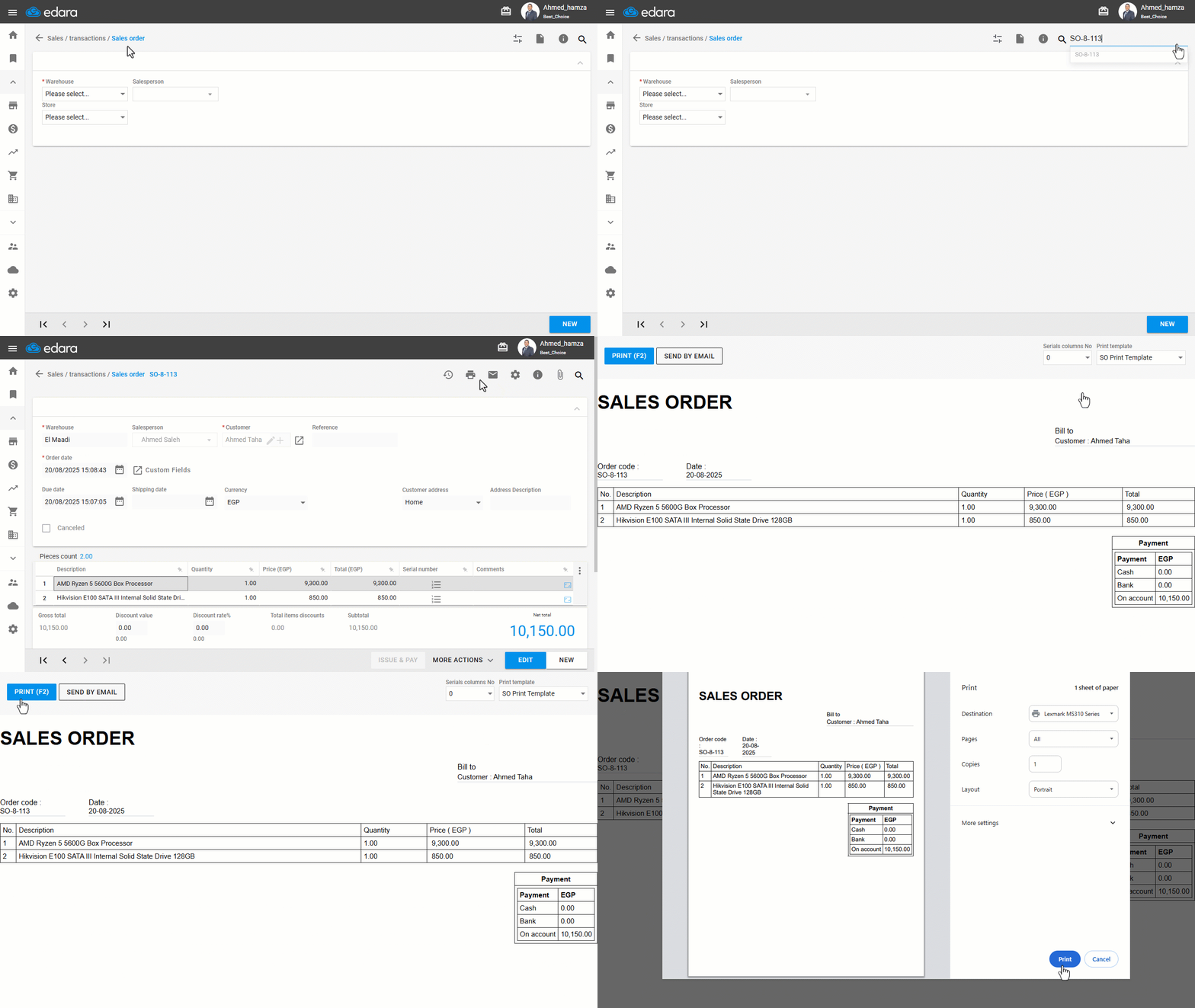
If you'd like to quickly access the details of a specific sales order, you can use the search feature to locate it easily.
Once you find the order you need, you can print the form after confirming the printing permissions, which will allow you to obtain a paper copy of the sales order for easier review or archiving.
Search for a Sales Order
- Go to the Sales module.
- Open the "Sales Order" page.
- Enter the sales order number in the search field by clicking the search icon 🔎, then select it.
Note: You can also use the arrows at the bottom of the page to navigate through the sales orders.
Print the Sales Order
After reviewing the sales order you want to print, follow these steps:
- Click on 🖨️.
- Select "Sales Order Print Template," but first, make sure you have permission to print templates.
- Click on "Print".
If you encounter any challenges or have questions during these processes, you can contact our technical support team, who are ready to assist you at any time.
Did this answer your question?