

Sharing Sales Order Details via WhatsApp
Last updated:
You can easily share sales order details with the customer via WhatsApp, helping speed up communication and allowing the order details to be reviewed instantly.
Sharing Sales Order Details via WhatsApp

- Go to the “Sales” module.
- Open the “Sales Order” page.
- Search for the required document using the search icon “🔍” or the navigation arrows at the bottom of the page.
- Click on the print icon “
 ”.
”. - Select “Print Order”.
- Click on the WhatsApp icon “
 ”.
”. - Enter the WhatsApp number.
- Click on “Share”.
The WhatsApp application will open automatically with a ready-made message that includes a summary of the sales order, such as the order date, total amount, and number of items, along with a link to download the full document in PDF format.
- Click on “Send”.
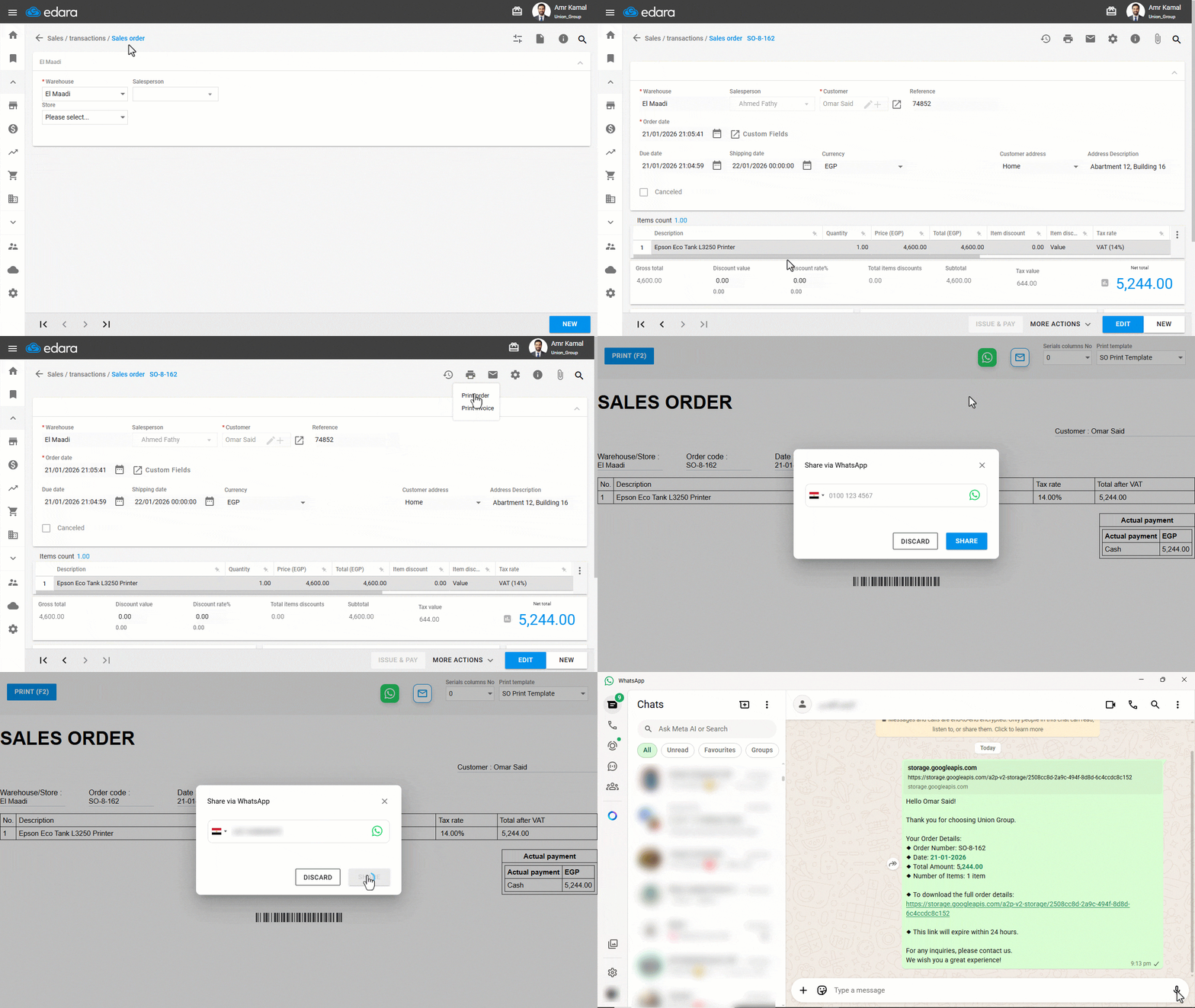
Note: The PDF download link included in the WhatsApp message is temporary and expires 24 hours after being sent.
Frequently asked questions
How long is the PDF link sent via WhatsApp valid?
The PDF download link included in the WhatsApp message is temporary and expires 24 hours after being sent.
If you encounter any challenges or have questions during these processes, you can contact our technical support team, who are ready to assist you at any time.