

Adding the Tax Registration ID to the Sales Order Print Template
Last updated:
Many countries require the tax registration ID to be included on all commercial documents, including sales orders, to ensure compliance with tax laws and regulations.
Adding the Tax Registration ID to the Sales Order Print Template
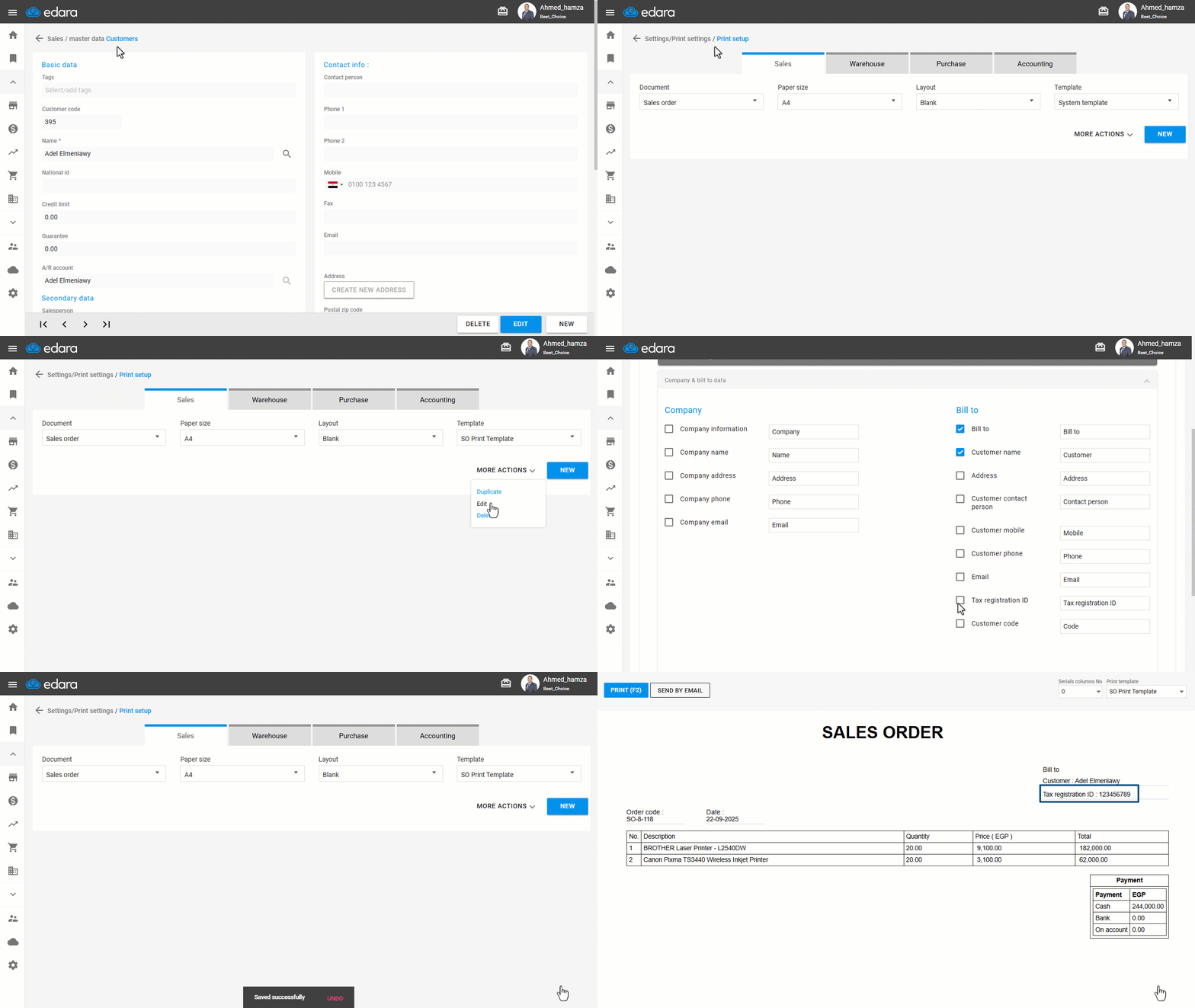
First, ensure to add the customer’s tax registration ID, then update the Sales Order print template by following these steps:
- Go to the Settings.
- Open the "Print Set up".
- Select the "Sales Order" page.
- Choose the “Template” you want to modify (from the Template drop-down list).
- Click on "More Actions".
- Click on "Edit".
- Click on "Company & bill to Data".
- Enable the "Tax Registration ID" option.
- Click "Save."
If you encounter any challenges or have questions during these processes, you can contact our technical support team, who are ready to assist you at any time.
Did this answer your question?