

Displaying the Sales Bundle Name in the Print Template
Last updated:
You can display the Sales Bundle name and its details on a single line in the print template, rather than listing the individual items, which simplifies the print layout and makes the printed data clearer.
Displaying the Sales Bundle Name in the Print Template
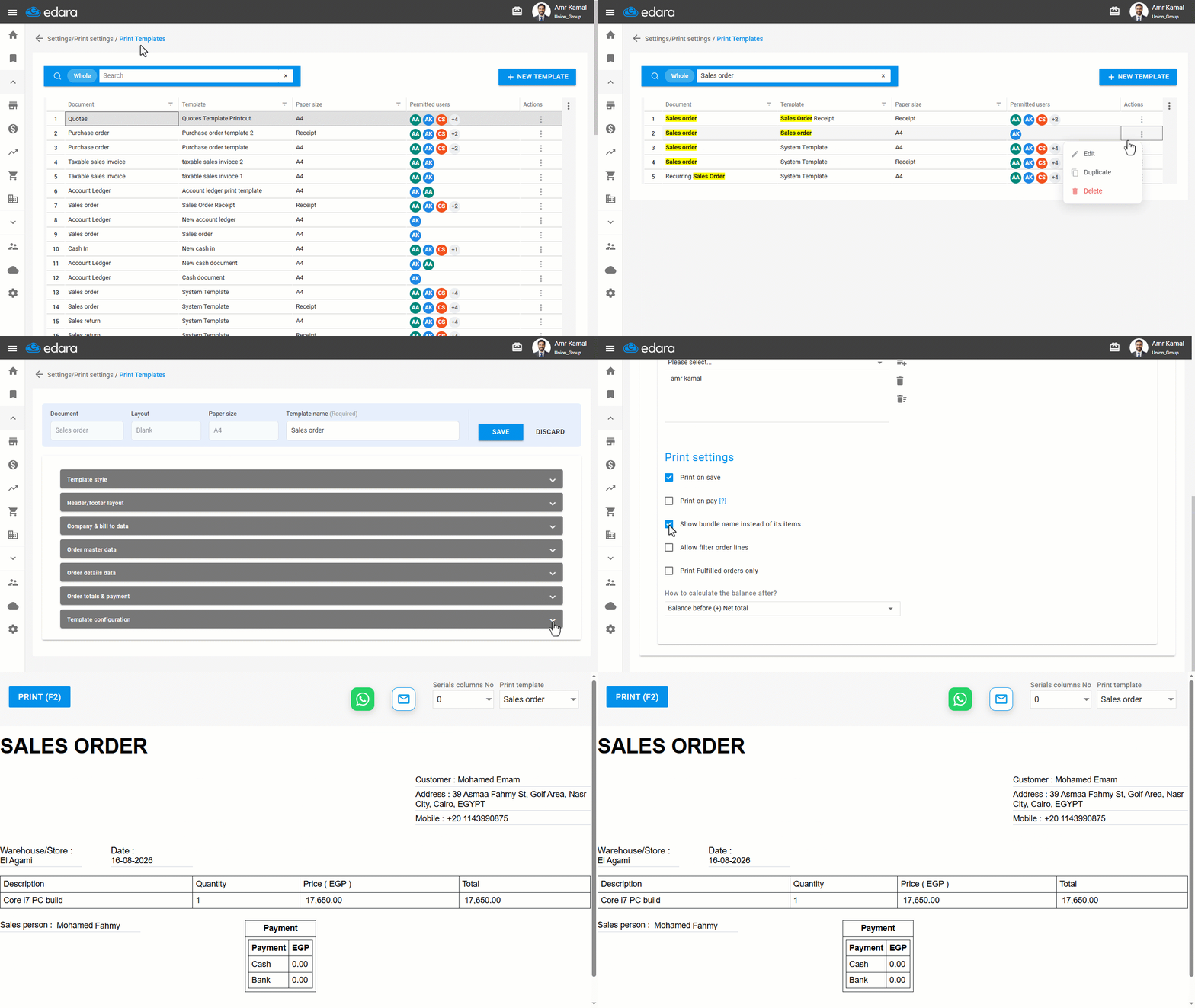
- Go to “Settings”.
- Open the “Print Templates” page.
- Search for the required print template using the search bar, or filter the list using the “Template” column.
- Click on the “⋮” icon in the “Actions” column next to the required print template.
- Click on “Edit”.
Note: If the print template is a system template, click on "Load".
- Go to “Template Configuration”.
- Enable the “Show Bundle Name Instead of Its Items” option.
- Click on “Save”.
The sales bundle will appear in the print template on a single line, as shown in the following image:
Note: This feature only affects the print template. It does not change how sales bundle details—such as items, quantities, and prices—are displayed within the Sales Order.
Frequently asked questions
Does showing the bundle name change how the bundle appears in the sales order?
This feature only affects the print template. It does not change how sales bundle details—such as items, quantities, and prices—are displayed within the Sales Order.
If you encounter any challenges or have questions during these processes, you can contact our technical support team, who are ready to assist you at any time.