

Displaying Account Balances Before and After Sales Document in Print Templates
Last updated:
When the same account is linked to both a customer and a supplier, the account balance is the most accurate option to display in print, as it shows the total balance of the account in one unified view, including all transactions made as a customer or as a supplier.
In "Edara", you can display the account balance before and after the sales document within print templates, ensuring that printed data appears more accurate and clearer.
Displaying Account Balances Before and After Sales Document in Print Templates

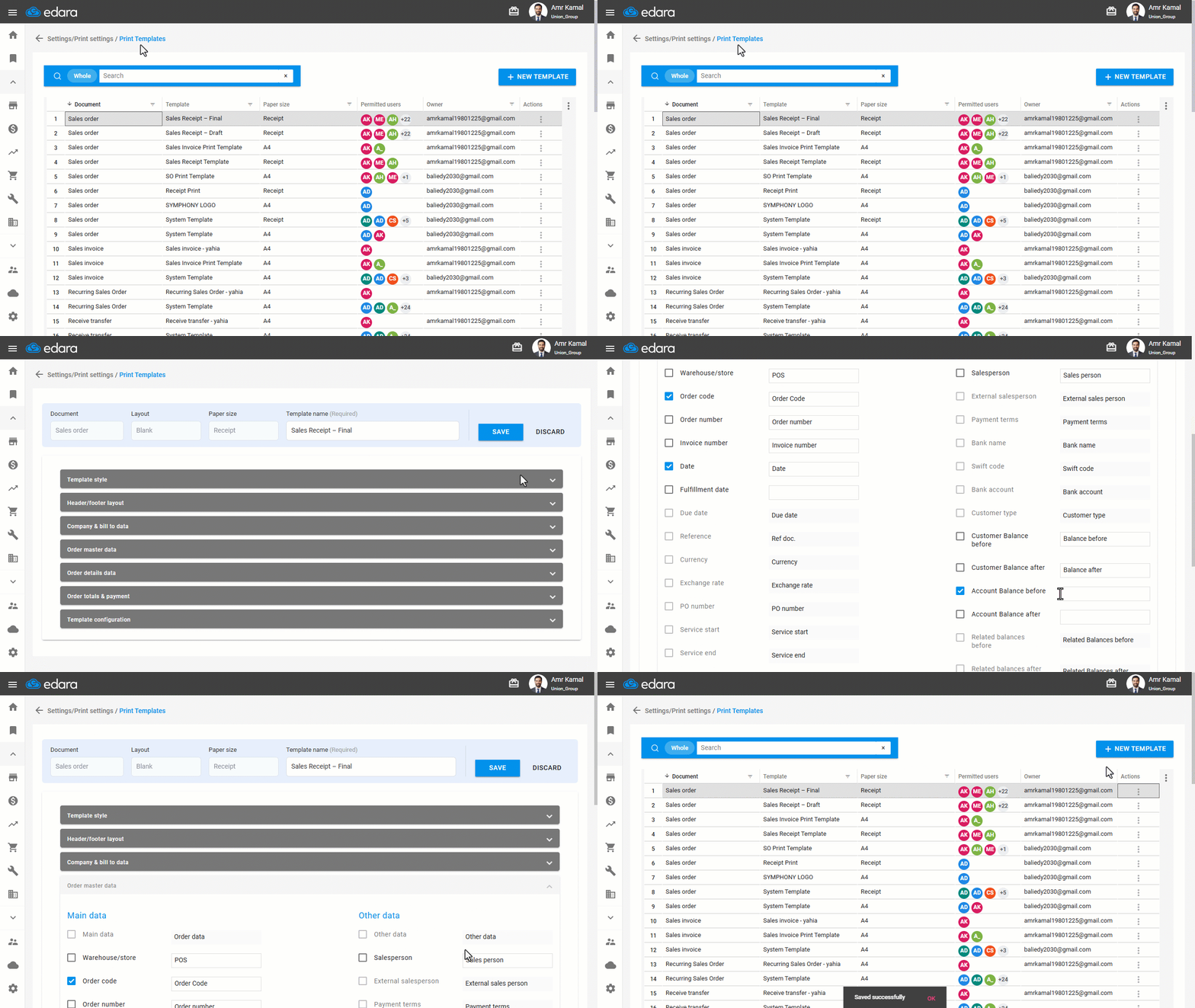
- Go to “Settings”.
- Open the “Print Templates” page.
- Click on “⋮” next to the required print template.
- Click on “Edit”.
- Go to the “Order master data” section.
- Enable the following fields according to your needs:
- Account Balance Before: Displays the total account balance before creating the document, including all related transactions whether as a customer or supplier.
- Account Balance After: Displays the total account balance after creating the document, according to the selected method in the Print Templates settings.
- Click on “Save”.
Notes:
- If the account is used as a customer only, you can use “Customer Balance Before” and “Customer Balance After” options to display the customer’s balance before or after the document based only on customer transactions.
- These options are available in print templates for both “Sales Orders” and “Sales Returns”.
If you encounter any challenges or have questions during these processes, you can contact our technical support team, who are ready to assist you at any time.
Did this answer your question?