

Displaying Supplier Data in the Purchase Order Print Template
Last updated:
You can display supplier Data in the Purchase Order print template to make it easier to review and ensure clarity.
Displaying Supplier Data in the Purchase Order Print Template

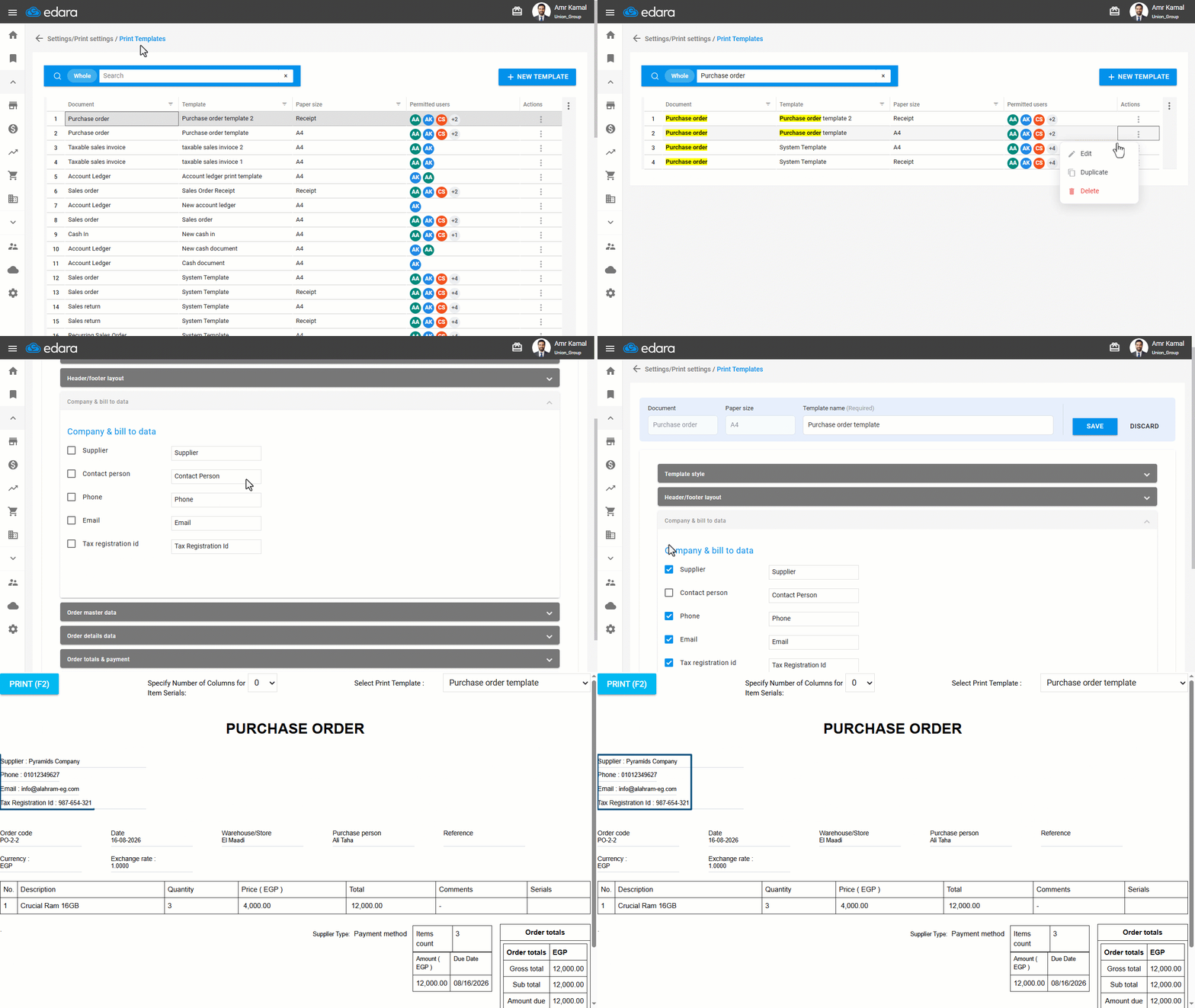
- Go to “Settings”.
- Open the “Print Templates” page.
- Search for the required print template using the search bar, or filter the list using the “Document” column.
- Click on the “⋮” icon in the “Actions” column next to the required purchase order template.
- Click on “Edit”.
Note: Select a print template other than the system template, as it cannot be modified, or create a new template.
- Go to the “Company & bill to data”.
- Enable the supplier details you want to display.
- Click on “Save”.
If you encounter any challenges or have questions during these processes, you can contact our technical support team, who are ready to assist you at any time.
Did this answer your question?