

Granting/Revoking Permission to Print the Account Ledger
Last updated:
You can limit access to an account ledger print template to specific users, helping you manage permissions and specify who is allowed to print account ledger documents.
Granting/Revoking Permission to Print the Account Ledger
- Go to "Settings".
- Open the "Print Templates" page.
- Search for the required account ledger document, or filter the list by account ledger document.
- Click on “⋮” in the “Actions” column next to the account ledger print template for which you want to manage permissions.
- Click on "Edit".
- Go to the "Template configuration" Section.
- Select the permitted users.
- Click on "Save".
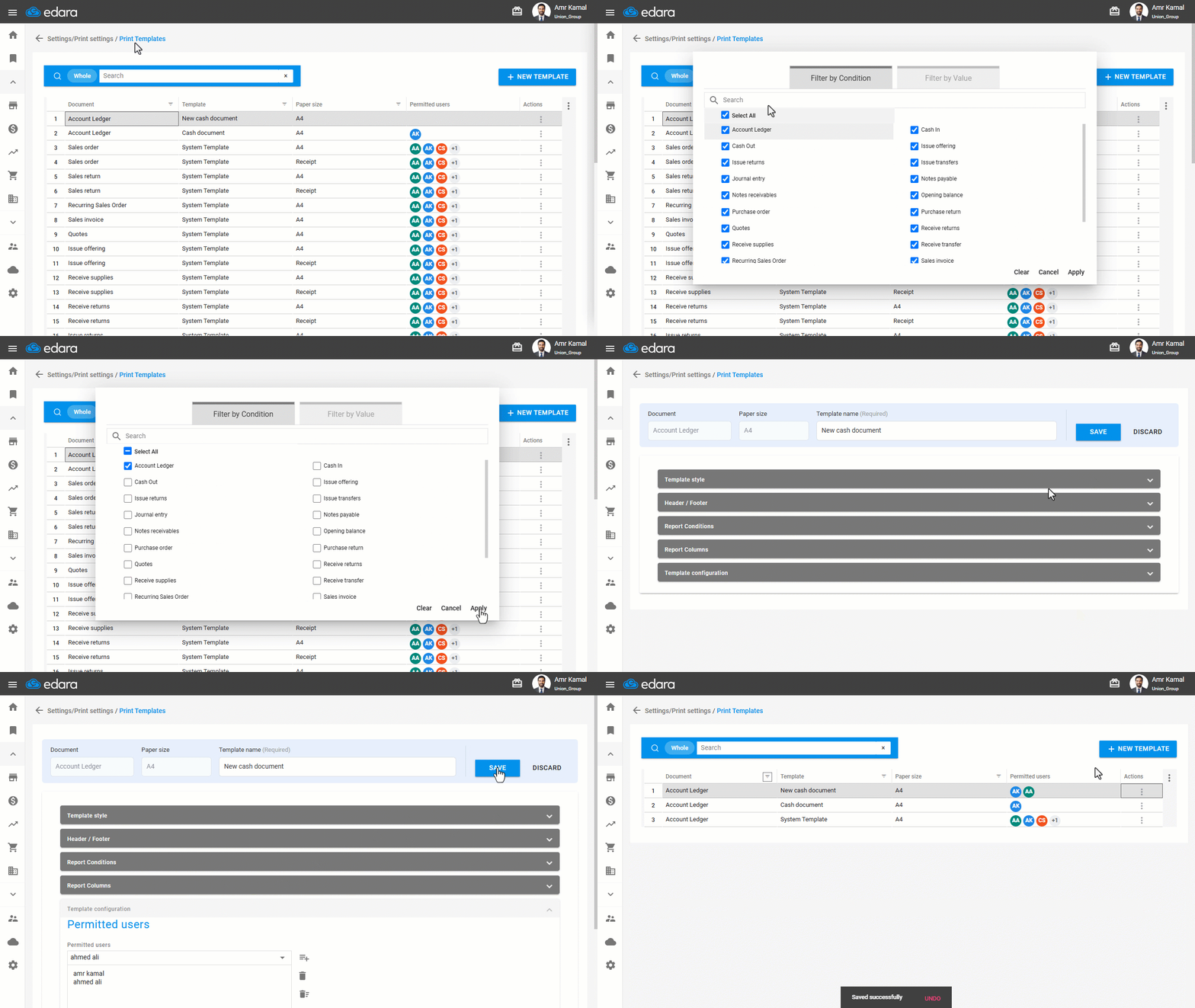
Note: To revoke a user's permission to use the template, follow the same steps, then select the required user, click on " ", and click on "Save".
If you encounter any challenges or have questions during these processes, you can contact our technical support team, who are ready to assist you at any time.
Did this answer your question?