

Creating a Sales Order at Zero Price
Last updated:
Some industries offer seasonal discounts to customers by providing free items on total invoices or offering free samples of new products for testing.
To achieve this while maintaining accurate accounting values, you can create sales orders at a zero price.
Creating a sales order at zero price
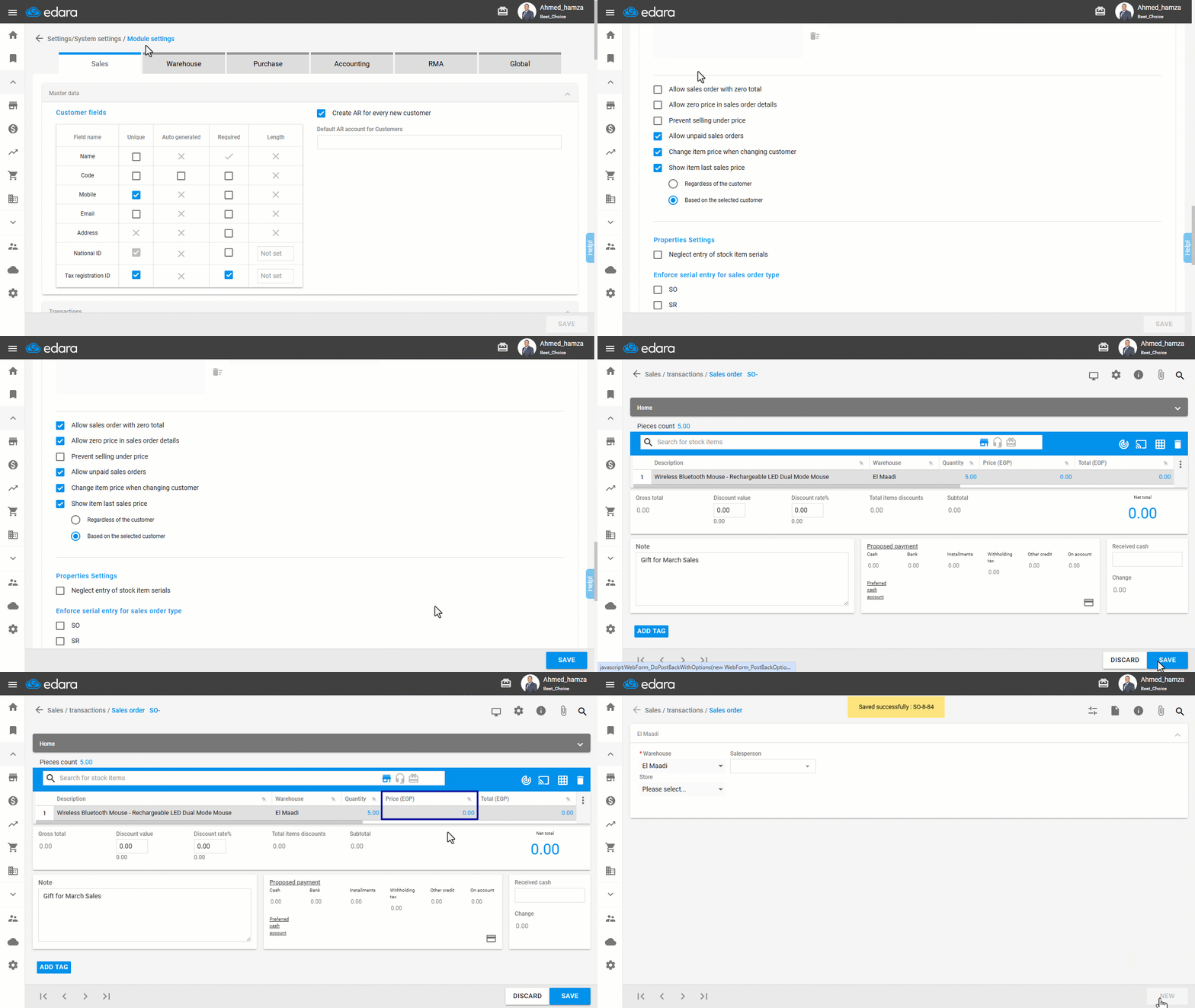
First, make sure you have the necessary permissions on the settings pages, then:
- Go to Settings.
- Select “Module Settings”.
Note: The default here is the “Sales Module” Settings.
- Enable the setting “Allow zero price in sales order details” if you wish to sell items at a zero price.
- Enable the setting “Allow sales order with zero total” if the total sales order or all item prices are zero.
- Click “Save”.
Important Notes:
- Ensure that the warehouse interface is linked to the zero-sales account so that the other party is directed to the correct account.
- Log out of the system and log in again to apply the changes and be able to create sales orders with zero prices or a full zero-price order.
If you encounter any challenges or have questions during these processes, you can contact our technical support team, who are ready to assist you at any time.
Did this answer your question?