

Preventing duplication of Ref. Doc. in Sales Orders
Last updated:
Each sales order is assigned a unique number to facilitate its identification and tracking throughout the sales process. Similarly, searching within sales documents using the reference document number is based on the assumption that this number is unique to prevent potential errors.
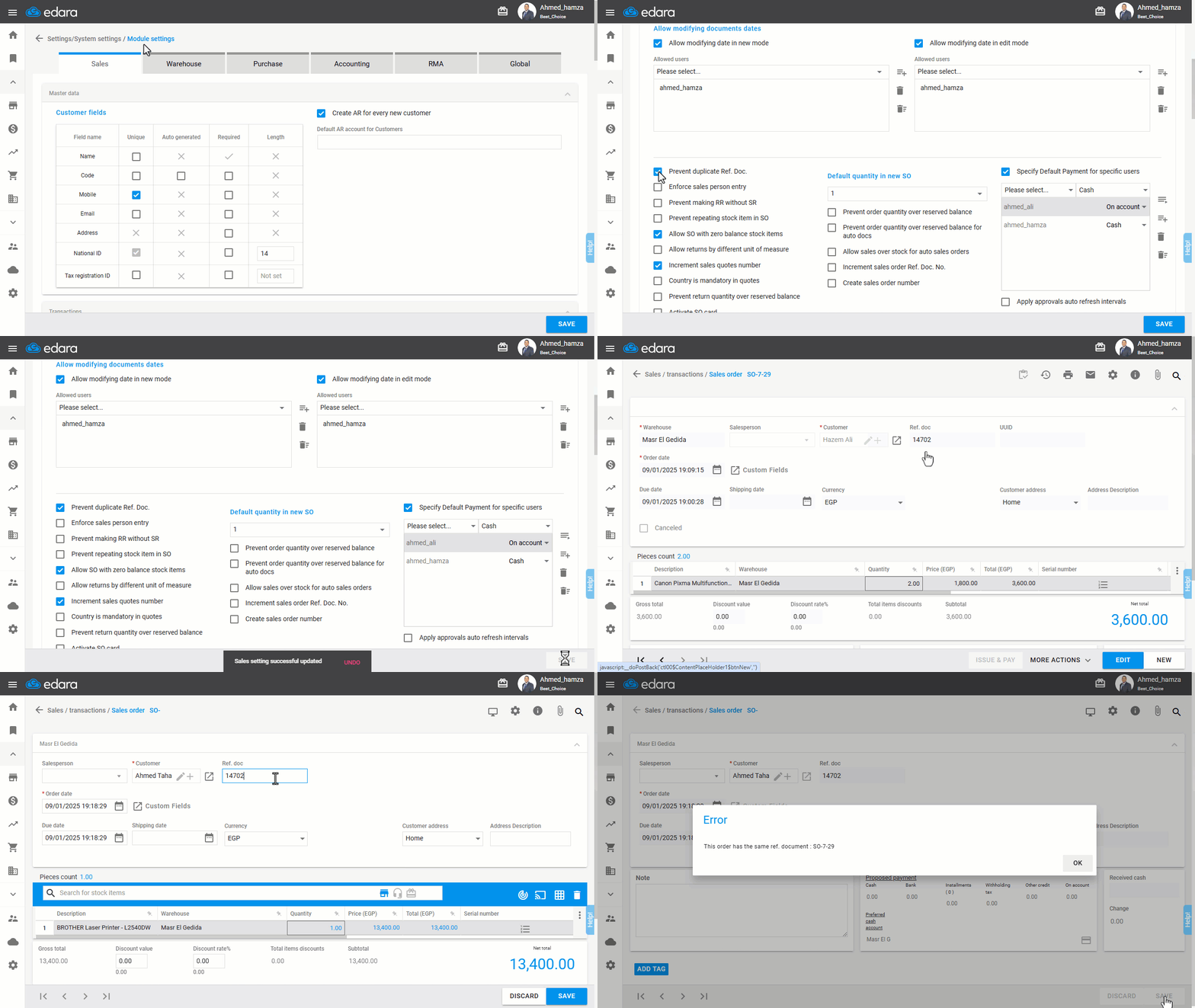
To address this, "Edara" offers the ability to "Prevent Duplicate Ref. Doc.".
Preventing duplication of Ref. Doc. in Sales Orders
- Go to Settings.
- Open the “Module Settings" page.
- Navigate to “Transaction Header” under the “Sales” module.
- Enable the “Prevent duplicate Ref. Doc.” setting.
- Click “Save”.
Note: You can also apply this setting to purchase documents by following the steps outlined in the article, "Prevent Duplicate Ref. Doc. in Purchase Orders".
Frequently asked questions
Can I prevent duplicate reference numbers in purchase documents?
You can also apply this setting to purchase documents by following the steps outlined in the article, "Prevent Duplicate Ref. Doc. in Purchase Orders".
If you encounter any challenges or have questions during these processes, you can contact our technical support team, who are ready to assist you at any time.