

Preventing duplication of Ref. Doc. in Purchase Orders
Last updated:
Each purchase order is assigned a unique number to simplify its identification and tracking throughout the procurement process. Duplicate document numbers can sometimes lead to errors in tracking orders, payments, and inventory management.
To address this, "Edara" provides a feature to prevent duplicate document numbers in purchase orders.
Preventing duplication of Ref. Doc. in Purchase Orders
- Go to Settings.
- Open the “Module Settings” page.
- Select the “Purchase” module.
- Enable the “Prevent duplicate Ref. Doc” option.
- Click “Save”.
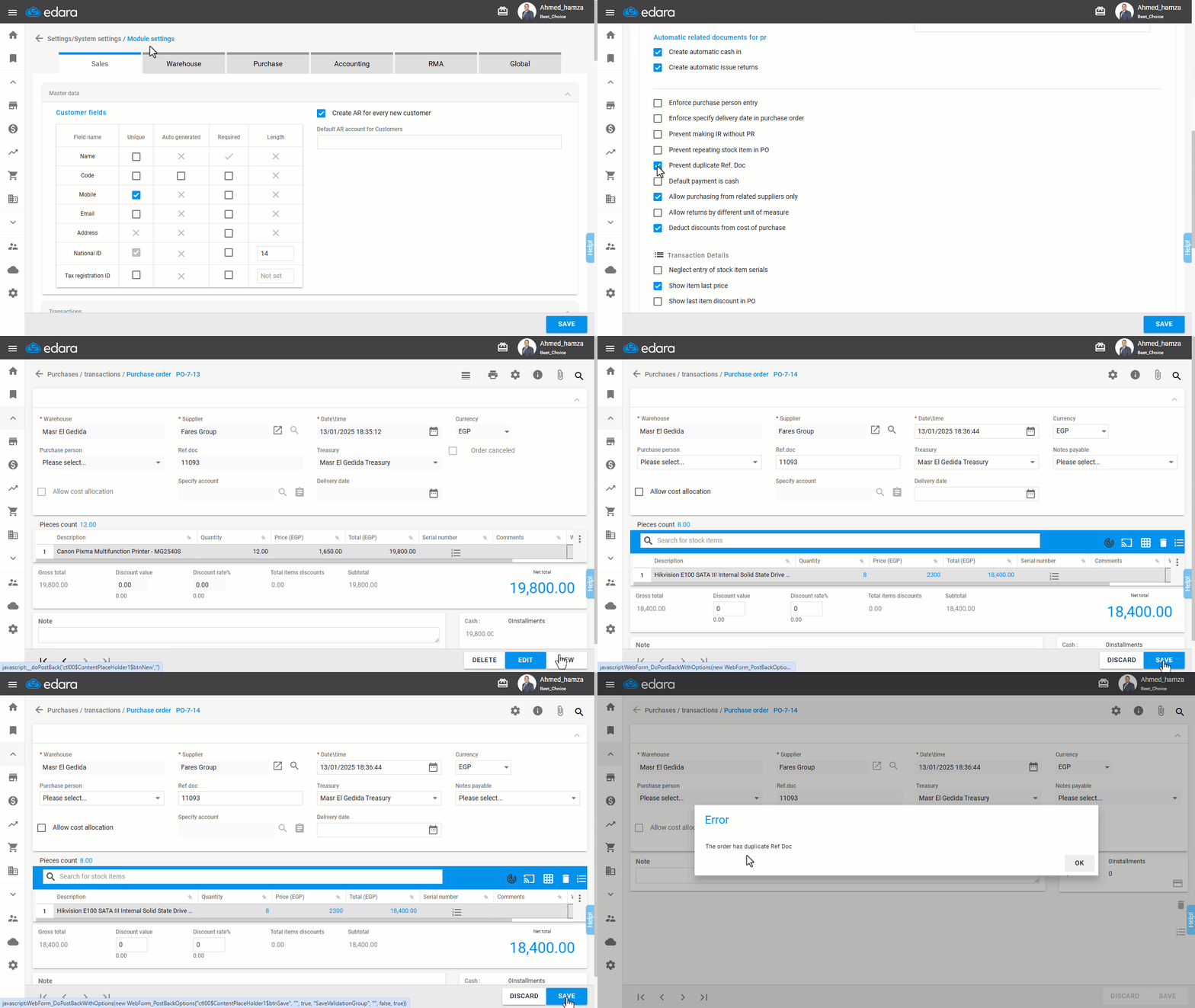
Once this feature is activated, you can create purchase orders without the risk of duplicate document numbers, ensuring smoother operations and error-free tracking.
If you encounter any challenges or have questions during these processes, you can contact our technical support team, who are ready to assist you at any time.
Did this answer your question?