

Using the Reference Document of a Sales Order to Create a Sales Return
Last updated:
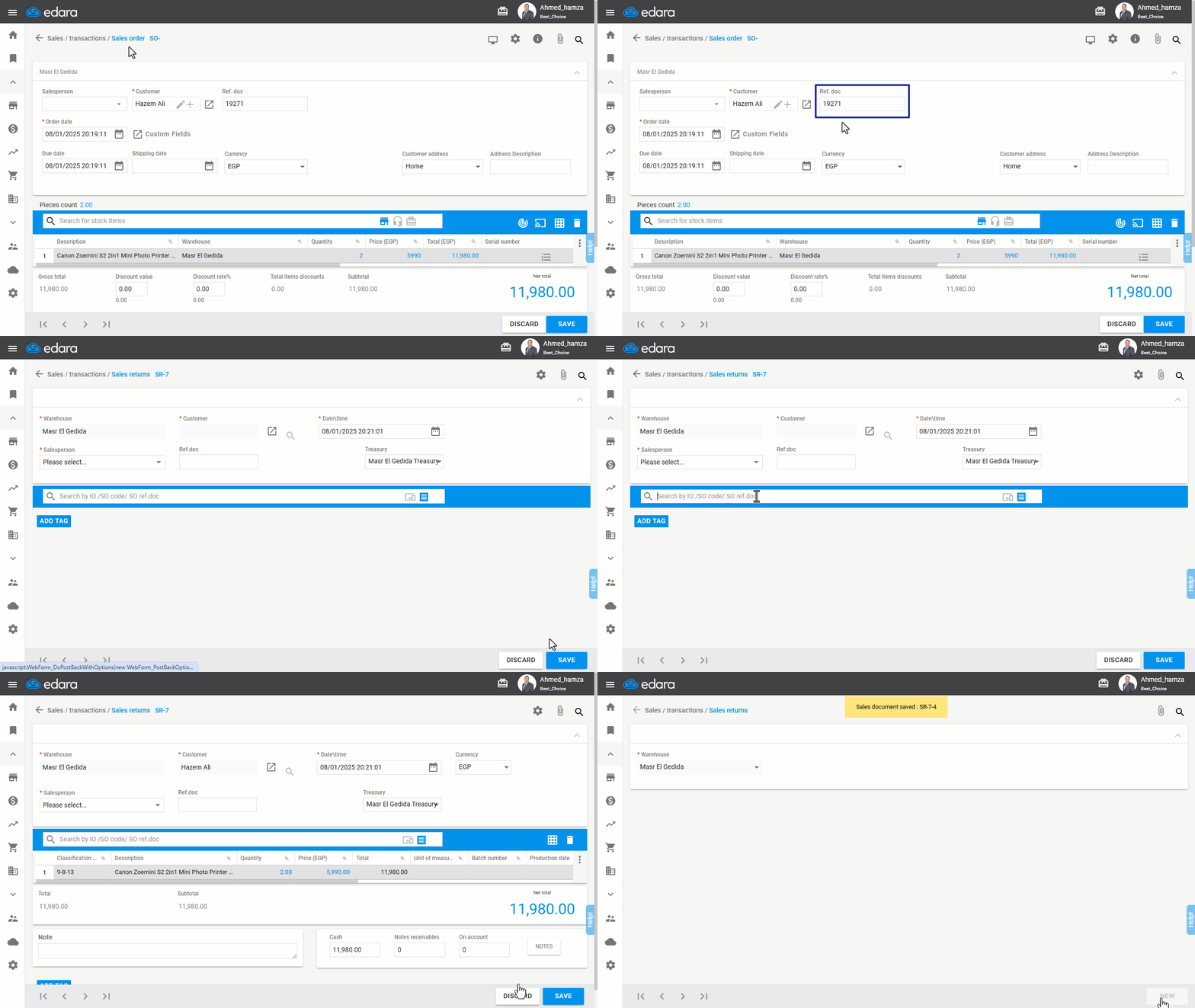
Some companies heavily rely on the reference document number added to the sales order when processing a sales return.
Using this method can streamline and simplify the creation of accurate sales returns that match the original data, helping to improve efficiency and reduce errors.
Using the Reference Document of a Sales Order to Create a Sales Return
- Go to the “Sales” module
- Select “Sales Returns”
- Click “New”
- Ensure that "Search by Document" is selected by clicking the "📋" icon in the search field
- Search for the sales order using the reference document number (Ref. doc.)
- Click “Search”
- Click “Save”
Note: The "Search by Document" feature assumes no duplication of reference numbers, And you can enable the "Prevent Duplicate Ref. Doc." feature to enforce this rule.
Frequently asked questions
Why must the reference document number not be repeated?
The "Search by Document" feature assumes no duplication of reference numbers, And you can enable the "Prevent Duplicate Ref. Doc." feature to enforce this rule.
If you encounter any challenges or have questions during these processes, you can contact our technical support team, who are ready to assist you at any time.