

Creating a Tax Return for an Unrecorded Sales Order
Last updated:
You can create a tax return for a sales order that is not registered in the system, such as sales orders that were executed before the start of “Edara”, to ensure that the return is recorded correctly and that the data complies with tax requirements.
Creating a Tax Return for an Unrecorded Sales Order

- Create a new Sales Store.
- Create a sales order under this Store.
- Create an Issue Offering.
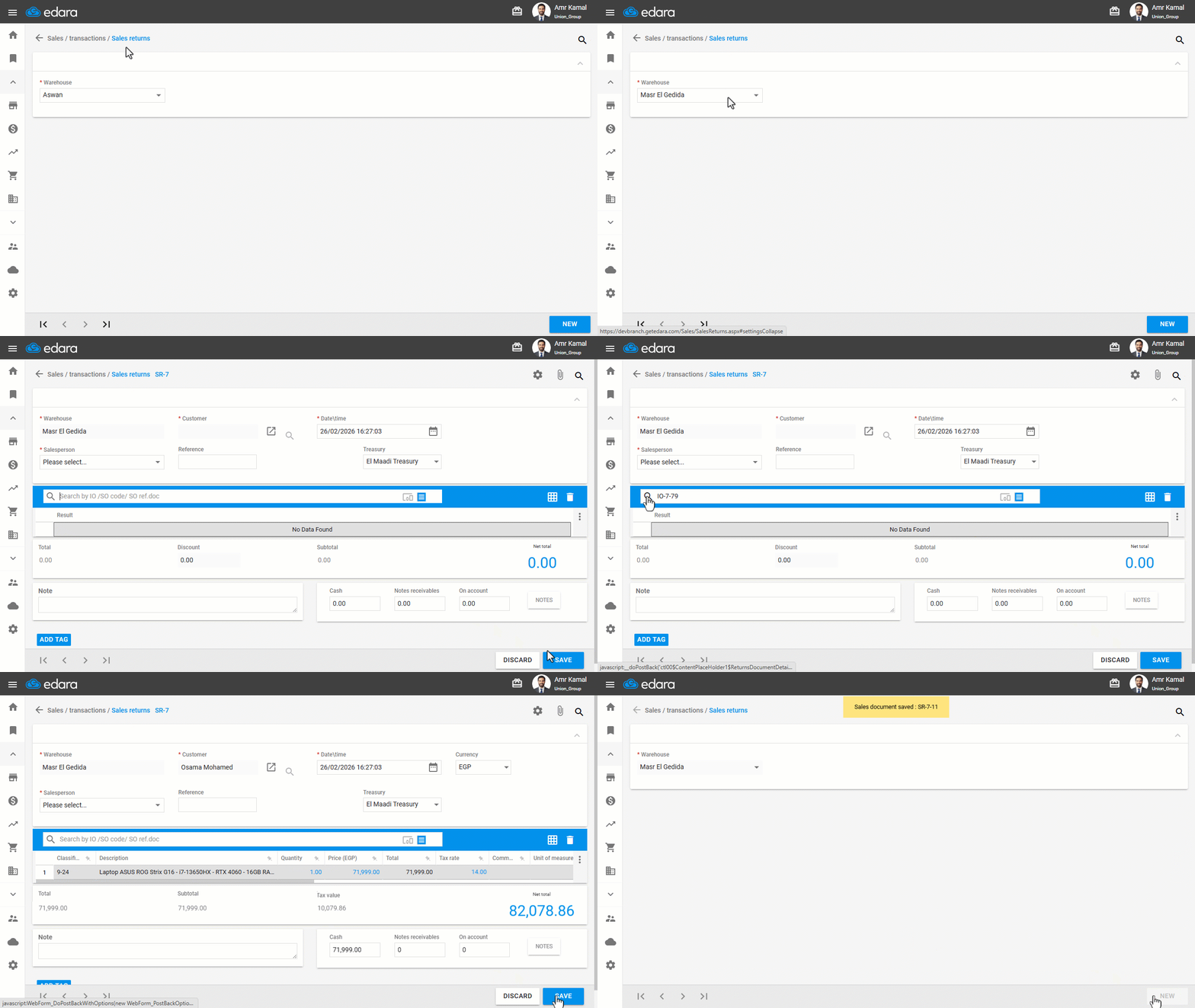
- Go to the "Sales" module.
- Open the "Sales Returns" page.
- Select the required warehouse.
- Click on "New".
- Search for the Issue Offering document you created.
- Click on "Save".
Note: After completion, ensure that you revoke user permissions on the sales Store you created, to prevent it from being used in actual sales transactions.
Frequently asked questions
What should I do with the sales store after creating the return?
After completion, ensure that you revoke user permissions on the sales Store you created, to prevent it from being used in actual sales transactions.
If you encounter any challenges or have questions during these processes, you can contact our technical support team, who are ready to assist you at any time.
Did this answer your question?