

Preventing change in sales prices
Last updated:
To prevent changes to the sales price and ensure that set prices are followed, especially in companies with multiple branches or unified pricing policies, you can enable the “Prevent Change Sales Price” setting.
When this setting is enabled, users cannot change the item price while creating or editing Sales Orders. You can also select specific users as exceptions who are allowed to change the price when needed.
Preventing change in sales prices

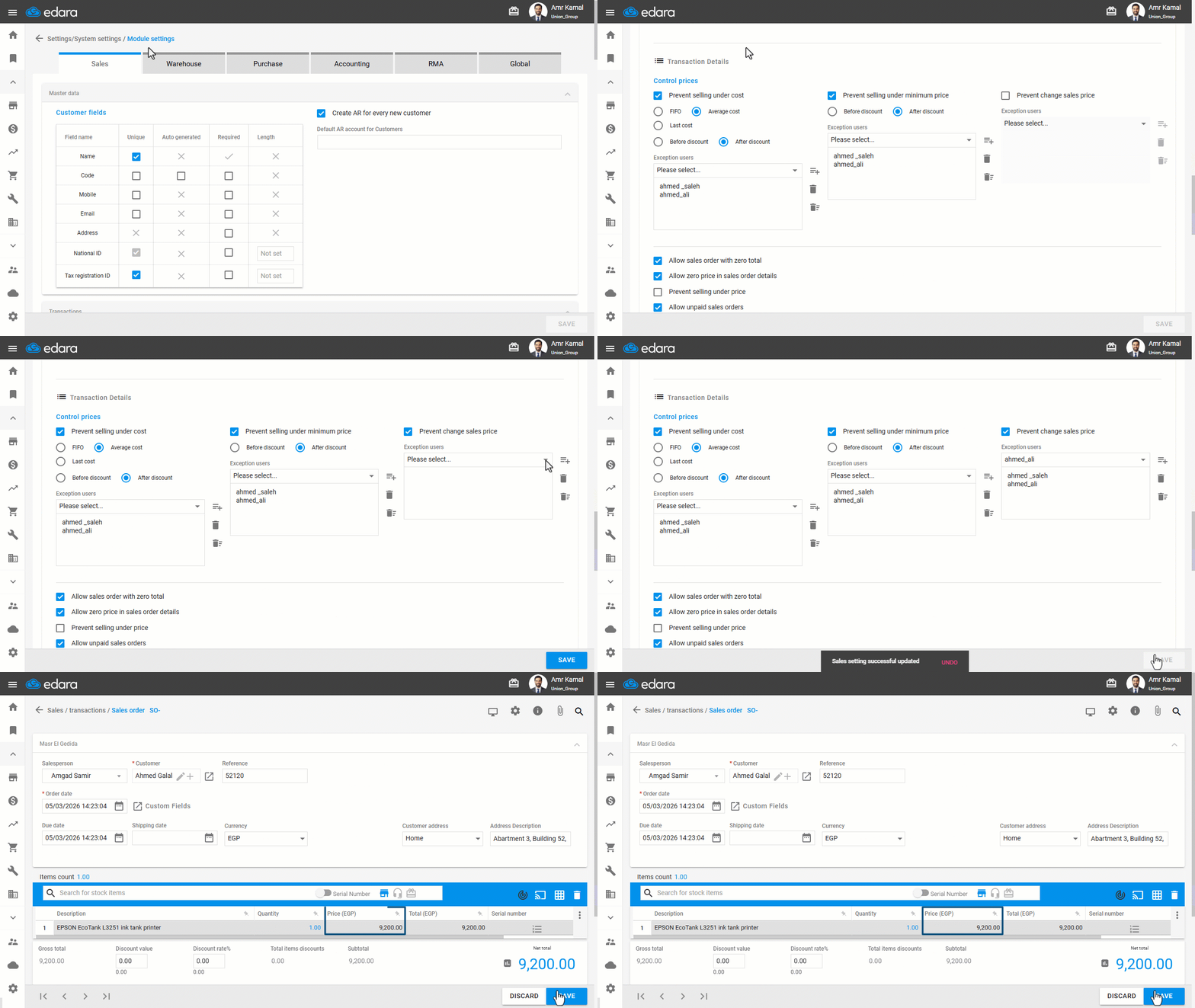
- Go to “Settings.”
- Open the “Module Settings” page.
The default tab here is the “Sales” tab.
- Enable the “Prevent change sales price” option.
- Select the exception users who are allowed to modify the sales price.
- Click on “Save”.
Note: Only users specified under “Exception Users” can modify the sale price, whether in sales orders within “Sales” or in “Points of Sale” in version “Edara 2.5”.
Frequently asked questions
Who can change the sales price after enabling the setting?
Only users specified under “Exception Users” can modify the sale price, whether in sales orders within “Sales” or in “Points of Sale” in version “Edara 2.5”.
If you encounter any challenges or have questions during these processes, you can contact our technical support team, who are ready to assist you at any time.