

Granting/Revoking Permission to Modify Dates in Documents
Last updated:
Sometimes, incorrect dates are entered when creating documents, hindering accurate review and proper analysis.
To address this, "Edara" allows you to grant permission to edit dates in accounting and inventory documents, ensuring the correct dates are recorded.
Granting Permission to Modify Dates in Documents
- Go to "Settings".
- Open the "Modules Settings" page.
- Select the module where you want to grant date modification permission.
- Ensure the setting is enabled by clicking ◻ to turn it into ☑.
- Add the user under "Allow modifying documents dates" from the dropdown list.
- Click on "Save".
Note: If date modification is required during document creation, the user must be added to "Allow modifying date in new mode" only. Or if modification is needed after saving the document, the user should be added to "Allow modifying date in edit mode".
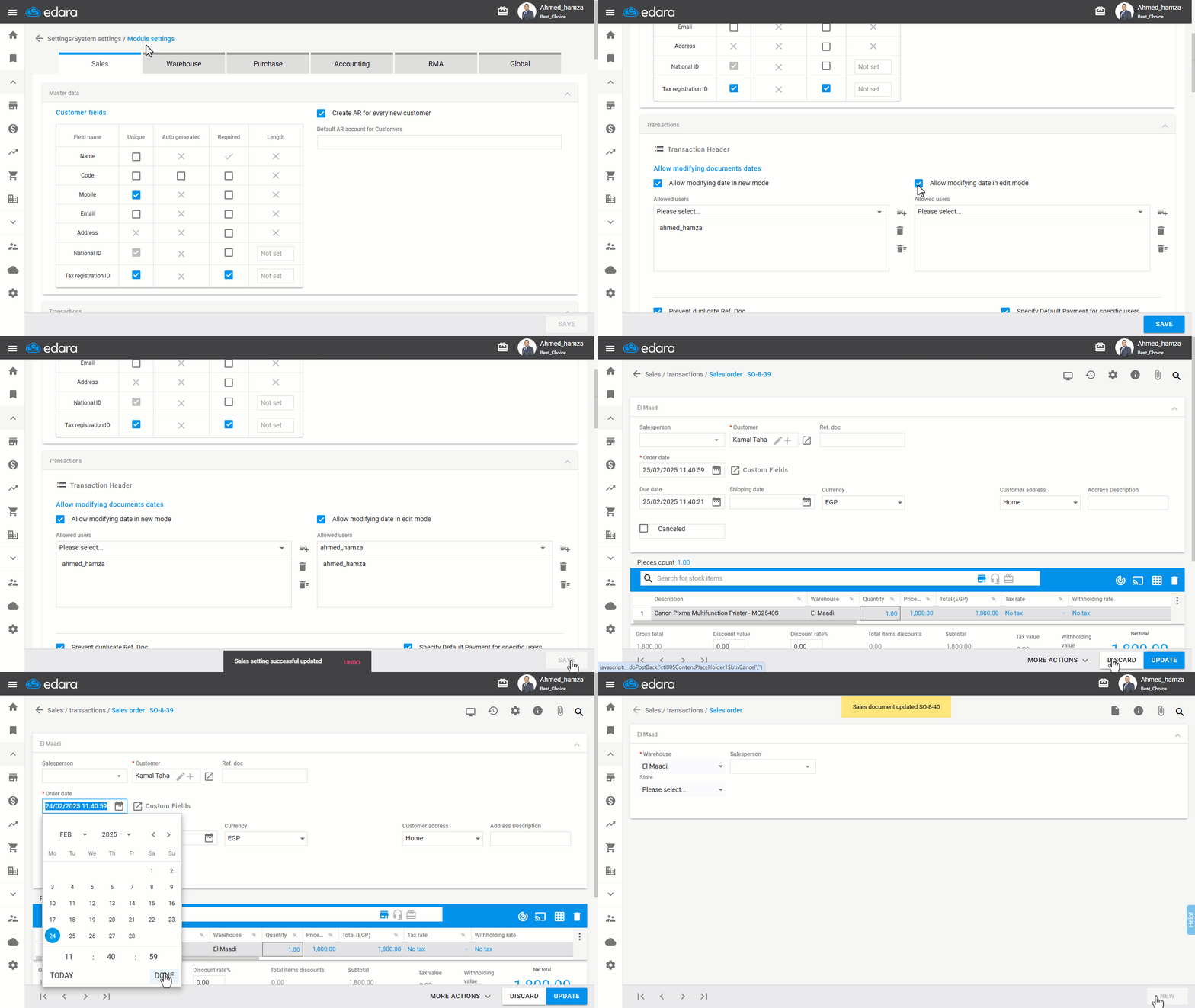
Note: You can remove a user's permission by selecting their name and clicking 
Frequently asked questions
What is the difference between changing the document date on creation and after saving?
If date modification is required during document creation, the user must be added to "Allow modifying date in new mode" only. Or if modification is needed after saving the document, the user should be added to "Allow modifying date in edit mode".
If you encounter any challenges or have questions during these processes, you can contact our technical support team, who are ready to assist you at any time.