

Granting/Revoking Permission to Set Closing Period On/Off
Last updated:
After completing the review of accounting documents, users may occasionally need to make changes to a document within a closed financial period.
In such cases, you need to grant them permission to unpost documents so they can make the required edits.
Granting/Revoking Permission to Set Closing Period On/Off
- Go to Settings.
- Open the “Module Settings” page.
- Select the “Accounting” module.
- Check the box next to “Set Closing Period On/Off” (☑️).
- Click on “Save”.
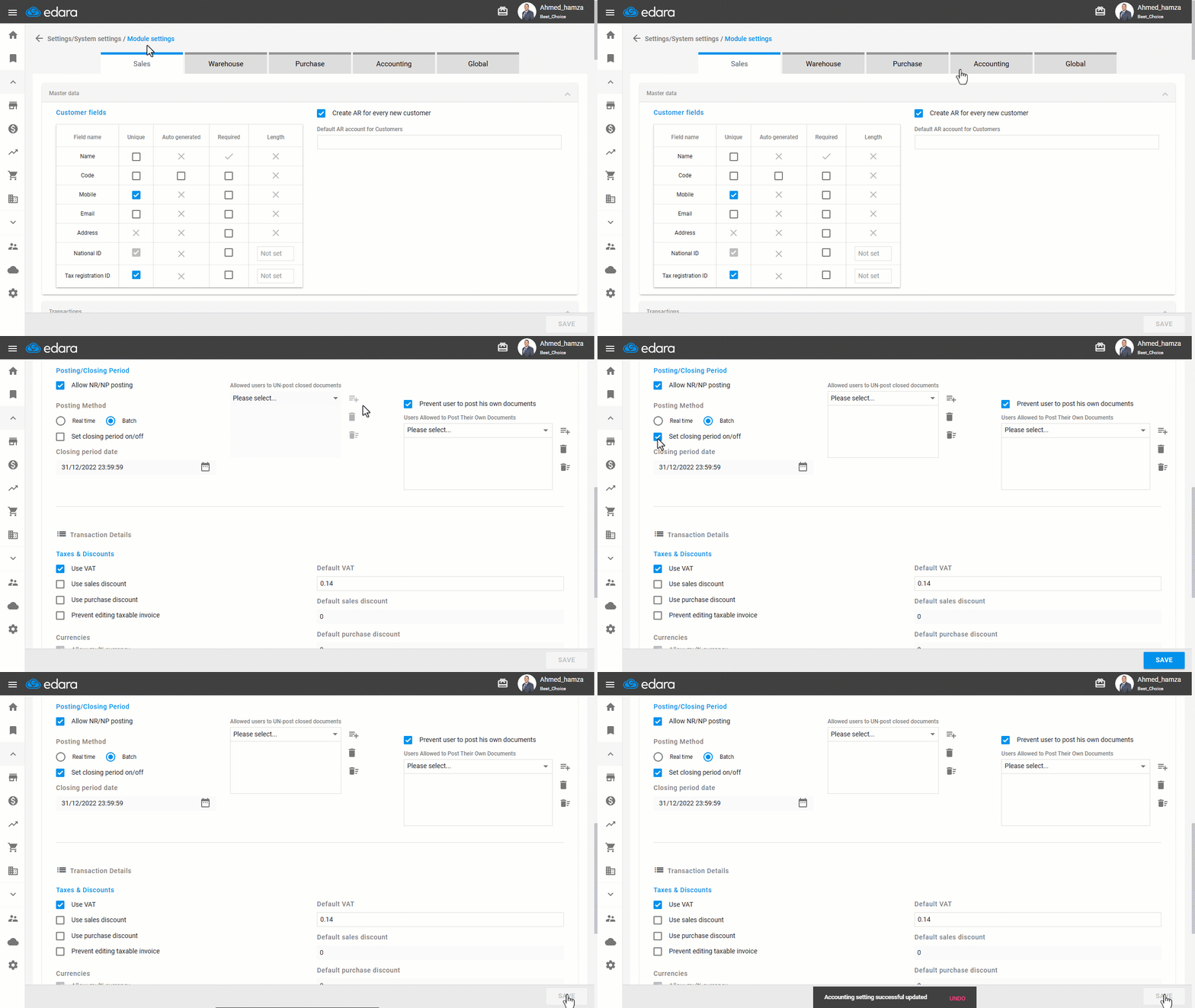
Note: If you want to revoke this permission later, simply repeat the steps above and uncheck the ☑️ box next to the setting.
Frequently asked questions
How do I revoke the unposting permission?
If you want to revoke this permission later, simply repeat the steps above and uncheck the ☑️ box next to the setting.
If you encounter any challenges or have questions during these processes, you can contact our technical support team, who are ready to assist you at any time.
Did this answer your question?