

Granting/Revoking Permission to Display Highest and Lowest Purchase Price
Last updated:
Applying permission control to the "Highest and Lowest RS Price" columns gives the company the ability to negotiate effectively with suppliers, as this information remains accessible only to relevant personnel.
"Edara" allows you to manage permissions for these columns, enabling you to grant or revoke access based on business needs.
Granting Permission to Display Highest and Lowest Purchase Price
- Go to the Users Module.
- Click on "Pages Permissions".
- Select the user or group of users you want to grant/revoke access from the list.
- Click "+" to open the pages for “Warehouse” module.
- Select “Reports” in the system elements tree.
- Click on the “Stock Sell out Summary” Report.
- Mark "☑️" to grant permission to control column visibility or leave it "⬜" to revoke access.
- Click “Save”.
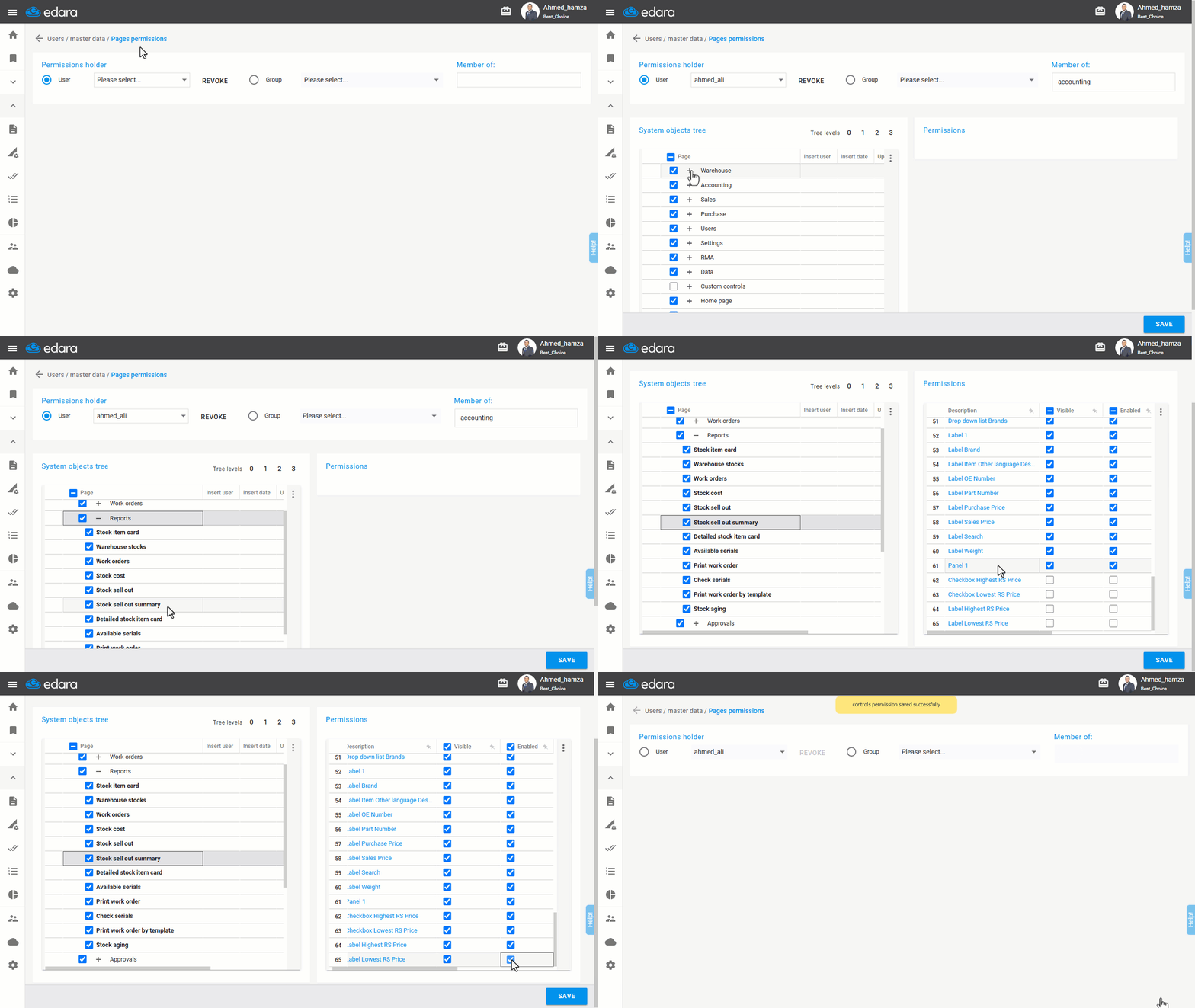
Note: You can disable both column selection boxes to make the columns visible to the user but prevent enabling their display. Alternatively, you can hide the column selection boxes entirely.
If you encounter any challenges or have questions during these processes, you can contact our technical support team, who are ready to assist you at any time.
Did this answer your question?