

Preventing a User from Deleting a Sales Return
Last updated:
Controlling user permissions is vital to ensure data security and prevent any unwanted actions. One such action is preventing a specific user from deleting a sales return, which requires adjustments in access permissions.
Learn how to implement this procedure through "Edara".
Preventing a User from Deleting a Sales Return
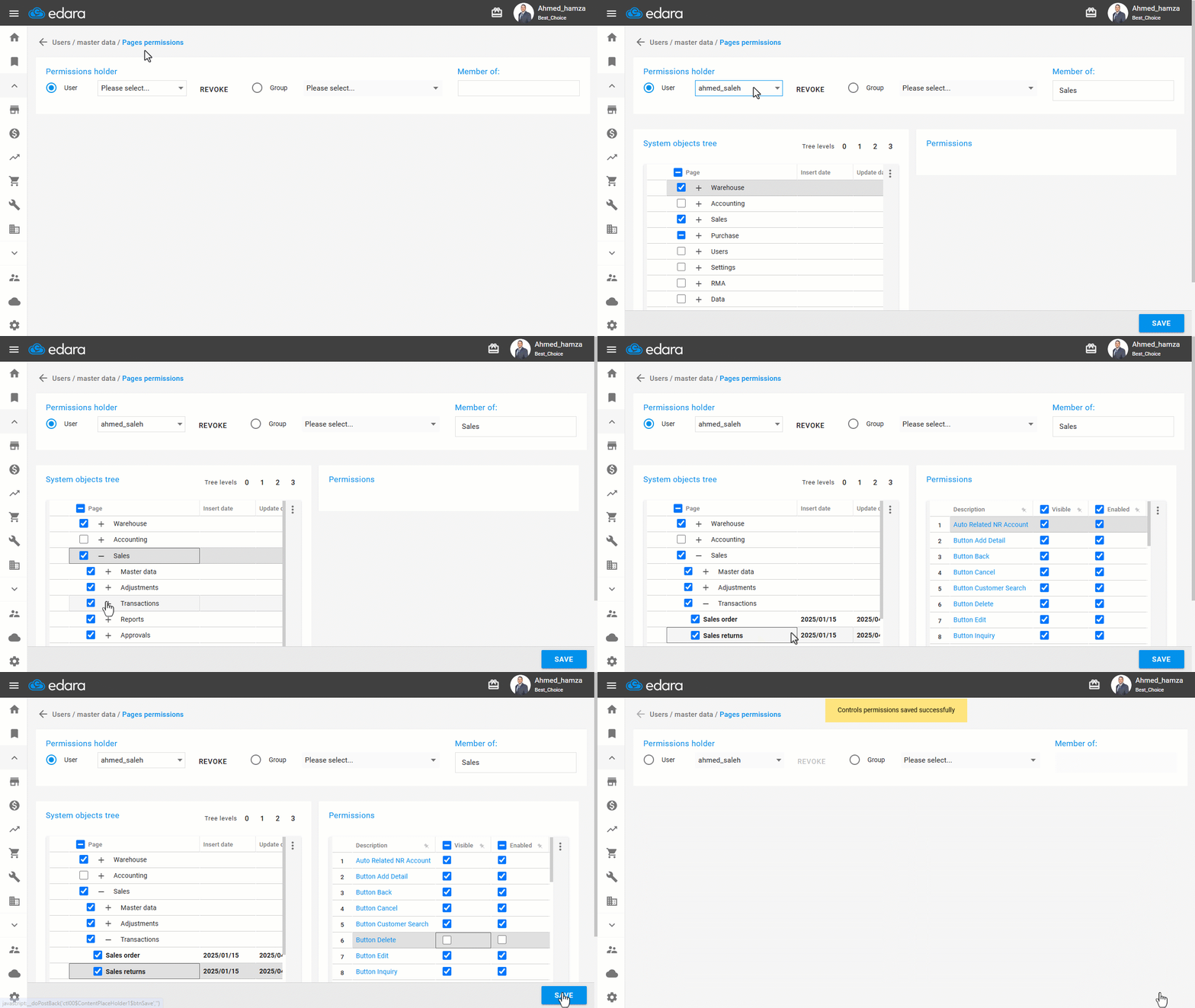
To revoke the permission to delete a sales return document in "Edara," follow these steps:
- Go to Users.
- Open the “Page Permissions” page.
- Select the user's name.
- Choose “Sales” from the system elements tree, then choose “Documents”.
- Click on “Sales Return” to display all the page permissions.
- Disable the Delete icon by either making it invisible or deactivating it while keeping it visible.
- Click on “Save”.
If you encounter any challenges or have questions during these processes, you can contact our technical support team, who are ready to assist you at any time.
Did this answer your question?