

Granting/Removing Sales Order Listing Permissions
Last updated:
“Edara” allows you to control who can access the Sales Order Listing page or perform actions such as issuing and completing orders, based on each user’s role.
Granting/Removing Sales Order Listing Permissions
- Go to “Users”.
- Open the “Pages permissions” page.
- Select the required user.
- Click on “+” next to “Sales”.
- Click on “+” next to “Transactions”.
- Click on “Sales Orders Listing page”.
- Click on “▢” next to the items you want to grant permission for.
- Click on “Save”.
After granting or modifying permissions, you will need to log out of the system and log in again for the changes to take effect.
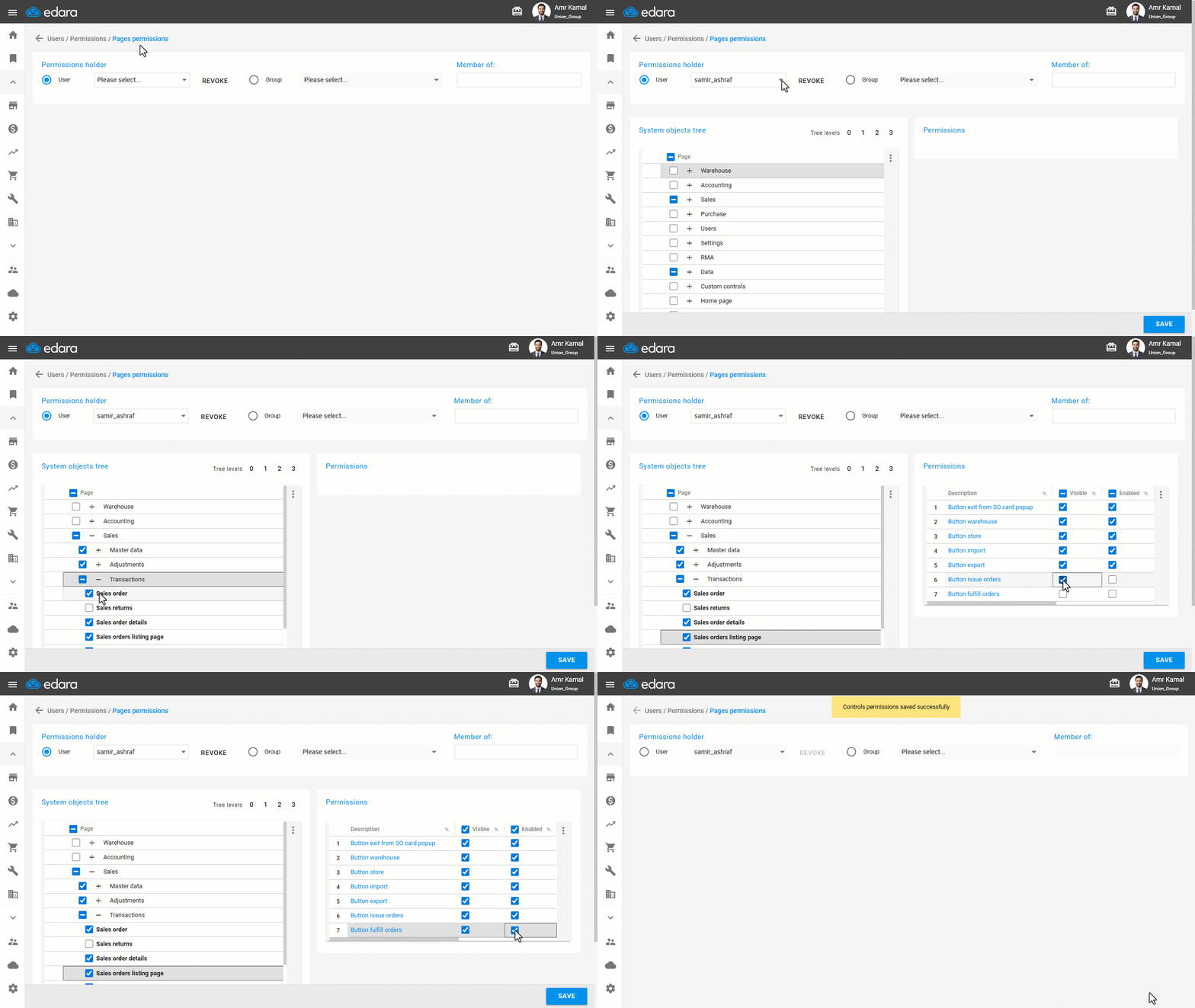
Note: If you want to revoke a user’s access to the Sales Order List, follow the same steps but uncheck the box “☑”.
Frequently asked questions
How do I revoke a permission on the Sales Order Listing?
If you want to revoke a user’s access to the Sales Order List, follow the same steps but uncheck the box “☑”.
If you encounter any challenges or have questions during these processes, you can contact our technical support team, who are ready to assist you at any time.
Did this answer your question?