

Granting/Revoking Page Permissions
Last updated:
Having a flexible permissions system that can be quickly updated when employee roles or responsibilities change helps assign each user the appropriate page access based on their job duties, enabling them to access only the pages they need to complete their work.
Additionally, revoking access to certain pages for specific users enhances data security by reducing the likelihood of accessing sensitive information or making unauthorized changes.
Granting Page Permissions

- Go to the Users Module.
- Click on "Pages Permissions".
- Select the user or group of users you want to grant access.
- Click "+" to open the pages for each module.
- Check the box “▢” to grant access to the page.
- Click "Save".
Note: The user must log out and back in to use the granted permissions.
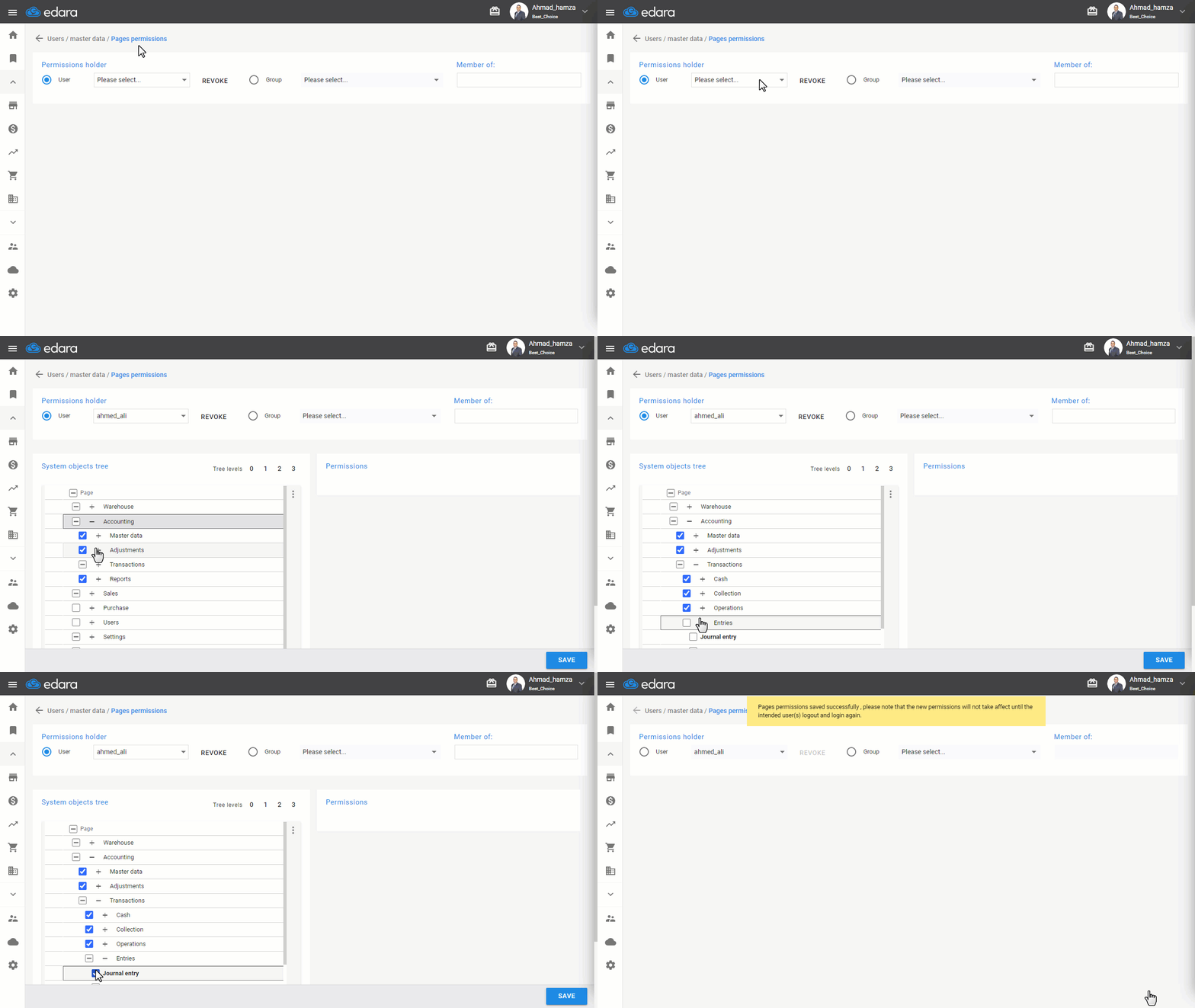
Note: You can also revoke Page Permissions by following the same steps, but click on the box marked ☑ to remove the check, then save.
Frequently asked questions
When do new page permissions take effect for the user?
The user must log out and back in to use the granted permissions.
If you encounter any challenges or have questions during these processes, you can contact our technical support team, who are ready to assist you at any time.