

Revoking Edit Permissions for Journal Entries
Last updated:
“Edara” allows you to assign user permissions according to your business needs. For example, when you give a user access to the “Journal Entry” page, they are automatically granted access to all its buttons.
However, to ensure data security and prevent tampering, you can restrict certain users to view-only access, without the ability to edit.
Revoking Edit Permissions for Journal Entries
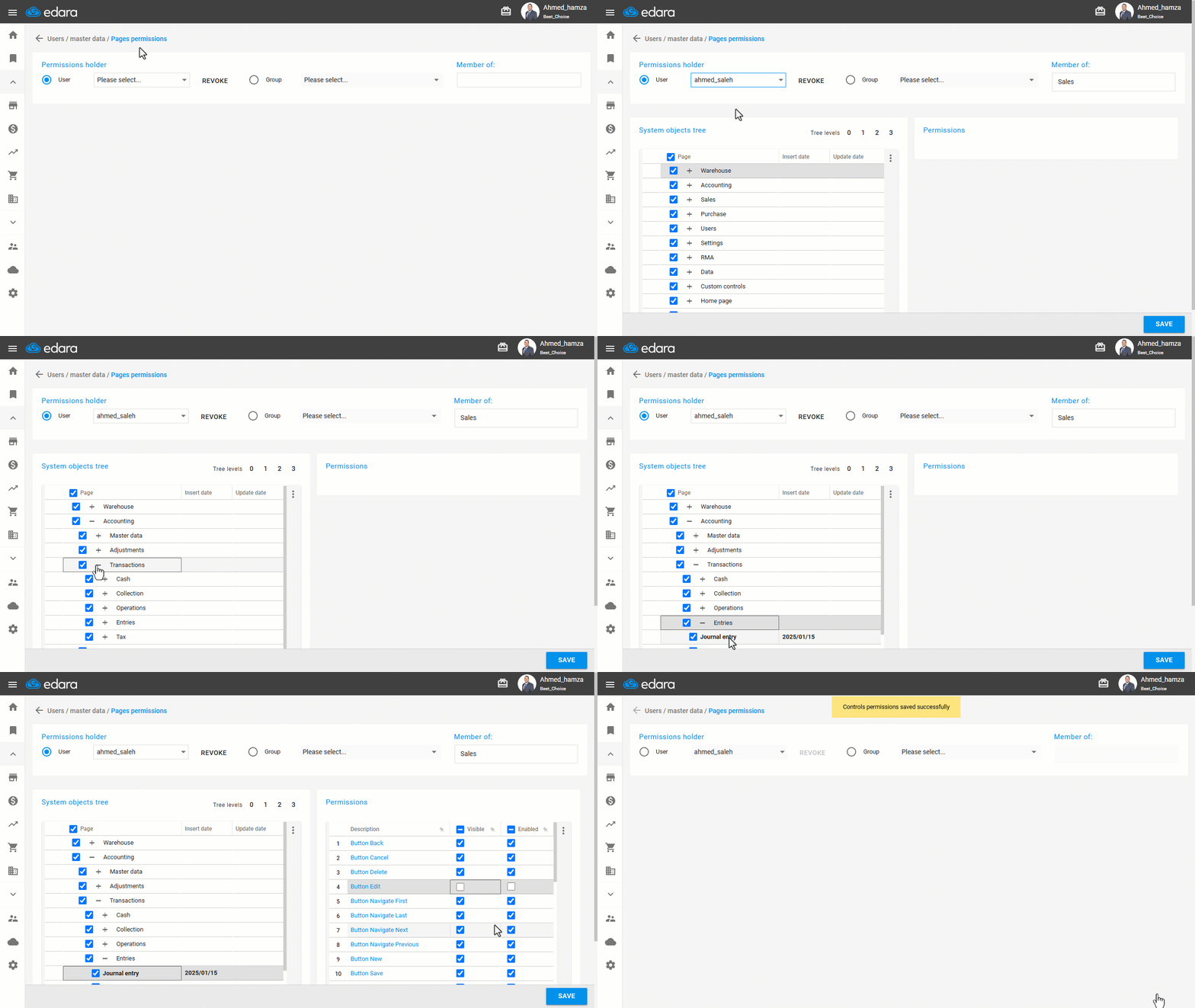
- Go to Users.
- Open the “Page Permissions” page.
- Select the user or group of users whose permissions you want to modify.
- Navigate to “Accounting” then “Transactions” then “Entries”.
- Click on the “Journal Entry” page to display its internal permissions.
- Uncheck the permission for the “Edit” Button.
- Click on “Save”.
Note: If you wish to re-enable the edit permission later, follow the same steps and check the box next to the “Edit” button to make it visible and active again.
Frequently asked questions
How do I restore the edit permission on journal entries?
If you wish to re-enable the edit permission later, follow the same steps and check the box next to the “Edit” button to make it visible and active again.
If you encounter any challenges or have questions during these processes, you can contact our technical support team, who are ready to assist you at any time.