

Setting the Default Payment Method in Sales Orders
Last updated:
Some users prefer a specific payment method as their default option, such as frequently using cash payments. To simplify sales operations and ensure that a specific payment method is selected automatically, you can assign a default payment method for each user.
Setting the Default Payment Method in Sales Orders
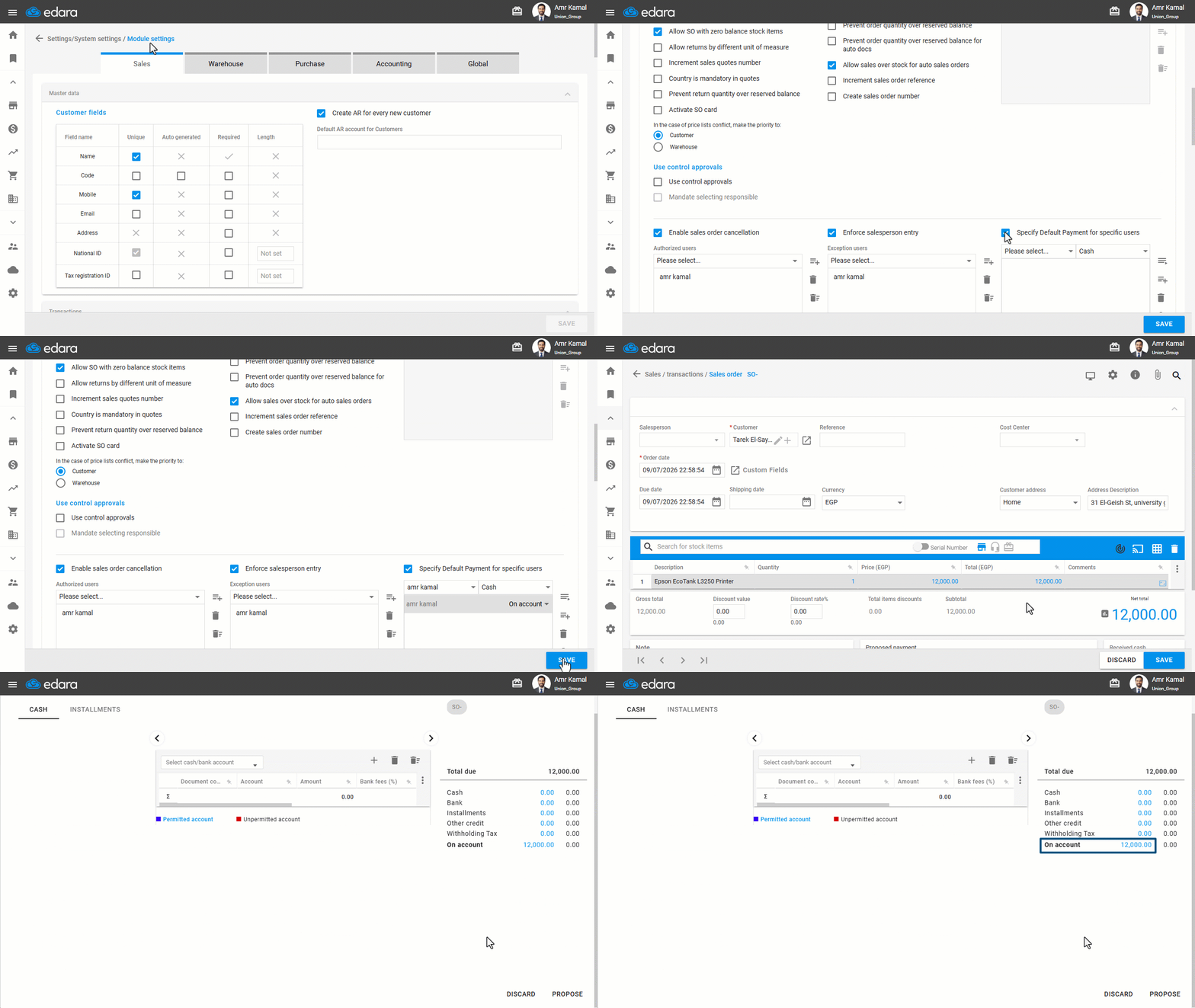
- Go to "Settings".
- Open the "Modules Settings" page.
The default tab here is "Sales".
- Enable the "Specify Default Payment for specific users" setting.
- Select the user.
- Select the user's payment method (Cash or On Account).
- Click on "Save".
After setting the default payment method, the system will automatically suggest it in Sales Orders, as shown in the image below:
Understanding the Suggested Payment Method in Sales Orders
The payment method suggested in a Sales Order depends on the customer type (Cash or On Account) and the user's default payment method. The following table shows how the system behaves in each case:
| Customer Type | User Default Payment Method | Payment Control Behavior | Sales Order Default Payment |
|---|---|---|---|
| Cash | Cash | Don’t open | Cash |
| Cash | On Account | Don’t open | Cash |
| Cash | Null | Open | Cash |
| Credit | Cash | Don’t open | Cash |
| Credit | On Account | Don’t open | On Account |
| Credit | Null | Open | Credit |
Note: If the customer type is “Cash”, the system will not allow you to save the Sales Order using the “On Account” payment method, even if the user's default payment method is set to “On Account”. This is because the customer type in the Sales Order always takes priority.
Frequently asked questions
Can I save a sales order for a cash customer with the “On Account” payment method?
If the customer type is “Cash”, the system will not allow you to save the Sales Order using the “On Account” payment method, even if the user's default payment method is set to “On Account”. This is because the customer type in the Sales Order always takes priority.
If you encounter any challenges or have questions during these processes, you can contact our technical support team, who are ready to assist you at any time.