

Linking “WooCommerce” Payment Methods with “Edara” Payment Methods
Last updated:
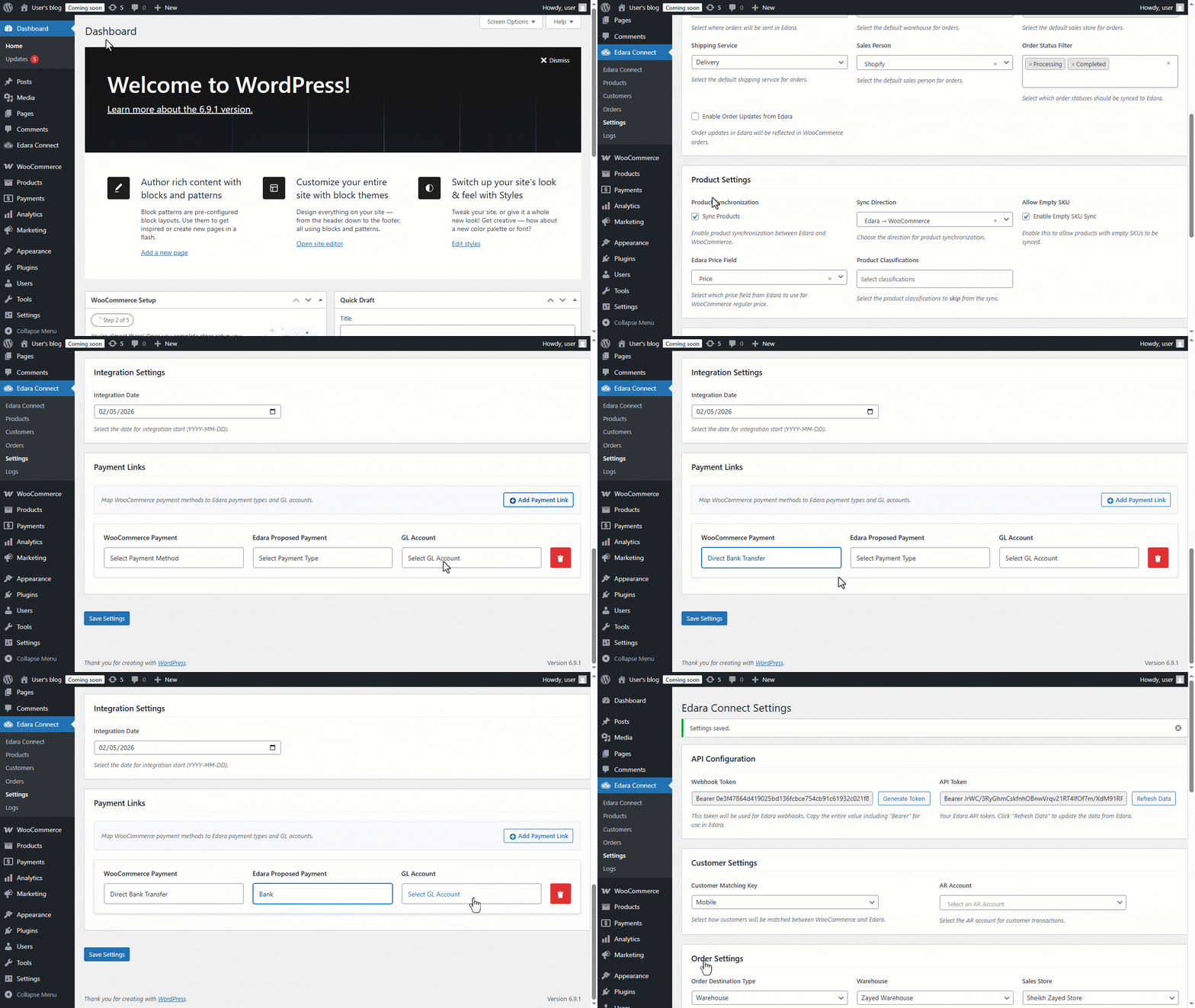
To simplify the payment settlement of Sales Orders, Edara allows you to link a specific “WooCommerce” payment method to a corresponding payment method in “Edara”.
Once the link is configured, Sales Orders created through “WooCommerce” will be generated in “Edara” using the correct payment method, enabling smooth and accurate collection without complications.
Linking “WooCommerce” Payment Methods with “Edara” Payment Methods
- Go to “WooCommerce”.
- Open the “Edara Connect” page.
- Click on “Settings”.
- Click on “Add Payment Link”.
- Select “WooCommerce Payment”.
- Choose the corresponding “Edara Proposed Payment”.
- Select the “GL Account” (you must have permission to use this account in Edara)
Note: You can add multiple Payment Links for the same store.
- Click on “Save Settings”
Frequently asked questions
Can I add more than one payment link?
You can add multiple Payment Links for the same store.
If you encounter any challenges or have questions during these processes, you can contact our technical support team, who are ready to assist you at any time.
Did this answer your question?