

Bulk Linking Products Between "WooCommerce" and "Edara"
Last updated:
After installing the necessary plugins to connect “Edara” with “WooCommerce”, and configuring the required settings, you’ll need to link the products between both platforms.
This ensures that any order placed in your “WooCommerce” store for a specific item will automatically generate a matching sales order in “Edara”.
Bulk Linking Products Between "WooCommerce" and "Edara"
Note: The initial product linking is done using the product's SKU. It must match exactly on both “WooCommerce” and “Edara”.
- Go to "Edara Connect" on WordPress.
- Open the "Products" page.
- Select the products to be linked by pressing "◻" next to each product.
- Select "Bulk Link" from the command execution menu.
- Click on "Apply".
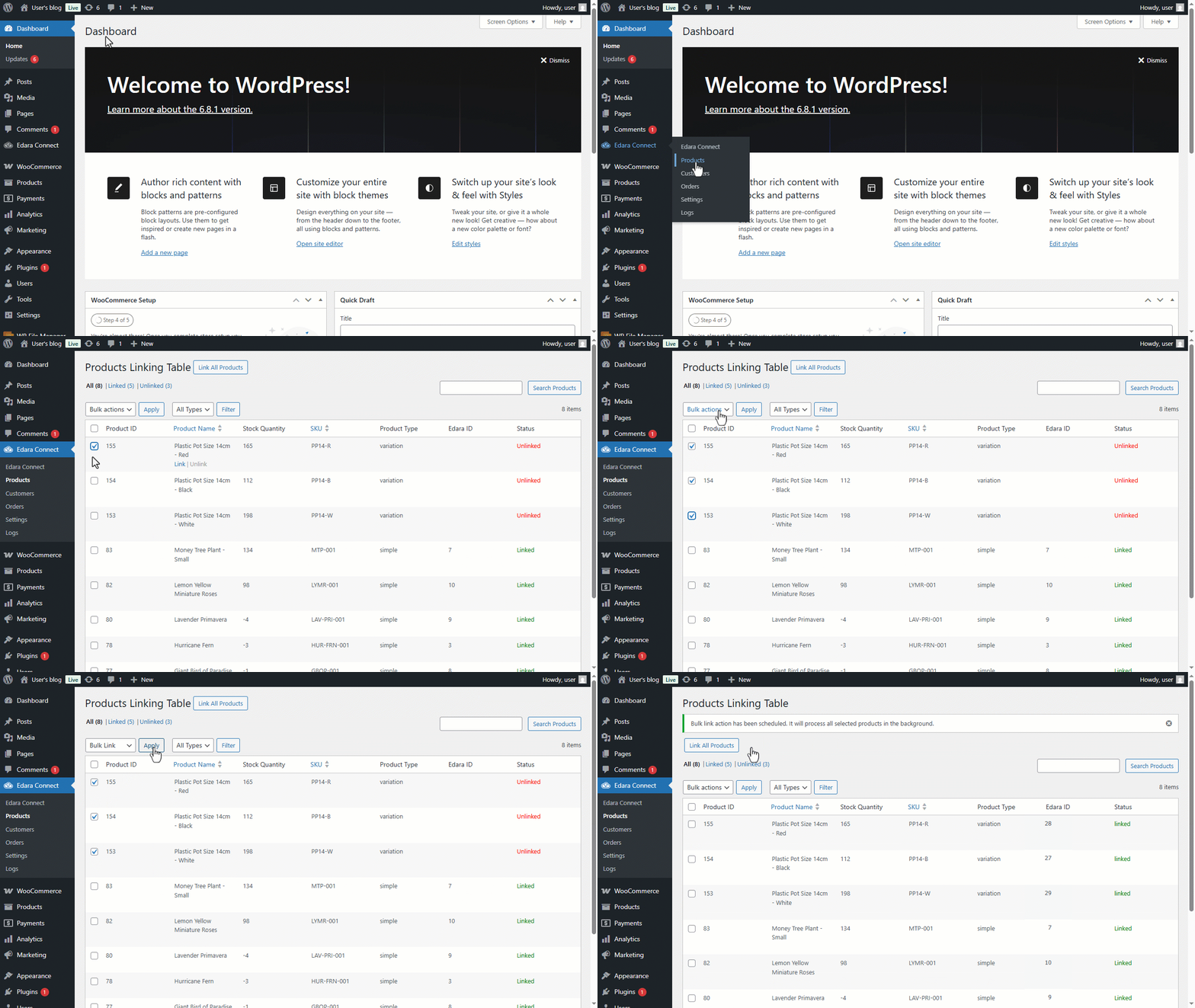
Note: If you have a very large number of products and want to link them all at once, you can open the "Products" page and click "Link All Products".
Frequently asked questions
How do I link all products at once?
If you have a very large number of products and want to link them all at once, you can open the "Products" page and click "Link All Products".
If you encounter any challenges or have questions during these processes, you can contact our technical support team, who are ready to assist you at any time.