

Bulk Linking Customers Between "WooCommerce" and "Edara"
Last updated:
When sales orders are sent from “WooCommerce” to “Edara”, customers are automatically synced between the two systems.
However, if you prefer to manually link customers before orders are pushed to “Edara”, you can do so.
Bulk Linking Customers Between "WooCommerce" and "Edara"
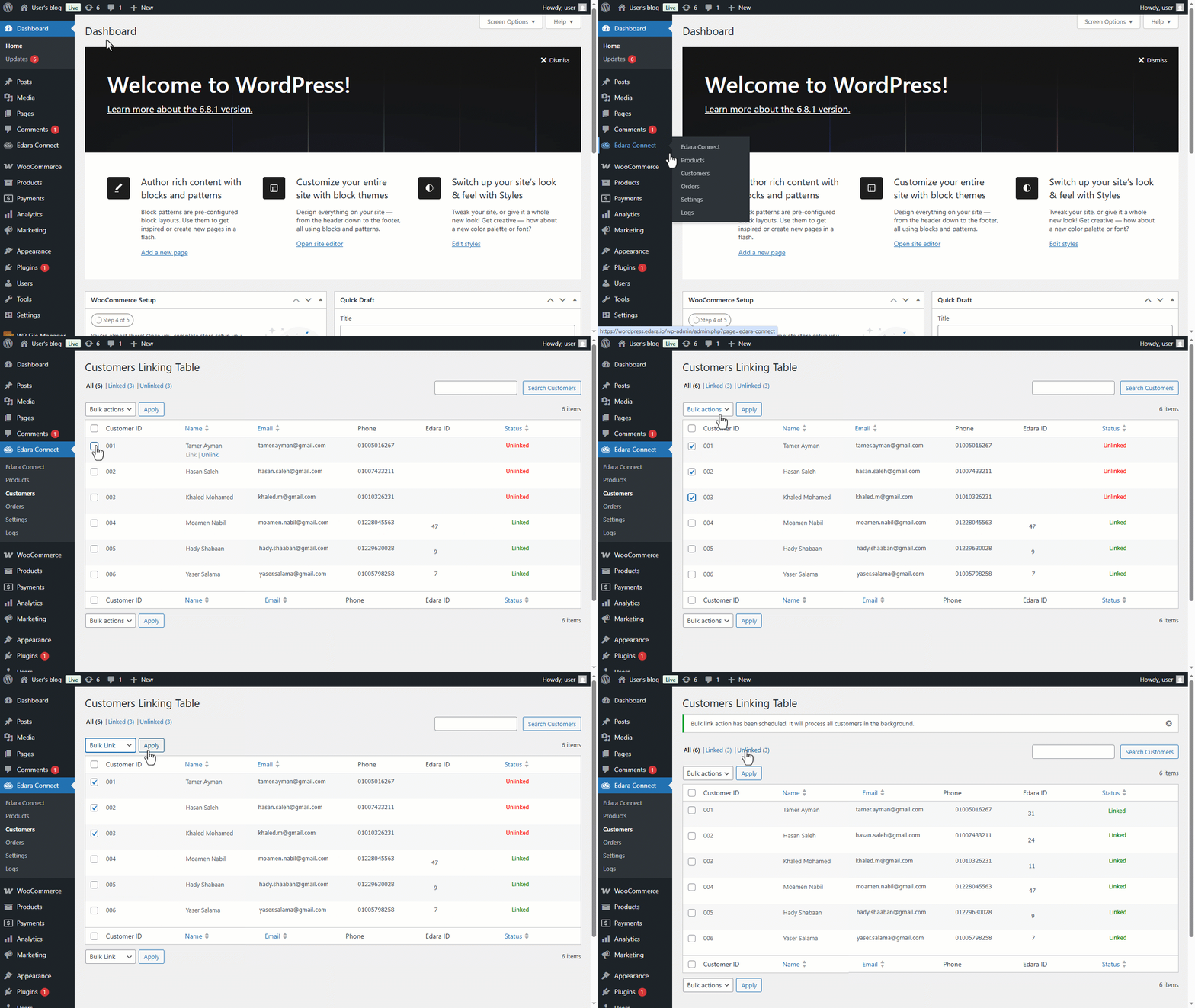
- Go to "Edara Connect" on WordPress.
- Open the "Customers" page.
- Select the customers you want to link by ticking the checkbox ◻ next to each customer.
Note: If you have a large number of customers and want to link them all at once, you can tick the checkbox ◻ next to the Customer ID column header to select all, then proceed with the next steps.
- Select "Bulk Link" from the bulk actions dropdown menu.
- Click on "Apply".
If you encounter any challenges or have questions during these processes, you can contact our technical support team, who are ready to assist you at any time.
Did this answer your question?