

Preventing Modifying/Exceeding Proposed Discounts in Sales Orders
Last updated:
Allowing unrestricted modification of the proposed item discount can lead to errors in sales recording, such as granting unjustified discounts or exceeding the approved discount limits.
Therefore, "Edara" offers the option to restrict changes or overrides to the proposed discount while permitting exceptions for certain users.
Preventing Modifying/Exceeding Proposed Discounts in Sales Orders
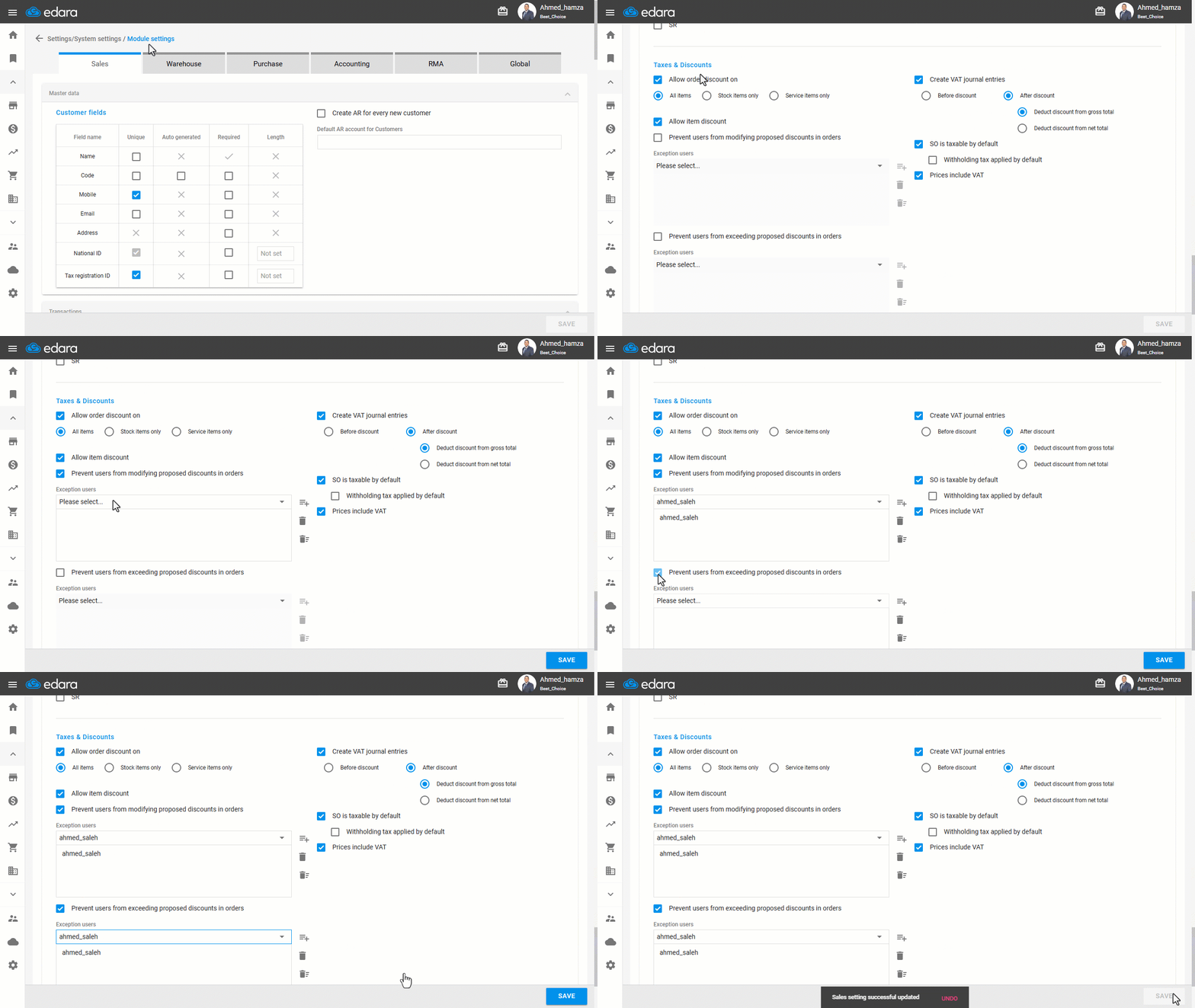
- Go to Settings.
- Open the "Module Settings" page.
Note: The default Module is the “Sales” Settings.
- Enable the "Prevent users from modifying proposed discounts in orders" option.
- Enable the "Prevent users from exceeding proposed discounts in orders" option.
- Click on "Save".
Note: If you need to give some users an exception to modify/exceed the proposed discount, add the user in the “Exclude” list, then click on “Save”.
Frequently asked questions
Can I exempt users from the proposed discount restriction?
If you need to give some users an exception to modify/exceed the proposed discount, add the user in the “Exclude” list, then click on “Save”.
If you encounter any challenges or have questions during these processes, you can contact our technical support team, who are ready to assist you at any time.