

Opening and Closing Register in Point of Sale
Last updated:
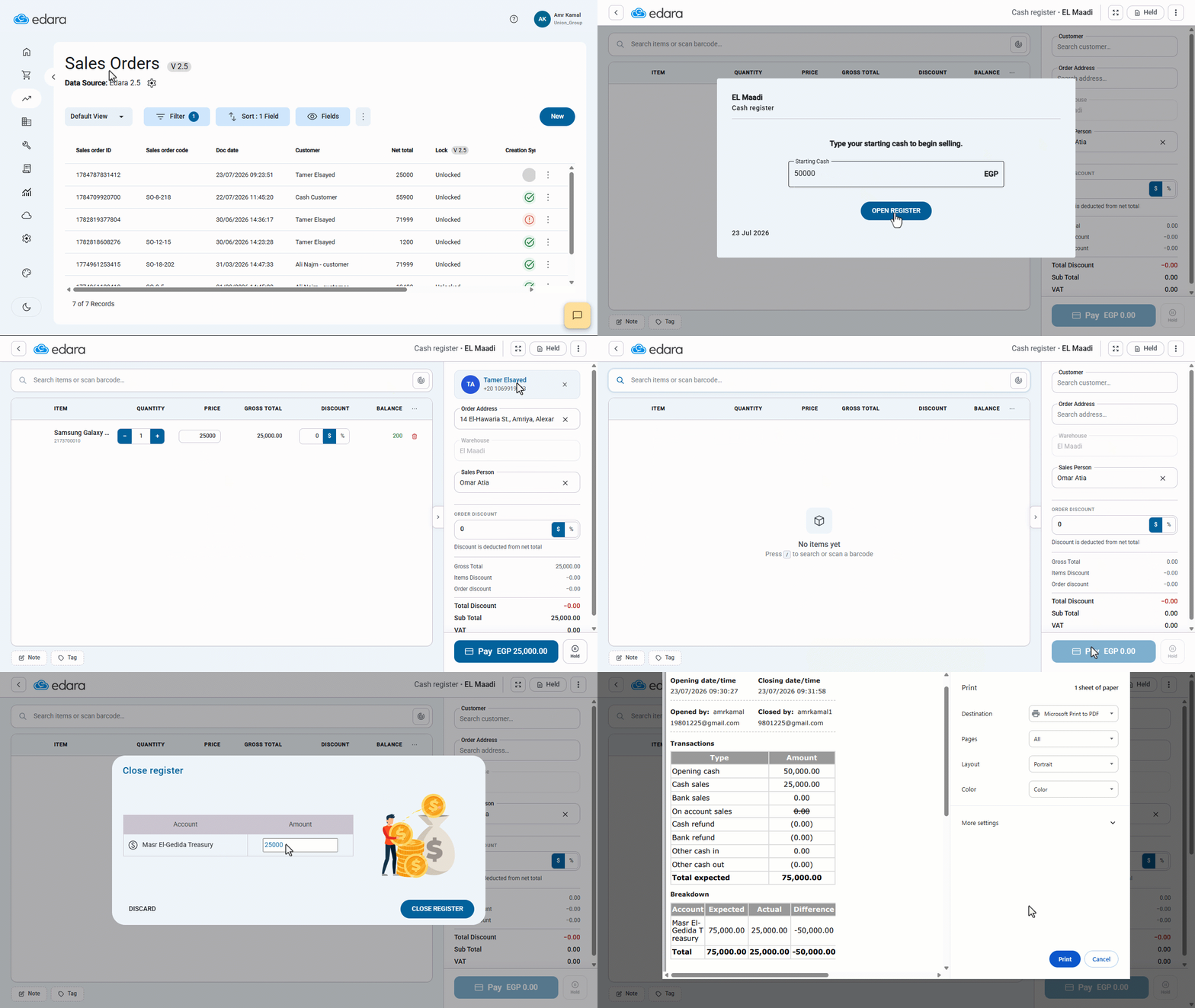
At the beginning of each shift, the cashier is required to record the amount of cash available in the cash Register, and at the end of the shift, record the actual cash amount. This allows the system to compare the actual balance with the expected balance and identify any cash overage or shortage.
Opening and Closing Register in Point of Sale
First, make sure that a Cash Register has been created for the Point of Sale and that the "Allow open/close register" setting is enabled.
- Go to the "Point of Sales" Module.
- Open the "Sales Orders" page.
- Click on "New".
The "Open Cash Register" window will appear automatically.
- Enter the opening cash amount.
- Click on "Open Register".
- Search for the required stock item.
After completing sales transactions and daily operations:
- Click on “⁝”.
- Choose "Close Register".
- Enter the actual amount available in the Register.
- Click on "Close Register".
A printable summary will be displayed, including cash balances, sales, returns, and any overages or shortages recorded during the shift.
Notes:
- If the actual balance matches the expected balance, no difference will be shown. If the actual balance is more than the expected balance, the difference will be recorded as an overage. If it is less than the expected balance, the difference will be recorded as a shortage.
- Expenses and cash amounts received into or paid from the cash Register during the shift can be recorded using Cash In and Cash Out transactions. The cash register must be open to do these transactions.
- It is recommended to close the cash register from the same device on which it was opened to ensure that the closing data is recorded correctly.
If you encounter any challenges or have questions during these processes, you can contact our technical support team, who are ready to assist you at any time.