

Entering Cash In and Cash out Transactions in POS
Last updated:
Recording cash-in and cash-out transactions throughout the day is one of the cashier's responsibilities, used to document all activities at their point of sale. This requires creating a payment document for proper documentation.
Now, in "Edara", you can create cash-in and cash-out transactions at the point of sale as follows.
Entering Cash In and Cash out Transactions in POS
- Go to the "Point of Sale" module.
- Open the "Cash Management" page.
- Select "Cash Out".
- Enter the "Amount".
- Add "Notes" if applicable, as they help to remember what was paid out.
- Click "Cash Out".
Note 1: The document will be automatically printed as shown in the image below. Note 2: No daily entries are generated from these steps.
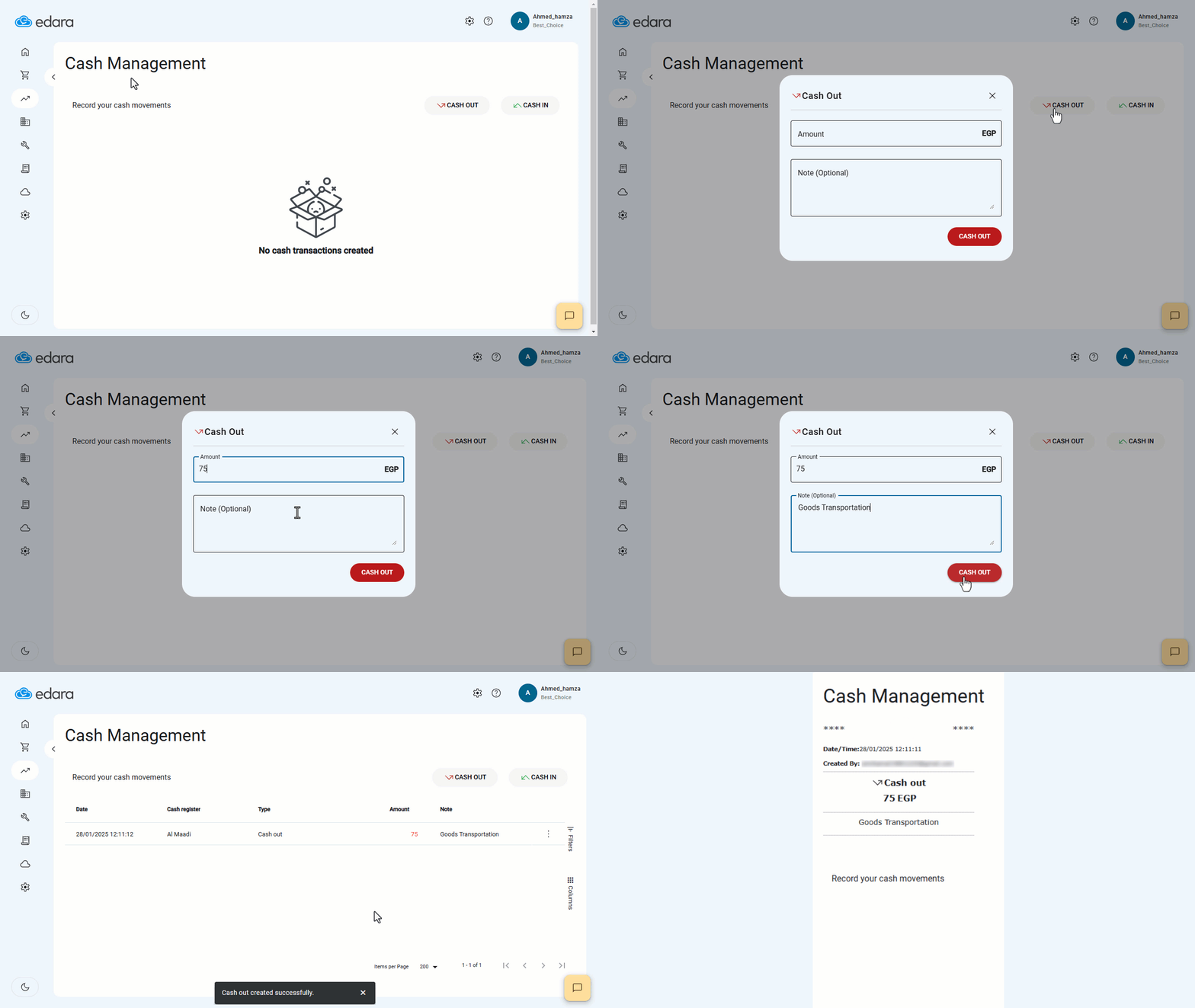
Note: The previous steps illustrate an example of recording a cash-out transaction. You can follow the same steps for cash-in documents by selecting "Cash In" in step 3.
Frequently asked questions
How do I record a cash-in transaction?
The previous steps illustrate an example of recording a cash-out transaction. You can follow the same steps for cash-in documents by selecting "Cash In" in step 3.
If you encounter any challenges or have questions during these processes, you can contact our technical support team, who are ready to assist you at any time.