

Selecting the Data Source for Sales Orders in POS
Last updated:
The display of sales orders in the Point of Sale (POS) depends on their source of creation, as you can define the data source to accurately display orders related to each source.
Selecting the Data Source for Sales Orders in POS

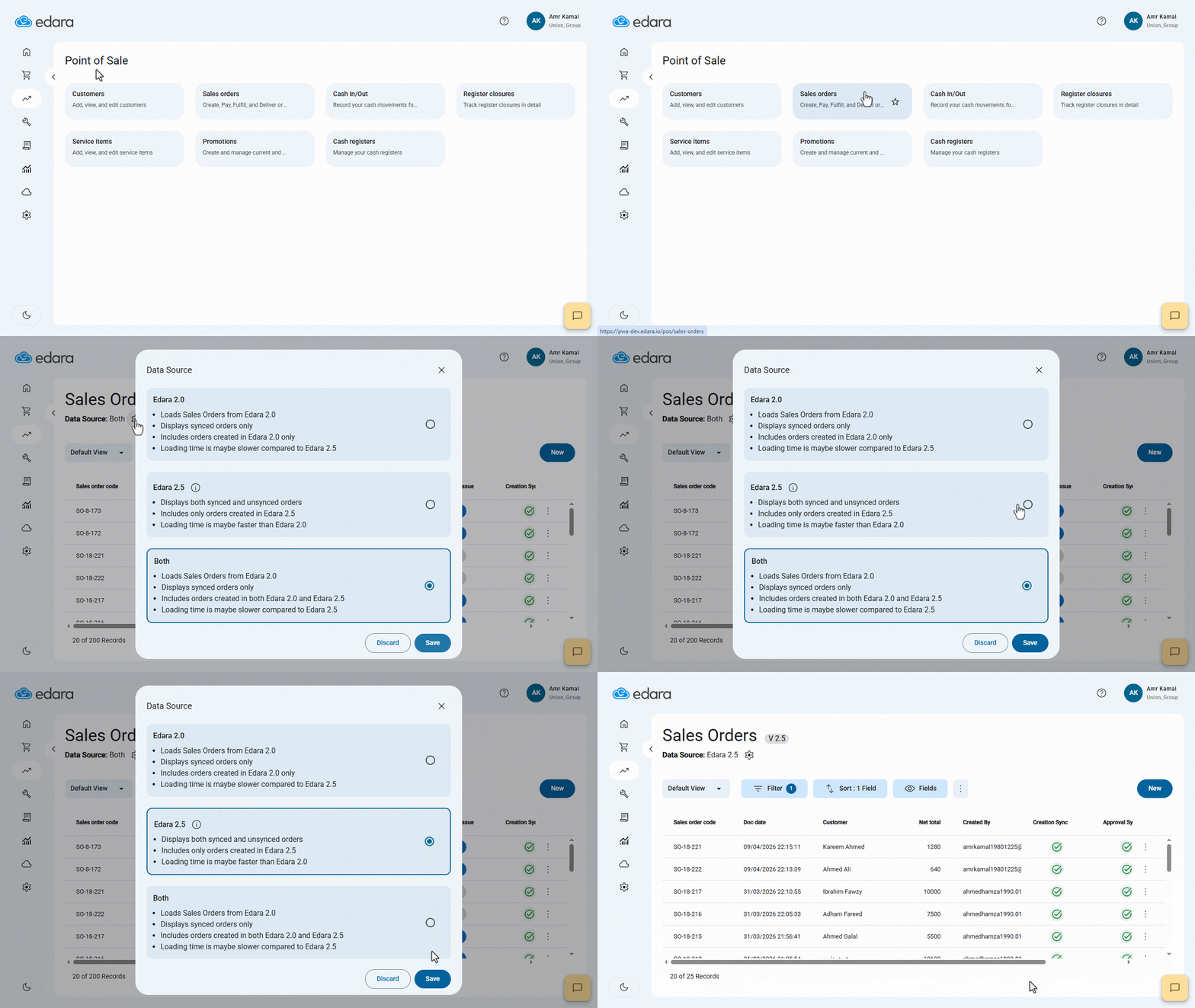
- Go to the “Point of Sale” module.
- Open the “Sales Orders” page.
- Click on the "
 " icon.
 - Select Data Source by choosing one of the following options:
- “Edara 2.0”: Displays only sales orders created in “Edara 2.0”, including synchronized orders only.
- “Edara 2.5”: Displays only sales orders created in “Edara 2.5”, including both synchronized and unsynchronized orders.
- Both: Displays sales orders created in both “Edara 2.0” and “Edara 2.5”, including synchronized orders only.
- Click on “Save”.
If you encounter any challenges or have questions during these processes, you can contact our technical support team, who are ready to assist you at any time.
Did this answer your question?