

Viewing Sales Orders for Specific Periods
Last updated:
Suppose a customer encounters an issue or inquires about a specific order on a particular date.
In that case, you can quickly access the order details to meet the customer's needs, thereby enhancing their satisfaction level.
Viewing Sales Orders for Specific Periods
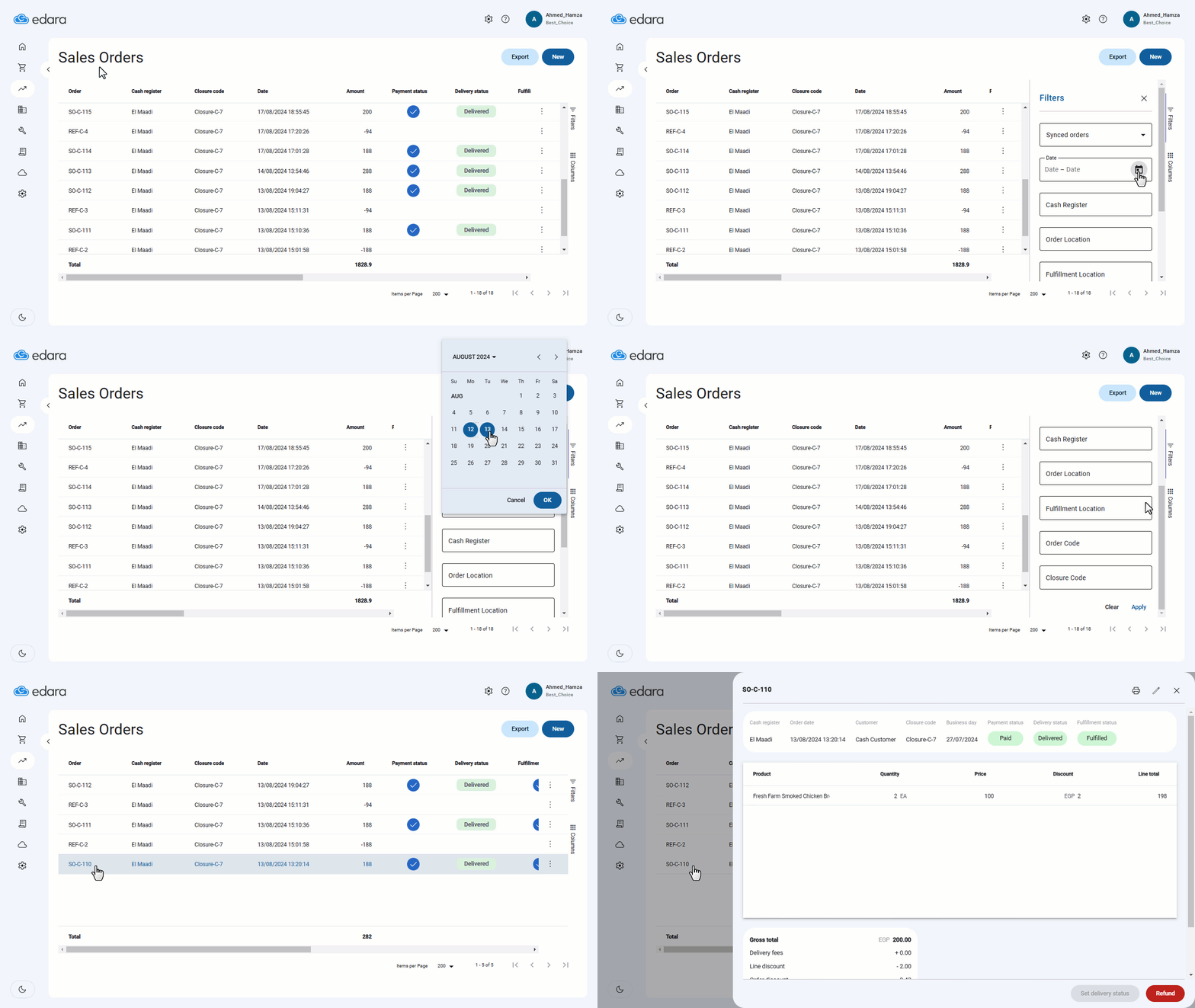
- Go to the "Point of Sale" module.
- Open "Sales Orders."
- Click on the “Filters” icon.
- Select the desired date.
Note: You can add multiple criteria for more specific results, such as cash register code, order number, or closure code.
- Click "Generate."
- Click on the ⋮ icon.
- Select "Details" to review the necessary information.
Note: You can also print the order if you have a cashier role.
If you encounter any challenges or have questions during these processes, you can contact our technical support team, who are ready to assist you at any time.
Did this answer your question?