

Editing the AR Account Linked to a Customer
Last updated:
To ensure accurate account management, you may need to edit the receivables account (AR) linked to a customer.
For example, if a customer's financial account changes or needs to be linked to a new account, updating this information helps maintain precise financial operations.
Editing the AR Account Linked to a Customer
- Go to the “Sales” module.
- Open the “Customers” page.
- Click on the “🔍” next to the customer to search for a customer or use the arrows at the bottom of the page.
- Click on “Edit”.
- Click the “🔍” icon next to the “A/R Account” field.
- Search for the desired account.
Note: If there is no existing AR account, you cancreate a new AR account, then return to these steps and search for it to select it.
- Click on “OK”.
- Click on “Update”.
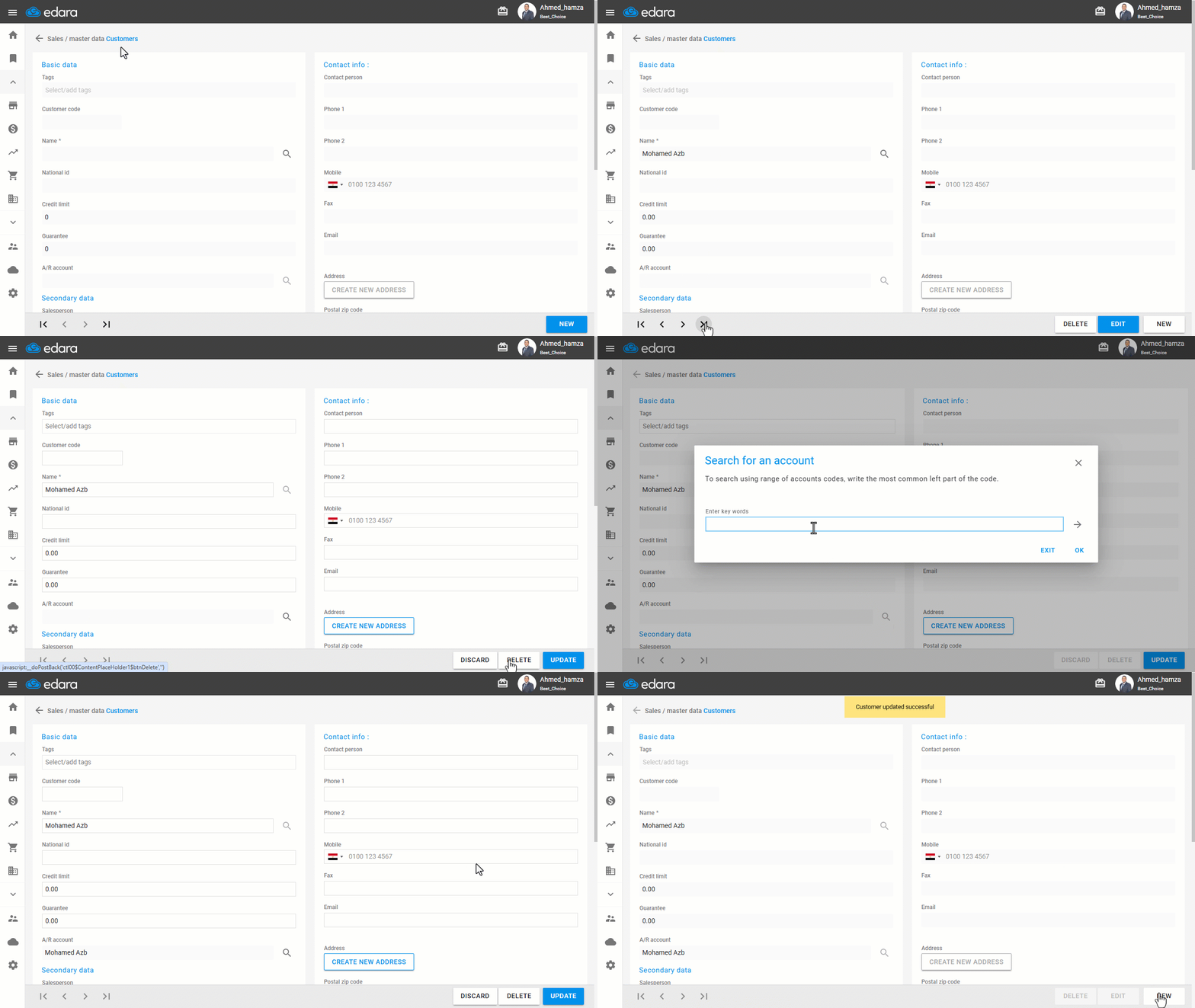
Note: Updating the AR account for a customer will only apply to new transactions and documents. All previous records will remain linked to the old account.
Frequently asked questions
What if there is no AR account yet?
If there is no existing AR account, you cancreate a new AR account, then return to these steps and search for it to select it.
Does changing the AR account affect old documents?
Updating the AR account for a customer will only apply to new transactions and documents. All previous records will remain linked to the old account.
If you encounter any challenges or have questions during these processes, you can contact our technical support team, who are ready to assist you at any time.