

Setting a Customer Credit Limit
Last updated:
When selling products to customers on credit, you may need to set a credit limit for each customer to control the amount of debt allowed, ensuring that the specified credit limit is not exceeded, and maintaining the company's cash flow.
Setting a Customer Credit Limit
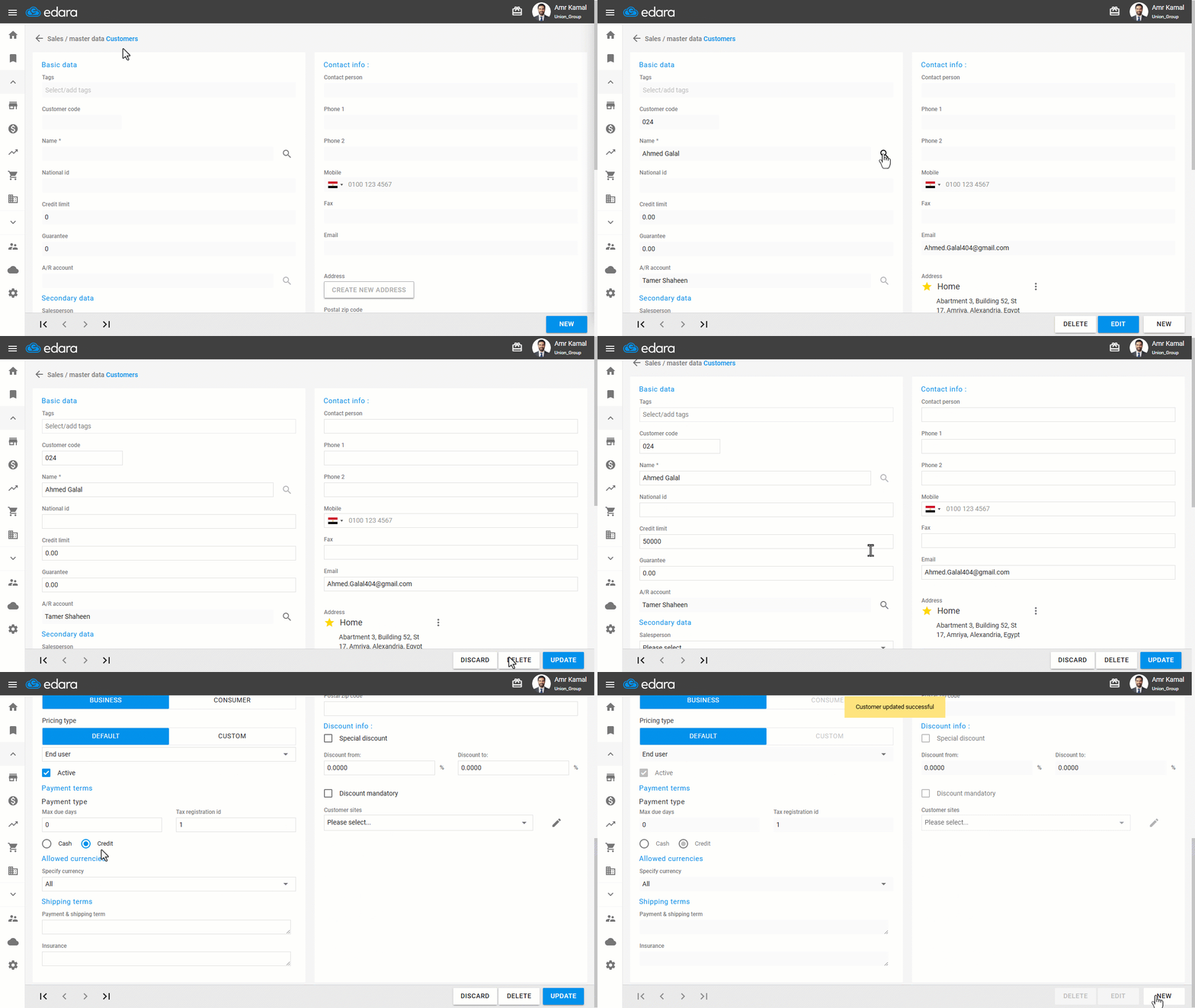
- Go to the "Sales" module.
- Open the "Customer" page.
- Search for the required customer using the search box next to the name field.
- Click on "Edit".
- Enter the required "Credit Limit" value.
- Select the Payment type "Credit".
- Click on "Update".
Note: The credit limit applies only to credit sales orders (on account). Sales Orders Paid in Cash are not affected by the credit limit because the payment is collected immediately, and no debt remains on the customer's account.
Frequently asked questions
Does the credit limit affect cash sales orders?
The credit limit applies only to credit sales orders (on account). Sales Orders Paid in Cash are not affected by the credit limit because the payment is collected immediately, and no debt remains on the customer's account.
If you encounter any challenges or have questions during these processes, you can contact our technical support team, who are ready to assist you at any time.