

Retrieving the Item ID in "Edara"
Last updated:
The Item ID is a number automatically generated by the database to ensure unique identification of items. It is considered more reliable than other identifiers like model codes or SKU numbers, which may vary in uniqueness depending on user-defined settings.
The ID column is hidden when exporting item data to avoid potential errors during re-import after modifications. However, in exceptional cases—such as importing raw material lists—it becomes necessary to display the ID for use in the import template.
Retrieving the Item ID in "Edara"
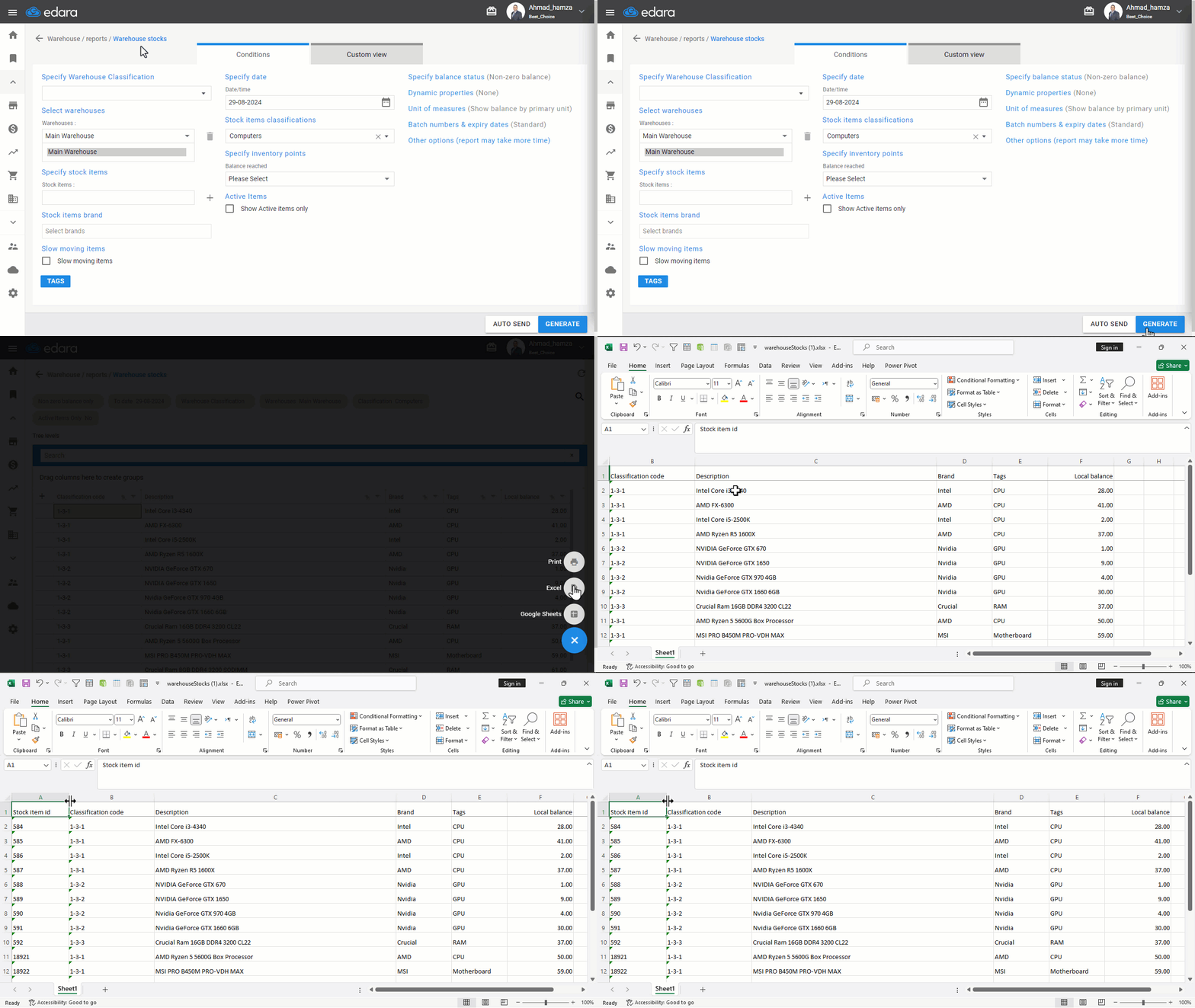
- Go to the Warehouse module.
- Open the “Warehouse Stocks Report”.
- Click “Generate”.
- Click on the “+” icon at the bottom right of the page.
- Select either Excel or Google Data, depending on your preference.
Note: When opening the Google Data file, you will find the item IDs in the first column. However, they remain hidden in the Excel file.
Frequently asked questions
Why doesn't the item ID appear in the Excel file?
When opening the Google Data file, you will find the item IDs in the first column. However, they remain hidden in the Excel file.
If you encounter any challenges or have questions during these processes, you can contact our technical support team, who are ready to assist you at any time.