

Controlling SKU Requirement and Uniqueness
Last updated:
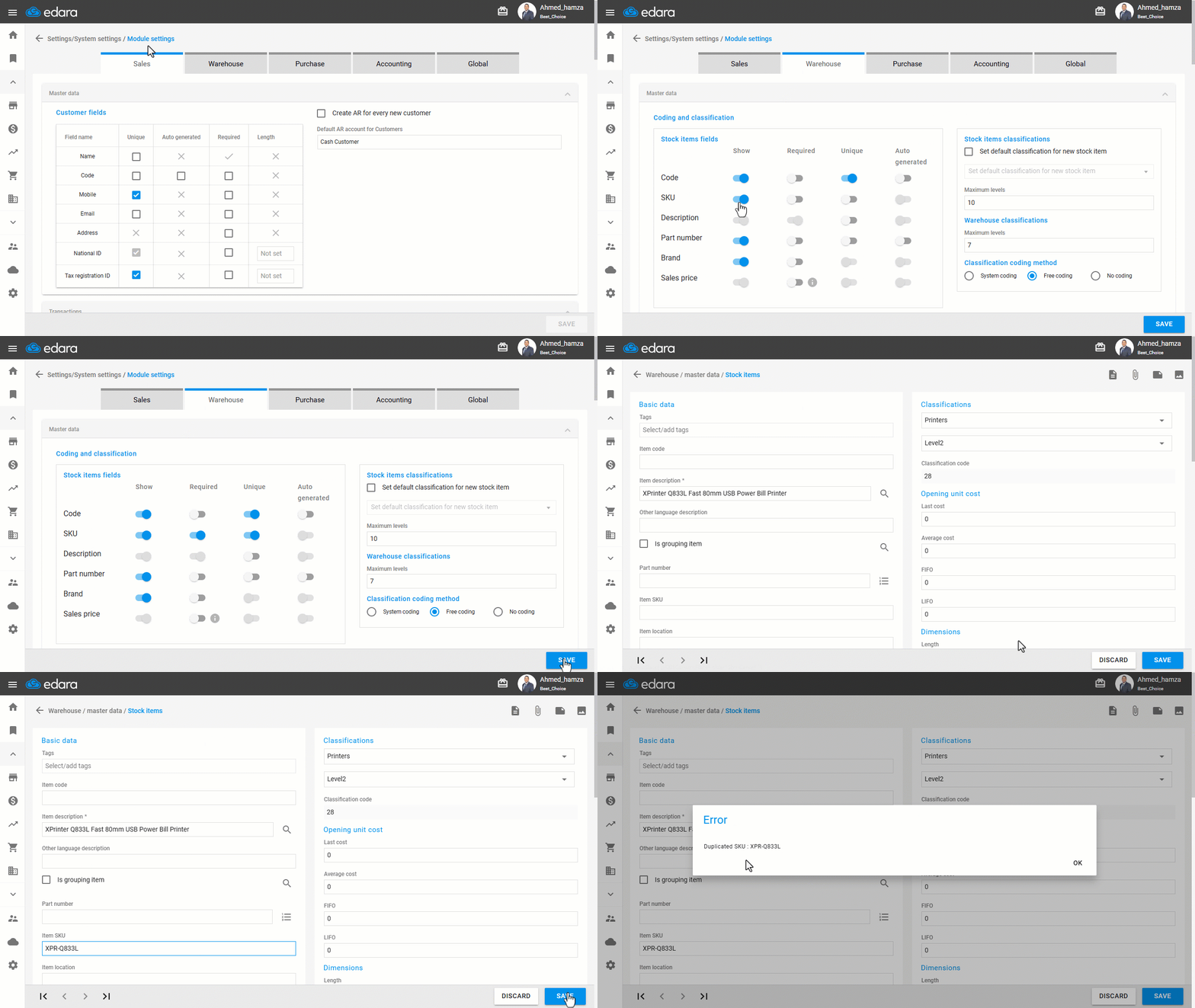
When creating items in your warehouse, Edara allows you to control how product codes (SKUs) are handled. You can define whether entering an SKU is required or whether it can be duplicated.
This helps prevent data entry errors and ensures a consistent coding structure that aligns with your operational needs.
Controlling SKU Requirement and Uniqueness
- Go to the “Settings” module.
- Open the “Modules Settings” page.
- Choose the “Warehouse” section.
- Select the SKU control options that best match your needs.
Note: You will find several options for SKU control:
- Show: Choose whether the SKU field is visible to users.
- Required: When enabled, you must enter an SKU to create or edit an item.
- Unique: When enabled, each SKU must be unique and cannot be used for more than one item.
- Auto-Generate: is unavailable
- Click on “Save” to apply changes.
If you encounter any challenges or have questions during these processes, you can contact our technical support team, who are ready to assist you at any time.
Did this answer your question?