

Displaying the Last Purchase Price in Purchase Orders and Receive Supplies
Last updated:
Displaying the last purchase price helps you track price changes and make more accurate purchasing decisions, especially when dealing with suppliers.
Displaying the Last Purchase Price in Purchase Orders and Receive Supplies
- Go to “Settings”.
- Open the “Module settings” page.
- Select the “Warehouse” tab.
- Go to the “Transactions” section.
- Enable the ”Show last price on RS” option.
- Click on “Save”.
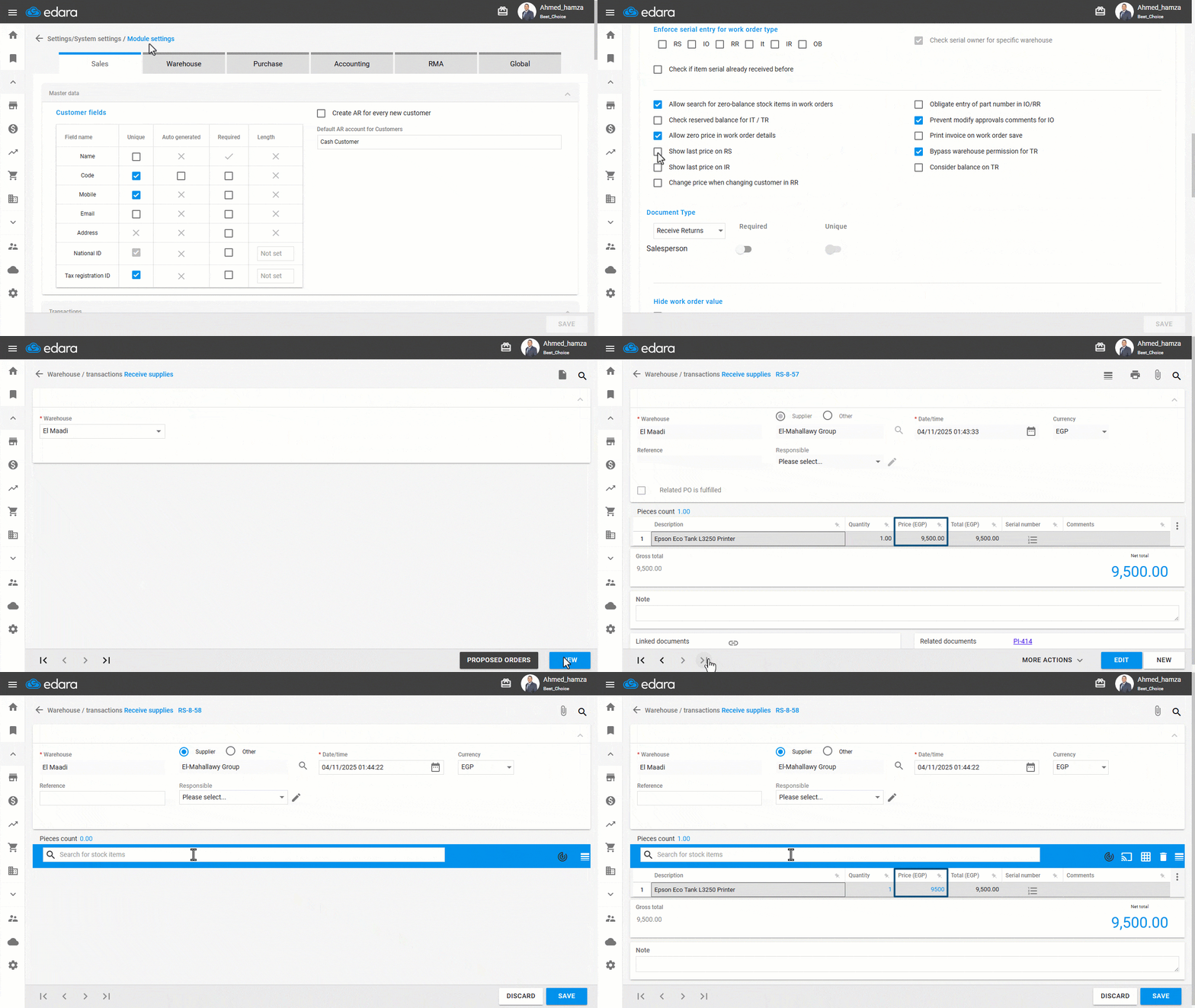
Note: If you select an item that uses units of measure, the system will display the last purchase price based on the units of measure specified in the Receive Supplies Document (RS).
Frequently asked questions
Which last purchase price is shown for stock items that use units of measure?
If you select an item that uses units of measure, the system will display the last purchase price based on the units of measure specified in the Receive Supplies Document (RS).
If you encounter any challenges or have questions during these processes, you can contact our technical support team, who are ready to assist you at any time.
Did this answer your question?