

Activating Reordering Point Alerts
Last updated:
The reordering point alerts feature helps efficiently manage inventory and ensures that important products don’t run out. It allows you to set alerts when stock reaches a predefined reordering point, helping maintain proper inventory levels.
Activating Reordering Point Alerts
First, set the reorder point for stock items so that alerts are sent when its balance reaches the specified quantity.
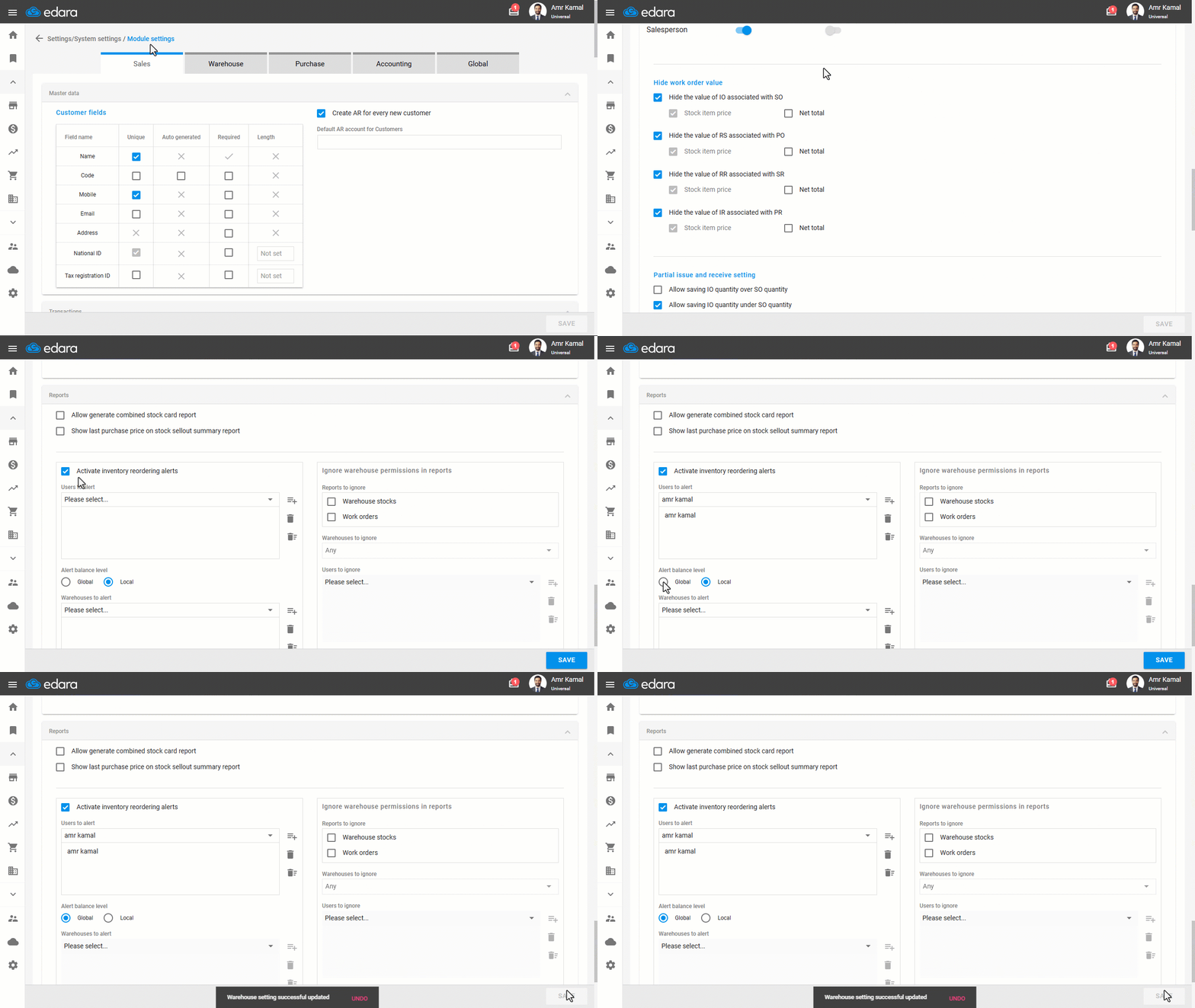
- Go to “Settings”.
- Select the “Module Settings” page.
- Choose the “Warehouse” tab.
- Enable the “Activate inventory reordering alerts” option.
- Choose the user who should receive the alerts by adding the user's name.
The notification will be sent to the selected user via email.
- Set the Alert Balance Level to “Global” or “Local”.
If you choose “Local”, select the warehouses for which you want to receive alerts when their stock reaches the reorder level.
- Click on “Save”.
If you encounter any challenges or have questions during these processes, you can contact our technical support team, who are ready to assist you at any time.
Did this answer your question?