

Controlling Serial Number Settings
Last updated:
When dealing with stock items with serial numbers, you may need to control how serial numbers are entered or validated during different operations to ensure accurate stock item tracking and prevent duplicate or invalid serial transactions.
Controlling Serial Number Settings
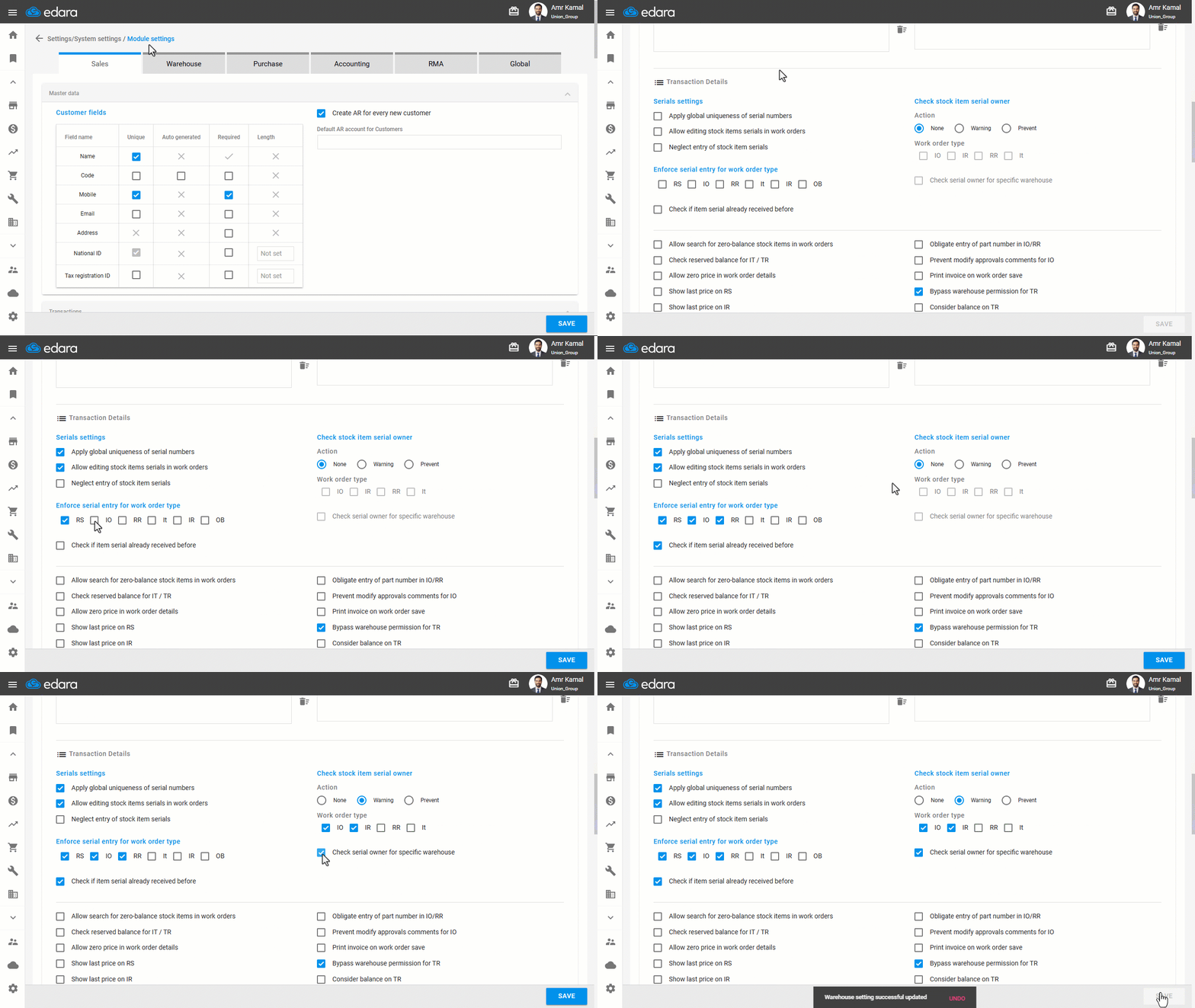
- Go to the “Settings”.
- Open the “Modules settings” page.
- Go to the “Warehouse” tab.
You can control serial numbers through the following settings:
- Apply global uniqueness of serial numbers: Prevents duplicate serial numbers between different stock items within the system.
- Allow editing stock items serials in work orders: Allows entering serial numbers directly within the document without switching to edit mode, either by clicking on the serial icon or pressing Space on the keyboard.
- Neglect entry of stock item serials: Hides serial number entry columns from Work Order and Sales Order pages.
- Enforce serial entry for work order type: Used to define which warehouse documents require mandatory serial number entry. Activated documents cannot be completed until serial numbers are entered for stock items that require them. The requirement can be applied to the following documents: (RS - IO - RR - IT - IR - OB).
- Check if item serial already received before: Prevents receiving the same serial number for the same stock item more than once, as long as it is still available in the warehouse.
Note: The “Apply global uniqueness of serial numbers” setting is applied only after enabling the “Check if item serial already received before” setting.
- Check stock item serial owner: Used to confirm that the serial number is valid and available for the required transaction within the document. Through this setting, you can specify:
- Action: Used to determine what happens when no item is found to own the serial number, according to the following options:
- None: The validation is ignored, and the transaction can proceed.
- Warning: A message appears stating "Serial has no owner”; the user can click on “OK” to continue the transaction.
- Prevent: A message appears stating "Serial has no owner." The document cannot be saved until a valid serial number is entered.
- Work order type: Defines the documents where verification will be applied (IO - IR - RR - IT).
- Check serial owner for specific warehouse: Used in (IO - IR - IT) documents to verify that the serial number is available in the same warehouse where the transaction is performed, ensuring that it cannot be issued from a different warehouse.
- Action: Used to determine what happens when no item is found to own the serial number, according to the following options:
Note: In the Receive Return document (RR), the system verifies that the serial number has been previously issued before allowing it to be returned.
- Click on “Save”.
Note: You can hide the serial number column from the Sales Order page by enabling the “Neglect entry of stock item serials” option. You can also control Enforce Serial Number Entry in Sales Documents.
Frequently asked questions
Can I hide the serial number column from the Sales Order page?
You can hide the serial number column from the Sales Order page by enabling the “Neglect entry of stock item serials” option. You can also control Enforce Serial Number Entry in Sales Documents.
If you encounter any challenges or have questions during these processes, you can contact our technical support team, who are ready to assist you at any time.