

Allowing the Use of Different Currencies for a Specific Account
Last updated:
When dealing with customers or suppliers outside your country, you may need to use different currencies when creating documents for these accounts. Therefore, the system allows you to use multiple currencies for each account, ensuring that financial documents are accurately recorded according to each country's requirements and avoiding errors resulting from currency differences.
Allowing the Use of Different Currencies for a Specific Account
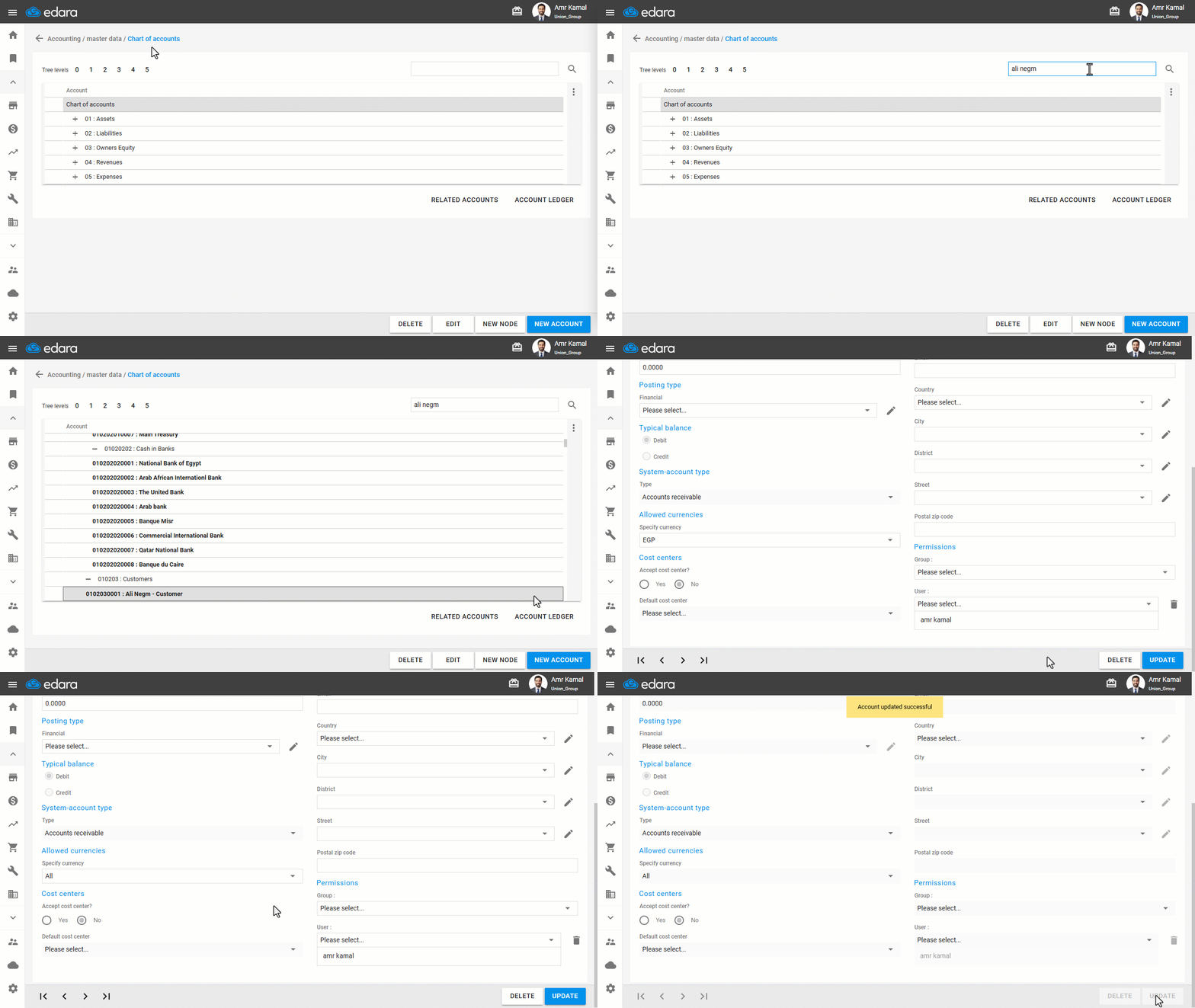
- Go to the “Accounting” module.
- Open the “Chart of Accounts” page.
- Search for the account you want to allow multiple currencies for.
- Click on “Edit”.
- Set the allowed currencies to “All”.
Note: Some countries legally require businesses to use the local currency only. In such cases, make sure to select that currency as the only allowed one for document creation.
- Click on “Update”.
Note: You can control the default account currency setting by going to the “System defaults” page, selecting the account default currency (All / System Currency), and then clicking on “Save”.
Frequently asked questions
How do I control the default currency of new accounts?
You can control the default account currency setting by going to the “System defaults” page, selecting the account default currency (All / System Currency), and then clicking on “Save”.
If you encounter any challenges or have questions during these processes, you can contact our technical support team, who are ready to assist you at any time.