

Deleting an Account from the Chart of Accounts
Last updated:
“Edara” allows you to delete unused accounts as long as there are no transactions associated with them.
Deleting an Account from the Chart of Accounts
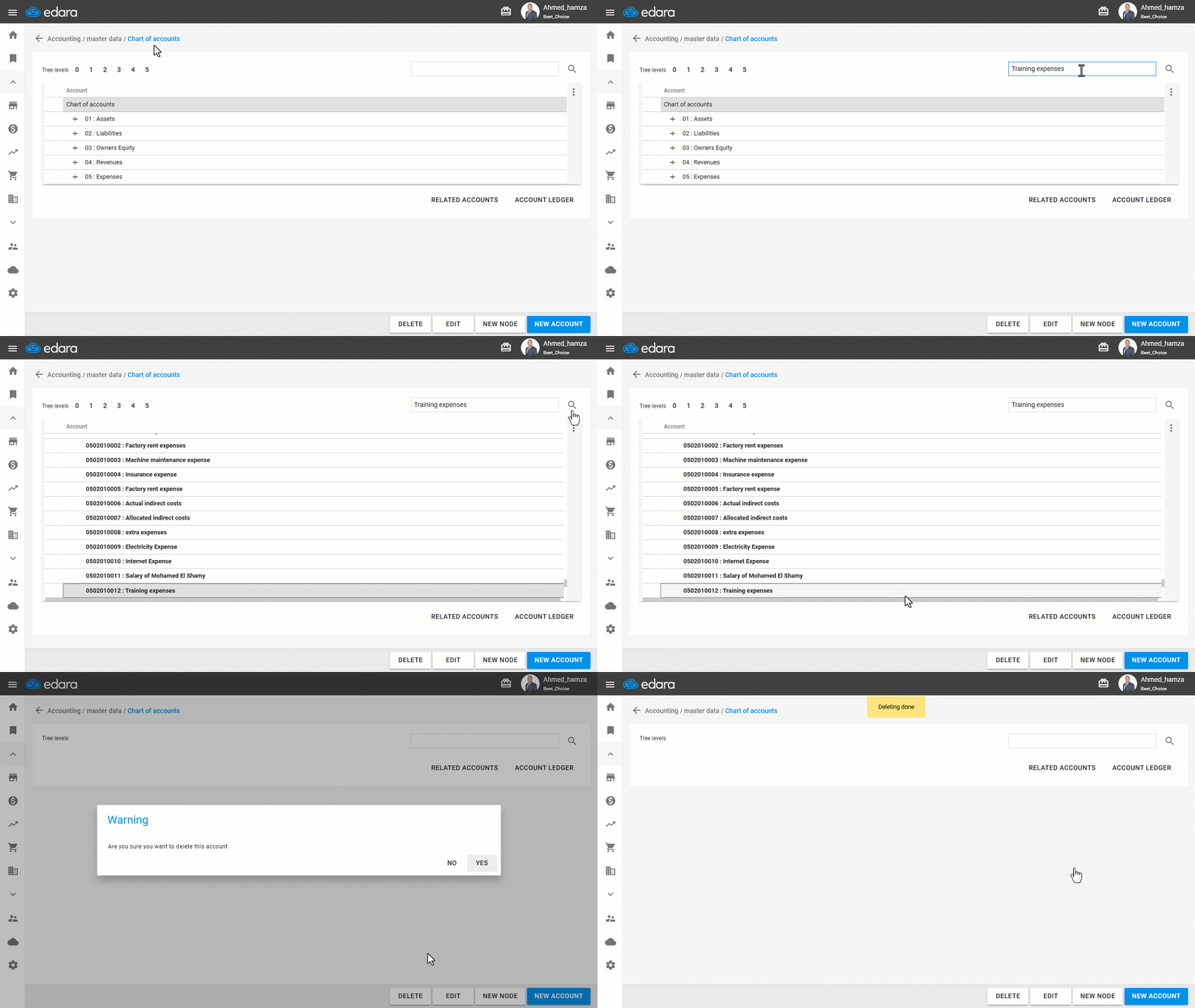
First make sure that the account is not associated with any transactions to be able to delete it, then follow the steps below:
- Go to the Accounting module.
- Open the “Chart of accounts” page.
- Click on “+” to view the chart of accounts, or search for it by typing its name and pressing the 🔍 sign.
- Select the account by pressing it once.
- Click on “Delete”.
- Select “Yes” to respond to the notification message.
Note: If you have made any transactions on the account and don't want to create new ones, you can deactivate the account.
Frequently asked questions
What can I do if the account has transactions and I no longer want to use it?
If you have made any transactions on the account and don't want to create new ones, you can deactivate the account.
If you encounter any challenges or have questions during these processes, you can contact our technical support team, who are ready to assist you at any time.
Did this answer your question?