

Allowing specifying time in the date picker
Last updated:
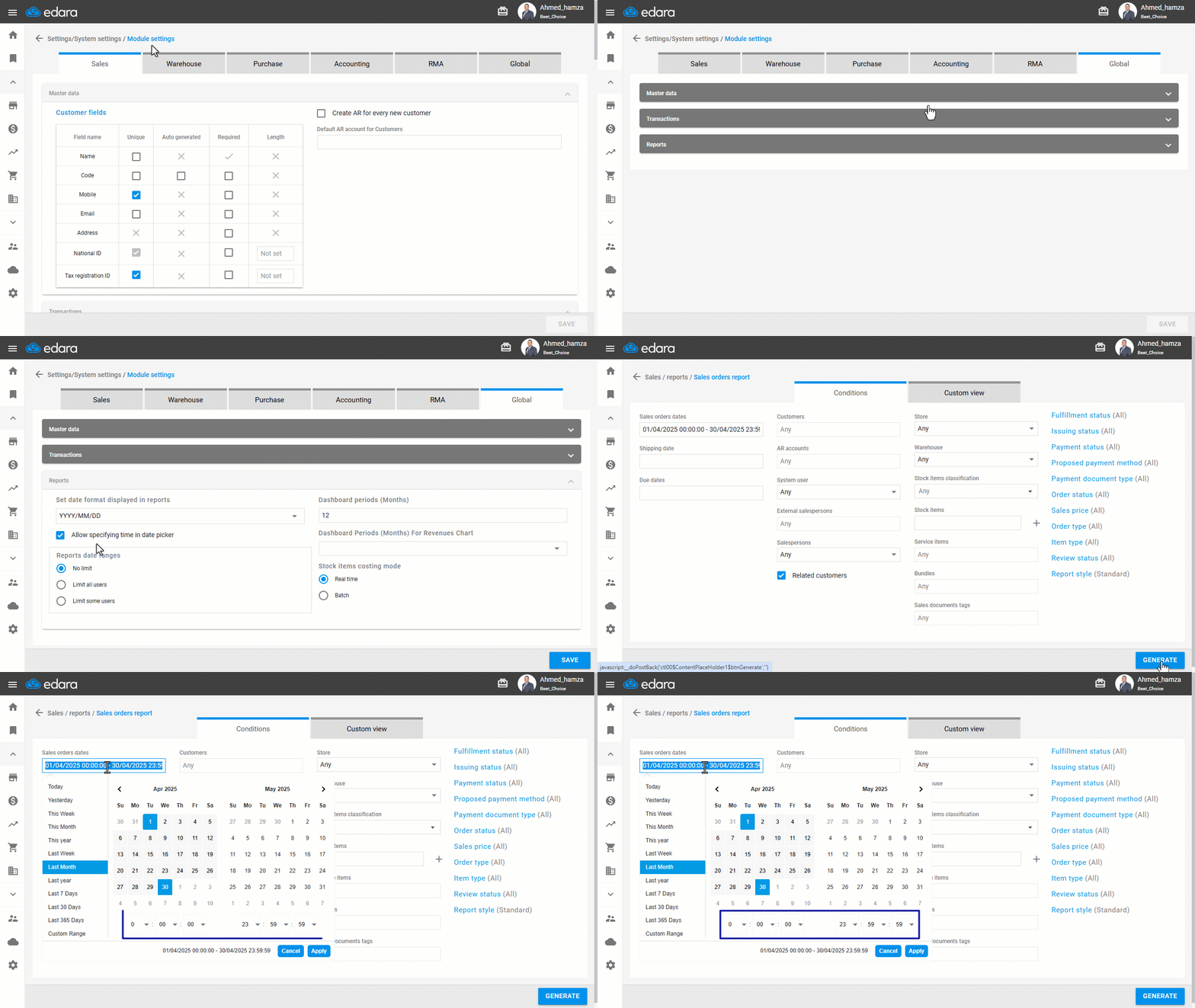
Sometimes you may need to use time to filter the results of a particular report, for example, if your workday starts at 10 am and ends at 2 am the next morning, and you want to review the sales of a previous day, you will need to filter the report results according to the start and end time of the workday.
“Edara” allows you to enable time selection in the report date range, so you can filter report results based on specific times.
Allowing specifying time in the date picker
- Go to Settings.
- Open the “Module Settings” page.
- Select the “Global” module.
- Enable the “Allow specifying time in date picker” option.
- Click on “Save”.
Note: If you want to disable the feature later, you can follow the same steps and uncheck the box instead (◻).
If you encounter any challenges or have questions during these processes, you can contact our technical support team, who are ready to assist you at any time.
Did this answer your question?