

Displaying Sales Volume per Customer in the Sales Report
Last updated:
If you're a Sales Manager looking to identify top purchasing customers or assess which customers haven't met sales targets, you can use the Sales Report to analyze quantities sold per customer.
By following these steps, you can view sales volume per customer, and export the report in different formats such as Excel or Google Sheets, making data analysis and decision-making easier.
Displaying Sales Volume per Customer in the Sales Report
- Go to the Sales module.
- Open the "Sales Report" page.
- Specify the data grouping option to be: “Customer”.
- Enable "Sales Volume" in the "Custom View" section.
- Click "Generate".
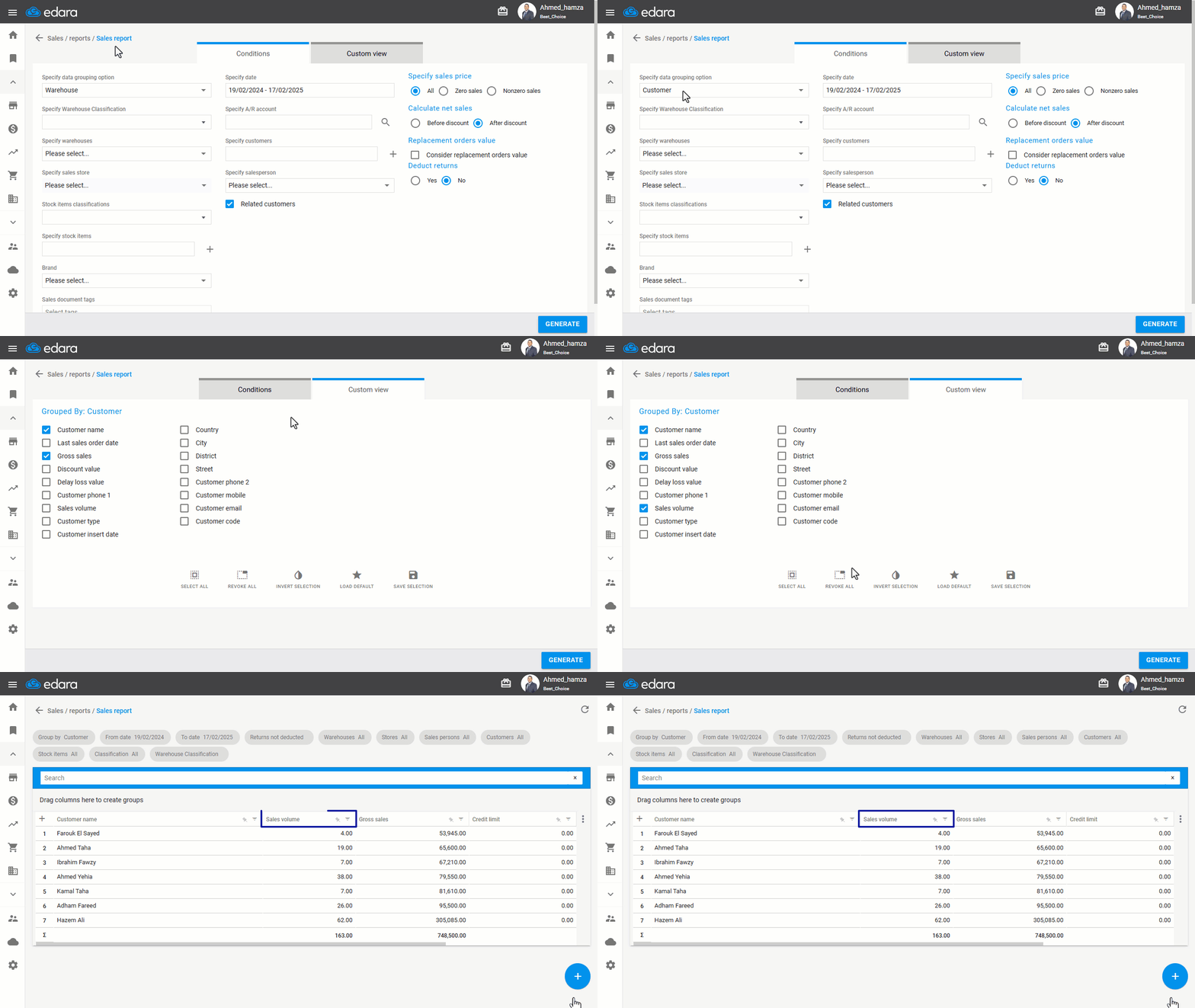
Note: The report can be exported to Excel or Google Sheets, or printed by clicking the "+" button.
Frequently asked questions
Can I export or print the report?
The report can be exported to Excel or Google Sheets, or printed by clicking the "+" button.
If you encounter any challenges or have questions during these processes, you can contact our technical support team, who are ready to assist you at any time.
Did this answer your question?