

Displaying the Second Party Cost Center in the Account Ledger Report
Last updated:
Instead of reviewing expenses or revenues separately, you can display the second party’s cost center in the account ledger report.
This setting in "Edara" allows you to review all expenses or revenues processed through a specific cash account while reviewing its account ledger report.
This makes identifying and correcting errors in cost center allocation easier.
Displaying the Second Party Cost Center in the Account Ledger Report
- Go to the Accounting Module.
- Select "Account Ledger Report".
- Choose the account by typing its name directly or selecting it from the “+” icon.
- Display the "Second party cost center" by selecting it from the "Custom View" option.
- Click on "Generate".
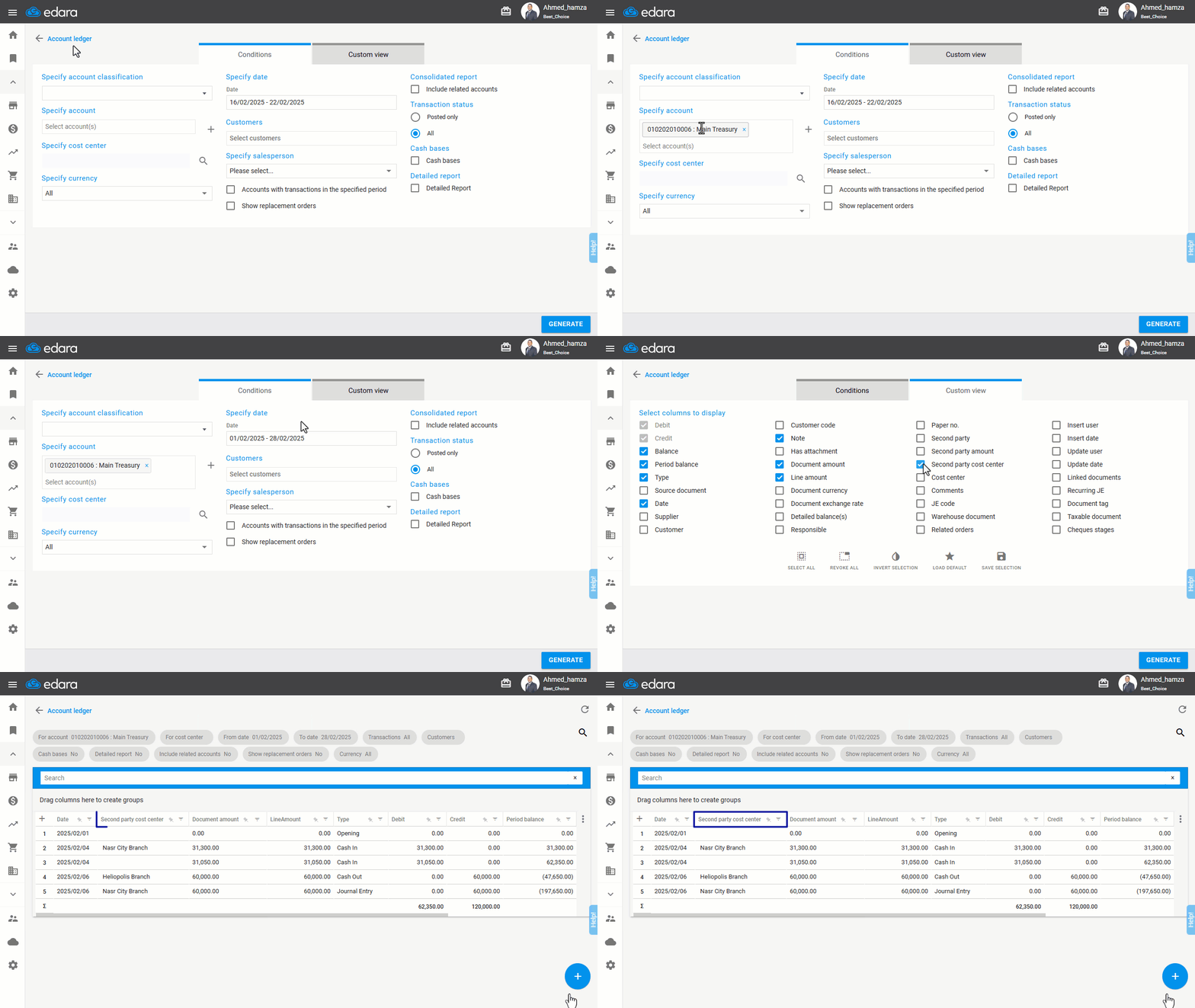
Note: You can export the report to Excel, or Google Sheets, or print it by clicking on the “+” icon.
If you encounter any challenges or have questions during these processes, you can contact our technical support team, who are ready to assist you at any time.
Did this answer your question?