

Displaying Sales in the General Ledger
Last updated:
The finance department needs to review sales revenue from an accounting perspective to ensure it matches the general ledger and cost centers.
With “Edara,” you can view sales data directly from the trial balance, offering an accurate, cost-center or time-based breakdown of your revenue.
Displaying Sales in the General Ledger
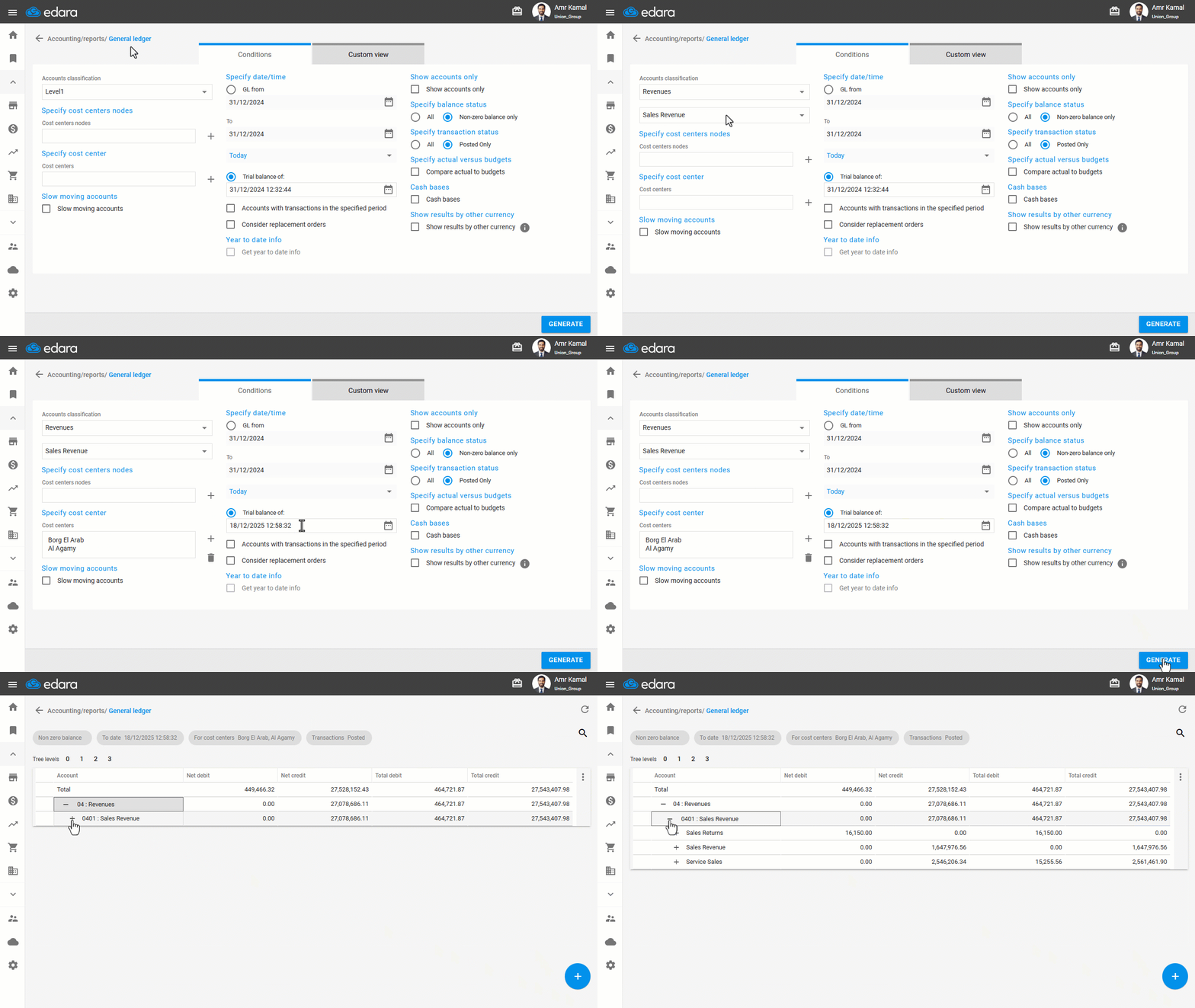
- Go to the “Accounting” module.
- Open the “General ledger” page.
- Select the “Revenue Account” from Level 1 in “Account Classification”.
- Select “Sales Revenue” from the Level 2 in “Account Classification”.
- Specify one or more cost center nodes, or choose one or more specific cost centers.
- Set the Date/Time for the period you want to generate the report for. You will find two options:
- GL from: Displays balances only for the selected date range (From–To) with the option to display opening balances.
- Trial balance of: Displays balances since the start of work on the system until the date you specified.
- Select any additional report options you want to include (Show accounts only, account status, transaction status, etc.).
- Click on ”Generate”.
If you encounter any challenges or have questions during these processes, you can contact our technical support team, who are ready to assist you at any time.
Did this answer your question?